68kMLA Classic Interface
This is a version of the 68kMLA forums for viewing on your favorite old mac. Visitors on modern platforms may prefer the main site.
| Click here to select a new forum. | | Beige G3 w/G4 upgrade - overclocking? | Posted by: Michael_b on 2020-04-03 10:34:55
Just got a Beige G3 Desktop. Someone in the past has installed an OWC G4/550 upgrade, which was a nice surprise
- Are there any drivers necessary to use this CPU in OS 9/OS X? It seems that the answer is no, but I don't know if there's any functionality that is missing without drivers.
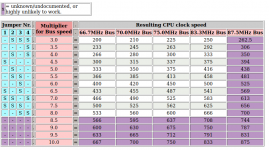
- I'd like to get this thing clocked as fast as possible while staying stable. I was messing around with the jumper settings as seen on this site, and I found
Does not post at the 83.3MHz bus speed, so that's not an option.
- It does work to either:
have 33.3PCI/66.7BUS/533CPU speeds
- have 35.0PCI/70.0BUS/560CPU speeds
- have 30.0PCI/75.0BUS/600CPU speeds
- What is the compatibility penalty to running the PCI bus at a speed other than 33.3MHz?
From what I've read, it shouldn't matter that much - is this correct?
- Is there a performance penalty to running the PCI bus at 30MHz, rather than 33.3MHz
This is particularly relevant as the fastest clock I've been able to achieve has necessitated a 30MHz PCI bus
- Most importantly, is there a way to obtain a higher bus speed multiplier than 8.0x (see attached picture)?
The website suggests that this is unknown/impossible - is this correct?
- If this were possible, it would allow speeds of 566/600/633/667 while keeping the PCI bus at 33.3, which would be nice
- I'm looking at getting a Radeon PCI 7000 or 9200/9250, so if anyone has any specific recommendations in that regard they would be appreciated!
| Posted by: waynestewart on 2020-04-03 14:42:22
There's 16 possible multiplier jumpers settings and your chart only shows 11 of those settings. Shouldn't take long to find out what the other 5 do
| Posted by: Michael_b on 2020-04-03 20:36:11
There's 16 possible multiplier jumpers settings and your chart only shows 11 of those settings. Shouldn't take long to find out what the other 5 do I feared that I would get this response...
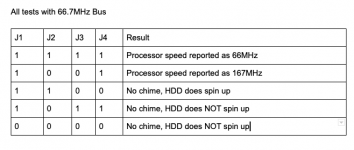
Here's what happens with the other 5 settings:
Is there any way to tell if the processor speed is being reported correctly? I'm just reading from Apple System Profiler in 9.2.2 right now.
I found some interesting info on this old thread:
Yeo Ver 3.0 G3s can do 10x, but the problem is that that would require CPU good enough to do 660MHz & up! ...
Not very likely, and there are no steps between 8 and 10. G4s jump from 8 to 9, and the newr G4s, (7450s), got to 16x, but none have half steps after 8x. and
The two missing (from most documetation),jumper settings... but they do work on Beiges, are G4@ 9x= j1, j2, j3, j4 ON. For the G3 @ 10x=j1, j4 ON.
And if that's not enough... I just read that there is a 87.5 MHz bus setting on the Beige... Woo Hoo!
[This message has been edited by BDAqua (edited 01 June 2002).] Interestingly enough, the two "missing settings" identified by "BDAqua" are the two settings that allow the machine to post, though it seems that they are not getting the results expected -
- 1,1,1,1 gets 167MHz, which is a 2.5x the Bus, not 9x
- 1,0,0,1 gets 66.7MHz, which is 1x the bus, not 10x
Is there a way to tell with version of the mother board (1, 2, or 3) I have? I have the version 3 ROM, but it would be nice to know for sure that this is a version 3 board as well, as the post above implies that the motherboard revision is relevant to the multipliers available.
| Posted by: Michael_b on 2020-04-06 21:12:43
I feared that I would get this response...
Here's what happens with the other 5 settings:
View attachment 32445
Is there any way to tell if the processor speed is being reported correctly? I'm just reading from Apple System Profiler in 9.2.2 right now.
I found some interesting info on this old thread:
and
Interestingly enough, the two "missing settings" identified by "BDAqua" are the two settings that allow the machine to post, though it seems that they are not getting the results expected -
- 1,1,1,1 gets 167MHz, which is a 2.5x the Bus, not 9x
- 1,0,0,1 gets 66.7MHz, which is 1x the bus, not 10x
Is there a way to tell with version of the mother board (1, 2, or 3) I have? I have the version 3 ROM, but it would be nice to know for sure that this is a version 3 board as well, as the post above implies that the motherboard revision is relevant to the multipliers available. Just retested using Newertech's Gauge Pro. The additional jumper settings may be correct:
- 1,1,1,1 gets 600MHz, or 9x the bus speed
- 1,0,0,1 gets 667MHz, or 10x the bus speed
Weird that System Profiler reports a different number, though I've heard it can't be trusted.
Either way, pretty happy that I've been able to squeeze another 133MHz out of this processor. Will need to benchmark further to see if it is a.) stable and b.) actually running at these speeds.
| | 1 |
|