68kMLA Classic Interface
This is a version of the 68kMLA forums for viewing on your favorite old mac. Visitors on modern platforms may prefer the main site.
| Click here to select a new forum. | |
| How do I install the apple 32-bit enabler on 7.1.1 SE/30 | |
| Posted by: lowlytech on 2020-04-01 20:30:30 I have 7.1.1 running on an SE/30 with 16MB of RAM. I was going to use the MODE32 which I have used without issue before, but I need the thread manager and the readme states that it is incompatible with all versions of MODE32, so that leaves me with the apple 32 bit enabler. I have downloaded this from 2 different sites, and extracted it without issue, but I end up with a single file that is neither an extension or a control panel applet. I am uncertain how to actually install this program. Any advice would be appreciated. Thanks again.. 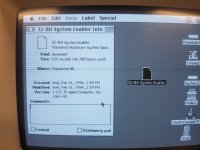 | |
| Posted by: mdeverhart on 2020-04-01 21:44:25 My recollection is that system enablers are just dropped into the top level of the System Folder (where the Finder and System suitcase are). | |
| Posted by: lowlytech on 2020-04-01 22:09:56 Hey that worked great. Thanks so much mdeverhart for the info. I feel silly now that it was indeed that simple. I have a way of over complicating stuff sometimes. | |
| Posted by: Bolle on 2020-04-02 03:31:56 What exactly is the issue with MODE32 and thread manager? I am pretty certain that I use those two together without a problem. | |
| Posted by: mdeverhart on 2020-04-02 06:04:18 Happy to help @lowlytech. No need to feel silly, these systems are old and it can be hard to find good documentation online for them. I only remember from a LOT of time on System 7 machines back when they were new(-ish). | |
Posted by: lowlytech on 2020-04-03 16:19:08What exactly is the issue with MODE32 and thread manager? I am pretty certain that I use those two together without a problem.Looks like maybe there was an issue before mode32 7.5. Searching, I found several instances where new features of mode32 was that it was compatible with thread manager. I didn't actually try mode32 on my se/30, but maybe the readme file i was looking at from the thread manager install was before mode32 v7.5 was a reality. | |
| 1 |