68kMLA Classic Interface
This is a version of the 68kMLA forums for viewing on your favorite old mac. Visitors on modern platforms may prefer the main site.
| Click here to select a new forum. | |
| Apple IIGS Repair Help | |
| Posted by: sixers105 on 2020-04-01 09:54:05 I just recently obtained my first Apple II, an Apple IIGS, as it was too good of a price to pass up. Previously, I had only dipped into vintage compact Mac land, with an SE/30, Classic, Classic II and Color Classic. I popped open the case upon unboxing it (awful pack job, btw, but it somehow made the journey safely without any visible damage), which revealed a pretty significant battery explosion - the battery and top part of the battery enclosure were nowhere to be found - perhaps removed by a previous owner, who knows...In any event, I cleaned the motherboard with a qtip and isopropyl alcohol to remove most of the battery gunk. "After" pictures attached below. I do intend to try to clean it off further with a toothbrush and alcohol, as someone suggested on an Apple II Facebook group. I was able to get the system to boot as it should the first time I fired her up (blue screen with Apple IIGS, ROM03), but only for a few seconds, and since then, it has been in a perpetual self-test loop upon firing up. Pics below. Any advice as to what to do next, besides, trying a toothbrush and isopropyl alcohol, with particular attention payed to Slot 1 and the IWM chip? I thought a recap could be in the cards, but I've been informed that caps on Apple IIs don't need to be replaced like on 68k macs. Any truth to that? Any help you're able to offer would be greatly appreciated. Thank you! 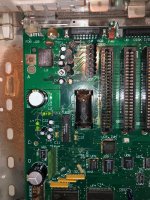 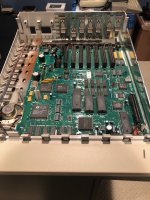 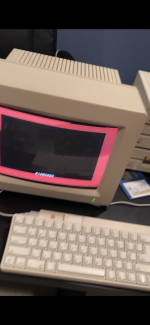 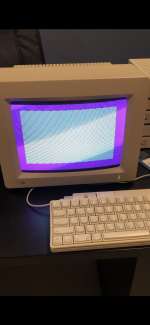 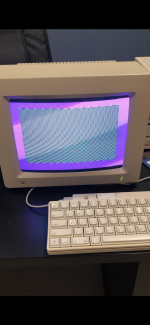 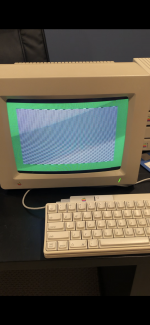 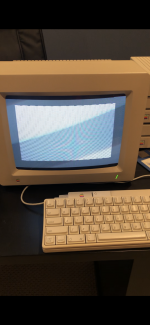 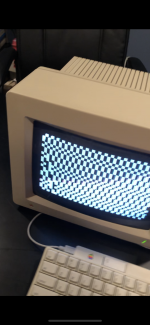 | |
| Posted by: bibilit on 2020-04-01 09:57:44 Looks like a ram issue to me. Probably not related to the battery problem | |
Posted by: sixers105 on 2020-04-01 10:01:59Looks like a ram issue to me.Ah yeah you know what, I did come across one article referencing ram codes and a 1 amongst 0s reflecting the position of the ram issue. So position "2" ram, per the 1 in the code in the pics above, would be where exactly? Sorry, I'm a total newb when it comes to this stuff. | |
| Posted by: bibilit on 2020-04-01 12:07:27 The best method is using a new chip on top of the faulty one, also called piggybacking. Always worked for me. | |
Posted by: sixers105 on 2020-04-01 13:12:45The best method is using a new chip on top of the faulty one, also called piggybacking.Super helpful, thank you. I wasn't familiar with piggybacking and just watched a YouTube video about it. Interesting stuff. Btw, I just ran the full self-test and got the following codes. It was my understanding that a "1" meant a ram issue but I'm unaware of what a 6 means... 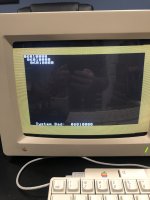 | |
| Posted by: sixers105 on 2020-04-01 14:38:04 I was able to find another thread with the same error code, also with a ROM03 motherboard: But in my situation, it's not intermittent, it's as far as I can get the system to go...Think this very well might be above my abilities. Anyone willing to work on my board if I ship it their way? | |
| Posted by: cruff on 2020-04-01 15:32:02 The battery contents were probably alkaline, you will need to neutralize that with a mild acid, such as vinegar, followed by a thorough wash. If you are going to replace the battery, I'd recommend using one of those off-board battery mounts with wires you solder to the motherboard where the battery holder used to be. | |
Posted by: sixers105 on 2020-04-01 15:36:59The battery contents were probably alkaline, you will need to neutralize that with a mild acid, such as vinegar, followed by a thorough wash. If you are going to replace the battery, I'd recommend using one of those off-board battery mounts with wires you solder to the motherboard where the battery holder used to be.Thanks, will give that a try. So you're suggesting it's *possible* that the battery corrosion is leading to the self-test and is reporting errantly, due to the corrosion? As in, perhaps with a cleaning, all will be well? | |
| Posted by: bibilit on 2020-04-02 01:43:56 Anything is possible. Don't know, but you can have several bad chips and the self-test is not accurate a 100%. The Apple IIc test Will stop at the first bad chip found, not giving the full information. Iirc the iigs memory is split in two. | |
| Posted by: cruff on 2020-04-04 05:57:27 Yes the corrosion could cause shorts, higher impedance "shorts" or open traces. | |
| Posted by: Lee Adamson on 2020-04-04 16:27:14 I'm sending him my spare ROM1 mobo and a RAM card, and he's sending me his dead one to try to fix. It'll be an interesting project. It looks pretty dire to me, lol, so I'm not gonna hold my breath. Gunna have bodge wires stacked so deep underneath that it won't snap back over the tabs. :3 | |
| 1 |