68kMLA Classic Interface
This is a version of the 68kMLA forums for viewing on your favorite old mac. Visitors on modern platforms may prefer the main site.
| Click here to select a new forum. | |
| SE/30 repair help | |
| Posted by: thxkbye on 2020-03-25 10:20:54 Can anyone tell me if the screen on an SE or SE/30 will do anything with a bad logic board? I am trying to restore an SE/30 that had a bad PSU and possibly more, when i got it it was dead. I recapped the logic board and analog board and got a new known working PSU from an SE dual drive. Hard drive spins up Monitor does nothing just black, Even when adjusting the brightness wheel. To troubleshoot i put the working PSU back on the SE Analog board. I know the SE gets screen and boots although with vertical lines. Is the SE/30 screen dead? Thinking back i should have just put the se/30 logic board in the SE to test it... How does an SE Monitor act with a dead logic board, is it just black with zero activity or does the screen glow at all? Edit, i do not get a chime on the SE/30. Thank you sorry for the lengthy explanation! | |
| Posted by: bibilit on 2020-03-25 10:37:01 As far as I know, and with all the previous bad logic boards I have seen on SE/30s, the screen should lit and show a simasimac behavior. Never seen a black screen. | |
Posted by: thxkbye on 2020-03-25 10:48:23As far as I know, and with all the previous bad logic boards I have seen on SE/30s, the screen should lit and show a simasimac behavior.So then by swapping the analog board and PSU from the SE I know its not the flyback, analog board, or PSU because i get the below screen on the SE. So could it be the video board that plugs into the back of the yoke or the screen/tube its-self? I guess I should put everything back in the SE and put the SE/30 board in to see what happens. I am not the best a soldering so I am going to end up sending this se/30 logic board somewhere to get cleaned up properly. 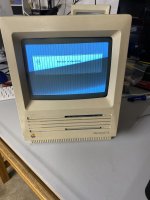 | |
| Posted by: bibilit on 2020-03-25 12:03:42 Yes, most probably a broken pin or tube in the CRT side. | |
Posted by: thxkbye on 2020-03-25 12:06:06Yes, most probably a broken pin or tube in the CRT side.Can I take the samsung screen from the SE along with the analog board and move it to the SE/30? The screen in the SE/30 right now is a Clinton. | |
| Posted by: pinto_guy on 2020-03-25 13:11:54 Yes, AFAIK, the screens are the same between an SE and an SE/30 | |
| Posted by: bibilit on 2020-03-25 13:20:25 More or less the same screen, from the 128 to the last Classic II. | |
Posted by: Dog Cow on 2020-03-25 13:20:42How does an SE Monitor act with a dead logic board, is it just black with zero activity or does the screen glow at all?Black with zero activity. Can I take the samsung screen from the SE along with the analog board and move it to the SE/30? The screen in the SE/30 right now is a Clinton.You can freely interchange SE and SE/30 motherboards. | |
| Posted by: thxkbye on 2020-03-25 19:02:38 Update: With the SE logic board in the SE/30 the monitor springs to life. So it is indeed the SE/30 logic board that is the problem. I was not expecting that, i literally sensed no activity from the screen or glow in the neck. Maybe i didn't wait long enough for the glow... The Samsung monitor from the SE is MUCH brighter even when the brightness wheel is all the way up on the Clinton monitor./ The Samsung internally looks newer and cleaner. I swapped that into my SE/30. The SE/30 logic board will be repaired and all should be well. Thank you so much for your help today! | |
| 1 |