68kMLA Classic Interface
This is a version of the 68kMLA forums for viewing on your favorite old mac. Visitors on modern platforms may prefer the main site.
| Click here to select a new forum. | |
| Upgraded my on 11'' lcd screen | |
| Posted by: stormy on 2020-01-18 03:21:17 Hi all, Just wanted to report I upgraded my LCD panel to a 1400x1050 Res screen. It was quite a difficult process involving a hacksaw but in the end I am very happy with the result. I followed this very detailed guide: https://www.ifixit.com/Guide/PowerBook+G4+Aluminum+12-Inch+1-1.5+GHz+LCD+panel+upgrade/3117 Other mods I've done to my pb12 are: pata to ssd with 64gb drive. Arctic silver thermal paste on CPU, new thermal pads for gpu and lubricated the cooling fan. 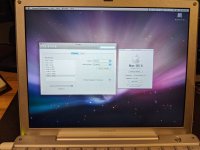 | |
| Posted by: cheesestraws on 2020-01-18 03:30:39 That is *really* nice. | |
| Posted by: Cory5412 on 2020-01-18 05:06:13 Gonna mirror that this looks great and I imagine it's a huge productivity booster on this machine. | |
| Posted by: stormy on 2020-01-18 10:21:57 Cheers guys, also in the title I mean 12'' 🙂 | |
| Posted by: CC_333 on 2020-01-18 18:52:35 This is neat! I have spare 12" lid parts, so maybe I can make up a hi res panel out of those so I can leave the original lid alone. c | |
Posted by: stormy on 2020-01-19 10:08:29This is neat!Don't worry there is literally no changes or mods to the lid. The only thing you mod is the new LCD. By the way I skipped the part that said to drill new screw holes into the new panel, I didn't need to do it and I thought it was too risky. | |
| Posted by: Byrd on 2020-01-19 13:52:57 Top work - are there any quirks with running the screen? For example in the Clamshell XGA mod you have to apply an Open Firmware patch and there are several glitches in booting until you reach the desktop. I performed the mod on a 366Mhz Clamshell iBook - partly because I had the requisite cable and LCD and nothing else. It mounted quite well in there but definitely looks like a hack. How much did you pick up the LCD panel for? | |
| Posted by: stormy on 2020-01-19 14:08:22 The LCD was quite expensive to be honest. About 100 USD all together after shipping. No issues with compatibility, as it just plugs directly into the same connection as the old display the geforce 5200 just accepts it as it's screen. | |
| Posted by: james_w on 2020-01-19 14:19:14 This is incredible. I still miss my 12" PB 🙁 | |
| Posted by: PB145B on 2020-01-22 21:12:46 DAMN! That looks incredible! Would this work on an iBook G4 12? Might be a nice upgrade for mine. | |
| Posted by: Bolle on 2020-01-22 22:18:54 Wow, this looks nice. I have a stack of 12" parts, looks like I will have to keep an eye out for one of those panels. How is the screen brightness compared to the original? Way better I guess, most of my 12" screens have gotten pretty dim over the years. | |
Posted by: stormy on 2020-01-26 13:24:24Wow, this looks nice. I have a stack of 12" parts, looks like I will have to keep an eye out for one of those panels.Yeah it is much brighter and the colours are a lot nicer. | |
| Posted by: beachycove on 2020-01-26 14:32:39 Couple of questions: 1. How did the new thermal pads impact on heat issues? The 12" PowerBook runs hot -- one if its main failings, as far as I'm concerned. 2. How is battery life and GPU heat with the new screen? | |
Posted by: stormy on 2020-01-28 03:51:51Couple of questions:1. Massive improvement, I also put arctic silver 5 on the CPU & oiled the fan. Before I did this the fan was really noisy/grindy and the laptop would randomly shutdown from overheating. 2. I can't really measure this as I don't have a good battery, the one I have barely holds any charge. But I read online that the new screen actually uses less power than the old screen and should extend battery life. Here is the guide I followed when replacing the thermal pads: https://forums.macrumors.com/threads/my-powerbook-g4-12-journal-full-tear-down-ssd-upgrade-and-cpu-fan.2059980/ | |
| 1 |