68kMLA Classic Interface
This is a version of the 68kMLA forums for viewing on your favorite old mac. Visitors on modern platforms may prefer the main site.
| Click here to select a new forum. | |
| Stuffit Magic Numbers | |
| Posted by: equant on 2020-01-17 06:53:16 In a different thread (over in software), @Dog Cow mentioned that there are magic numbers which can be used to distinguish which version of the stuffit algorithm was used to compress a file. Does anyone have more information on this? I would like to build a utility that can sort *.sit files, or perhaps improve the unix 'file' command to report a bit more than just "StuffIt Archive" when it sees "SIT!". I believe I can compress the same file with different versions and reverse engineer it, but figured I'd ask in case someone had this info somewhere. Thanks, Nathan | |
| Posted by: Crutch on 2020-01-17 09:33:36 This is a great idea. | |
| Posted by: uyjulian on 2020-01-17 09:39:10 I would recommend that you check out unar source code, which can extract Stuffit files (including resfork): https://cdn.theunarchiver.com/downloads/TheUnarchiverSource.zip | |
| Posted by: olePigeon on 2020-01-17 09:45:44 Would it be possible to make an INIT for System 6 and 7 that overrides the System Bundle icons for Stuffit files with one containing a version number? I could make up a set of icons for it. Then you could tell right off the bat which version of Stuffit you'd need. | |
| Posted by: Crutch on 2020-01-17 14:06:26 That’s a fun idea for a project. It’s not immediately obvious to me how to do that, since the Finder (or more likely a DRVR running in the background, launched by the INIT) would need to actually open the StuffIt archive and read far enough into it to get the magic number (if it’s there) each time it needed to decide what icon to draw. Patch _GetResource, and if the Finder is the foreground app and it’s getting an ICN# resource corresponding to an archive document from StuffIt, look up the file whose icon is being drawn (but how do I know which one that is???) in the precomputed hashtable of known archives and return the appropriate icon you designed ... and if the file hasn’t been seen before, stop and open it up to check the type and populate the hashtable entry? ...... or something. If I didn’t have a newborn, I would try it. Unless someone is super expert at how the Finder draws file icons, it would probably require a long Macsbug session. | |
| Posted by: PowerPup on 2020-01-17 18:27:26 The GitHub mirror for The Unarchiver have some amazing, reverse-engineered, documentation on the Stuffit Formats: https://github.com/mietek/theunarchiver/wiki/StuffItFormat https://github.com/mietek/theunarchiver/wiki/StuffIt5Format | |
| Posted by: equant on 2020-01-17 19:12:00 @PowerPup Thanks for those links. Looks perfect. I went ahead and did some tests and here's what I came up with. Looks like it's easy to tell apart pre 1.5.1, 1.5.1, 3.5 and 5.5. 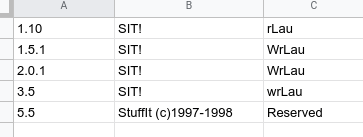 | |
| Posted by: Iesca on 2020-06-21 17:44:25 @equant Did you end up having any luck with this? 😀 | |
Posted by: equant on 2020-07-08 02:41:21@equant Did you end up having any luck with this? 😀A little luck, but not a lot. You can reliably tell the difference between "5.5 or later" or "pre 5.5". I found this to be a useful distinction when browsing archives. I implemented it into the RetroBridgeBBS interface so that I can tell (when browsing online archives) if the file I want to download is compatible with my machines running system 6 or early system 7 software or not. https://github.com/equant/RetroBridgeBBS This shows the basic idea of predownloading just the file's header, and then determining if it's old or new Stuffit. sit_patterns = [ [b"^SIT!", "StuffIt pre 5.5"], [b"^StuffIt", "StuffIt 5.5 or later"], ] headers = {"Range": "bytes=0-200", 'User-Agent': USER_AGENT} header = requests.get(self.url, headers=headers).content for p in self.sit_patterns: r = re.compile(p[0]) m = r.match(header) if m: print(f"File is archived with: {p[1]}") Getting a more precise version out of an archive is certainly possible, but it wasn't worth the work to me. | |
| Posted by: LaPorta on 2020-07-08 02:48:21 Another good idea is for everyone to make StuffIt 1.5.1 archives for everything under System 6, etc... | |
| 1 |