68kMLA Classic Interface
This is a version of the 68kMLA forums for viewing on your favorite old mac. Visitors on modern platforms may prefer the main site.
| Click here to select a new forum. | |
| Apple Hard Disk 20SC connected to iPhone. | |
| Posted by: napabar on 2020-01-04 11:39:40 This was a real thrill to make! | |
| Posted by: Crutch on 2020-01-04 12:23:55 That's pretty cool. So if I want to transfer files among various vintage Macs with external SCSI HDs, I can just use my iPhone to do it? Never thought of that. | |
Posted by: napabar on 2020-01-04 12:26:55That's pretty cool. So if I want to transfer files among various vintage Macs with external SCSI HDs, I can just use my iPhone to do it? Never thought of that.As long as they are formatted in either FAT or HFS+. Unfortunately, the iPhone can read old HFS. | |
| Posted by: Bolle on 2020-01-04 12:34:22 Watching that red light whenever you scroll through the PDF and browse stuff is fascinating. ;D | |
| Posted by: pcamen on 2020-01-04 12:58:28 @napabar what SCSI to USB adapter are you using? I've got a couple of them but I've never gotten them to work. I assumed some kind of driver was necessary or something. | |
Posted by: napabar on 2020-01-04 13:42:49@napabar what SCSI to USB adapter are you using? I've got a couple of them but I've never gotten them to work. I assumed some kind of driver was necessary or something.It’s branded a Castlewood, but in reality it’s made by Shuttle Technology, which apparently made a lot of the USB 1.1 adapters. No drivers needed. I have had a lot of luck with it, more videos coming soon. I hear the USB 2.0 adapters need drivers. | |
| Posted by: Byte Knight on 2020-01-04 18:59:55 Very cool - I'm blown away that a modern iOS device can still read an old SCSI hard drive! Now that's what I call backwards compatibility... | |
| Posted by: lightvox on 2020-05-12 17:51:35 This is so cool. I've been trying to connect an old SCSI hard drive to my Mac Pro running Mojave, and have searched everywhere for a solution, and ended up here. Are the Microtech adapters USB 1.1? Thanks. | |
Posted by: napabar on 2020-05-15 06:53:56This is so cool. I've been trying to connect an old SCSI hard drive to my Mac Pro running Mojave, and have searched everywhere for a solution, and ended up here. Are the Microtech adapters USB 1.1? Thanks.I don't know. I've heard the USB 2.0 SCSI adapters need drivers. I know the one like mine that use the "Shuttle Technology" chipset are USB 1.1 and don't need drivers. You can buy them here. https://www.yoycart.com/Product/561501395767/ | |
| Posted by: lightvox on 2020-06-03 03:35:59 Thanks napabar. I purchased one on ebay labeled with "Shuttle Connects" but it's still not working with an external SCSI HD. I also purchased an adapter on ebay to convert from a Centronics CN50 on the hard drive to the HD50 on the Shuttle Connects SCSI to USB adapter cable. There is a light on the cable and it doesn't light up when I am using the adapter and connected to the HD. It does light up when I connect it to a SCSI Iomega 2GB Jaz drive. I have the hard drive terminated and set to SCSI ID 0. | |
Posted by: lightvox on 2020-06-03 03:38:46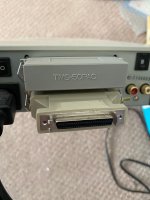 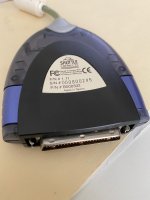 | |
| Posted by: napabar on 2020-06-12 21:32:43 That's stinks. Does it work with the Jaz Drive? | |
| Posted by: NJRoadfan on 2020-06-15 07:49:51 The cable likely needs termination power on the SCSI bus in order to work. I know the 20SC doesn't provide termination power, maybe the Jaz drive does? | |
| 1 |