68kMLA Classic Interface
This is a version of the 68kMLA forums for viewing on your favorite old mac. Visitors on modern platforms may prefer the main site.
| Click here to select a new forum. | |
| PowerBook G3 PDQ overclock to 333mhz? | |
| Posted by: AlpineRaven on 2019-11-15 01:45:55 Hey all - I have 300mhz G3 PDQ PowerBook G3. I was wondering if I could overlock to 333mhz? I seem cannot find concrete info so far. Cheers AP | |
| Posted by: AlpineRaven on 2019-12-09 21:34:19 Confirmed. Since I had a spare 300mhz CPU I decided to see it myself. Moved the resisters over and put it back in PDQ and powered on - at first go it fired up! System info shows 333mhz - Ripper! As I really wanted 333mhz. Decided to benchmark it - same specs as iMac 333mhz except the Hard Drive (PDQ has IDE to SD adapter in it) I don't have access to PowerBook G3 Lombard to see what the difference would be. Cheers AP 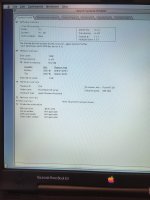 | |
| Posted by: Byrd on 2019-12-10 14:52:22 That's great - I love a good overclock! It should run 10.3 nicely | |
| Posted by: EvieSigma on 2019-12-10 21:02:00 I always wondered if you could OC the bus in the PDQ to 83MHz like the non-PDQ models. | |
| Posted by: Trash80toHP_Mini on 2019-12-10 22:54:42 Mine came as a PDQuicker from a very sharp original owner along with my Pismo 500. I always figured this is how it was done, but never looked, thanks for the confirmation. | |
| Posted by: Unknown_K on 2019-12-10 22:55:04 How well does that laptop deal with the extra heat? | |
| Posted by: Trash80toHP_Mini on 2019-12-10 23:02:38 I never noticed mine getting warm, it's only an 11% bump after all. That's nothing like ramping a IIsi from 20MHz to 25MHz or a Q605 from 25MHz to 33MHz. | |
Posted by: AlpineRaven on 2019-12-11 02:20:29I always wondered if you could OC the bus in the PDQ to 83MHz like the non-PDQ models.I was thinking about that - and I thought because I really like the PDQ and I didnt want to push it, 333mhz is good enough as it is. If I get another 300mhz (3rd CPU) then I'd consider it. How well does that laptop deal with the extra heat?No difference between 300 and 333mhz. While I was benchmarking I was touching the CPU area and I was able just to touch it it was hot to begin with - IMO both 300 and 333mhz felt the same "heat" from it. It has been more than 32 hours now - Ive copied about 8gb across network from the server to PDQ last night and it performed well. I tried installing OSX.3 - wouldnt allow to install, Ive forgotten what the program was called to boot into un-supported OSX! Edit: it was XPostFacto. that I needed... Cheers AP | |
| Posted by: Franklinstein on 2020-04-30 07:29:04 The MPC106 really doesn't take to overclocking (especially since 83MHz is about a 30% upclock), so you're likely stuck at 66MHz. I don't know why the upgrade providers never used the 83MHz variants. You'd figure if Sonnet or Newer could offer any sort of bump over the competition they would. I had ideas of desoldering and replacing one of the original 250 or 292MHz processors with a 500MHz version, but I would also likely have to source faster L2 cache chips (if I wanted to run it faster than 5:1, at least) and the 83MHz cards only had the BGA-style L2 cache chips, so that may prove difficult. As far as the Lombard goes, the 333MHz version really has nothing on your overclocked unit except faster video and built-in USB. You had to buy the 400MHz model to get the built-in DVD decoder hardware, though the 333 could use the WS's DVD decoder card. Personally I generally dismiss the Lombard as a sad speed-bump on the road to Pismo, though honestly I'd prefer the WS/PDQ over any of them because the WS had a double drive bay, floppy support, SCSI, two CardBus slots (for adding USB (including 2.0 support under 10.2.6+), FW, and 802.11g wifi), and a better keyboard. With a processor upgrade, the WS could be faster than a stock Pismo/500 anyway. The only real reasons to get a Pismo are for the better video system and faster memory bus. I guess they're lighter, too, if you're not up to hefting a fully loaded 14" WS. | |
| 1 |