68kMLA Classic Interface
This is a version of the 68kMLA forums for viewing on your favorite old mac. Visitors on modern platforms may prefer the main site.
| Click here to select a new forum. | |
| Hate to do this but... SE/30 Help needed | |
| Posted by: Billeh64 on 2019-11-14 16:50:52 I purchased this SE/30 with scrambled screen lines. I have tested it under various configs with the same pattern on the screen. It boots up to question floppy but has the same lines, pressing the interrupt cause some of the lines to go black, powering up with no RAM or ROM causes a blank screen with the lines. I don't know where to go from here, Thank you for your time. 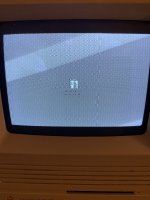 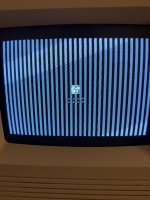 | |
| Posted by: beachycove on 2019-11-14 19:21:20 Start by searching for "Simasimac SE/30". | |
| Posted by: Scott Baret on 2019-11-14 20:45:46 Do you know if this Mac has been re-capped? If it hasn't, that's your first step. Every capacitor on the logic board should be replaced. | |
| Posted by: Bolle on 2019-11-14 21:17:43 First needs a recap if not yet done. One of you VRAM address muxes or a trace to one of those muxes is bad causing the video problems. | |
| Posted by: Billeh64 on 2019-11-15 07:27:25 Thank you for your help, I've ordered the capacitors | |
| Posted by: BadGoldEagle on 2019-11-15 07:31:43 The vertical lines in the first picture are definitely cap related. One of my boards produced the same patten before it was recapped (oddly enough it worked great without the accelerator, it only did this with the 50MHz Powercache 030...). Don't forget to clean the board REALLY well with isopropanol once you've removed the old caps. The rest of the symptoms are probably caused by cap goo shorting out a few components. | |
| Posted by: Billeh64 on 2019-11-15 07:34:31 Thanks for the reply, I've seen examples of people submerging the board and some just scrubbing the board which is the best method? | |
| Posted by: BadGoldEagle on 2019-11-15 08:04:38 I'd remove the old caps by cutting the top with some pliers (safer as ripping them off or twisting them I think), then immerge in some hot soapy water, scrub with a toothbrush. Rinse with clear water when done and rinse again but this time with isopropanol (this will effectively make the board dry faster and prevent any rust from forming). After that, clean the pads with your iron, and start soldering the new caps on. Did you go with tantalums or electrolytics? | |
| Posted by: Billeh64 on 2019-11-15 09:45:57 Electrolytic, I was not aware of the tantalum option... Another stupid question lead solder or leadless? | |
| Posted by: jimjimx on 2019-11-15 10:59:22 60/40 solder will do just fine, and doesn’t have a high melting point, which can cause more problems to the traces & vias. | |
| Posted by: Alex on 2019-11-19 01:14:13 All good advice which I will not challenge but when I can I always like to refer to "The Dead Mac Scrolls" by Larry Pina, here is the link https://archive.org/search.php?query=Larry pina&and[]=mediatype%3A"texts" 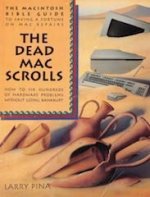 | |
| Posted by: Bolle on 2019-11-19 01:21:36 Only problem is that a lot of the problems that are occuring with these machines today have different causes than your usual problems back then. You simply had no damage due to leaking capacitors and batteries back then to the extent we have now. As long as you are aware of that the book is a good read nevertheless. | |
Posted by: Alex on 2019-11-19 03:16:55Only problem is that a lot of the problems that are occuring with these machines today have different causes than your usual problems back then.Thank you for the reminder, you made some valid points. | |
| 1 |