68kMLA Classic Interface
This is a version of the 68kMLA forums for viewing on your favorite old mac. Visitors on modern platforms may prefer the main site.
| Click here to select a new forum. | |
| IIci behaves like a compact mac | |
| Posted by: ktkm on 2019-11-10 12:45:50 I’m having a problem with a motherboard that has have been recently re-capped. First thing, the IIci behaves like a compact mac when turning off. Second, the floppy drive is recognised as an 800K drive, it won’t boot, and can’t format disks. Sound only works through the headphone jack. SCSI behaves as normal. Is this a ROM issue? | |
| Posted by: Bolle on 2019-11-10 13:18:14 You have broken traces and/or broken ICs in the startup circuit. This is common on the IIci and results in weird behaviour with either not turning on, not restarting from software or not turning off automatically like you are experiencing on your board. | |
| Posted by: ktkm on 2019-11-10 14:00:44 I see, how can I test it? | |
| Posted by: ktkm on 2019-11-10 15:07:11 I might add that I have yet to replace the large caps since they Looked okay. I’ll start with replacing those. | |
| Posted by: Bolle on 2019-11-11 01:36:35 This might give you an idea. Basically it's follow all traces in that circuit and see if they are good. If they are good replace the 74HC132s and 74HC74. (or test the original ICs in an external tester) | |
| Posted by: ktkm on 2019-11-11 04:13:53 Thank you @Bolle this is new territory for me! | |
| Posted by: Scott Baret on 2019-11-12 20:05:44 Would the same trace also be responsible for a IIci that wants to stay on all the time? I had mine re-capped eight years ago and it's had this issue since (otherwise, it works like a charm). If I plug it in, it comes on. If I turn it off, it comes back on a few seconds later. The switch isn't turned; I do know they can be rotated to keep the machine on (honestly a great feature since they were popular server machines). Also, speaking of caps...if your IIci has a cache card, recap it!! I had a cap burst open with smoke on mine. I believe the card has two caps offhand, not sure the size as I don't have the new one I just bought this past weekend handy... | |
Posted by: Bolle on 2019-11-13 04:22:16Would the same trace also be responsible for a IIci that wants to stay on all the time?Yes, this can be one of the possible fault scenarios. There are several traces involved and you should check them all. As said the ICs itself can be faulty as well. | |
| Posted by: ktkm on 2019-11-14 01:19:33 A morning update. 1. C133 fixed (small ceramic cap on the flip side had broken off). 2. The C10 plus-pad was ripped!!! I suspect this could be the reason for the floppy to behave strangely? I made a half-assed attempt to fix this, but with no luck. I would love some suggestion on this one! 3. Large capacitors in place (didn’t change much). I haven’t found any broken traces as @Bolle suggested, so I guess the IC:s are bad since I can’t turn it off. Does anyone know where replacements can be found? 4. Printer port works! 🙂 I was able to move Apple diagnostics to the hard drive. To be continued. 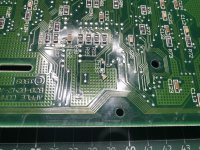 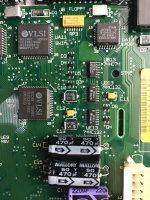 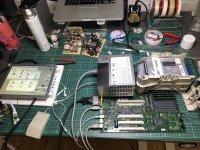 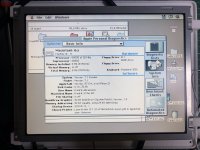 | |
| Posted by: Bolle on 2019-11-14 02:08:04 C10 is critical for the power circuit to function. So are you saying there is no contact at all or is the pad just wonky? Edit: just took a closer look at the pictures, seems you have fixed C10. Are you sure your wire is not touching the other via that's right next to it? Also I see a lot of traces that have started to corrode under the solder mask. 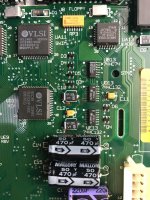 | |
Posted by: ktkm on 2019-11-14 02:21:17C10 is critical for the power circuit to function. So are you saying there is no contact at all or is the pad just wonky?Hard for me to say. I think it works after I made a little extension lead replacing the pad. It might as well be wonky. I’ll post a close-up tonight. | |
Posted by: ktkm on 2019-11-14 13:46:16Edit: just took a closer look at the pictures, seems you have fixed C10. Are you sure your wire is not touching the other via that's right next to it?I have checked the wire, it is no touching the via, but there were som tiny solder residues between the legs of 74HC74D and HC132A, however, removing them didn't change anything. I’m gonna check your markings thoroughly. 🙂 Good eyes @Bolle! Here some more pictures. 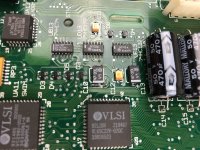 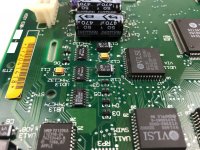 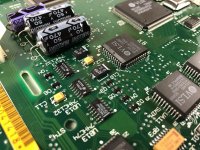 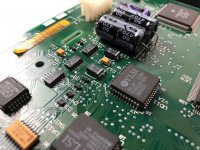 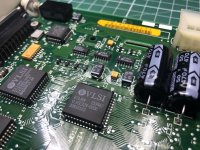 | |
| 1 |