68kMLA Classic Interface
This is a version of the 68kMLA forums for viewing on your favorite old mac. Visitors on modern platforms may prefer the main site.
| Click here to select a new forum. | |
| Large volumes in a 68030 | |
| Posted by: kissmyash933 on 2019-10-26 19:46:18 So, I recapped my IIci and stuffed it full of cards only to find out that the HDD was dead. My standard method of replacement is a 2.5" IBM Ultra 320 SCSI drive on an adapter, partitioned into small chunks. I booted up the machine, formatted with a Patched Drive Setup and installed System 7.1 only to find that it wouldn't boot, and then wouldn't mount when I booted up with a DT disk. The error received was "You need a 68040 or PPC mac for large volumes" I was under the impression that as long as I kept the partitions under 2GB, everything should work fine. Any way around this particular issue? | |
| Posted by: johnklos on 2019-10-26 21:32:22 You most likely need to use Apple HD SC Setup (patched) or an older Drive Setup. I always thought Drive Setup would DTRT when running on an '030, but I suppose not. If I had to guess, I'd guess you have a Drive Setup from 8.0 or 8.1. Somewhere there's a list of versions of Drive Setup, the versions of SCSI drivers they install, and what models of machine are supported by each version, but I don't know where that is off the top of my head. | |
| Posted by: kissmyash933 on 2019-10-29 20:31:36 Heck yes, this is exactly the information I needed! Thank you! | |
| Posted by: pcamen on 2019-11-26 16:40:00 Lido and Anubis are useful utilities for setting up drives too. https://macintoshgarden.org/apps/lido-756 https://macintoshgarden.org/apps/anubis-plus-v352 I particularly like Anubus' feature to create X number of equally sized partitions on a device; very easy. | |
| Posted by: Unknown_K on 2019-11-26 19:43:43 Pretty much what pcamen posted. You used a formatter for PPC and the 68k machine didn't like it. | |
Posted by: badCaps on 2019-11-26 19:51:15My standard method of replacement is a 2.5" IBM Ultra 320 SCSI drive on an adapter,Which adapter do you use for this? | |
| Posted by: pcamen on 2019-11-26 20:05:14 These are the ones that were recently recommended for me. I've used them before as well and they seem to work well. https://www.ebay.com/itm/80pin-to-50pin-SCSI-Adapter-Brand-New/392280277910?ssPageName=STRK%3AMEBIDX%3AIT&_trksid=p2057872.m2749.l2649 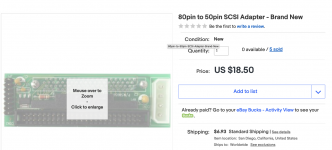 | |
| Posted by: JT737 on 2019-11-26 20:08:41 I use Lido 7 to partition my drives. In my SE/30 I am currently using a SCSI2SD converter with a 16gb micro SD card that I have partitioned into 4 4gb slices. Works great! And it sure is nice to have the space. | |
Posted by: badCaps on 2019-11-27 18:04:18These are the ones that were recently recommended for me. I've used them before as well and they seem to work well.Thanks! Not sure why I haven't heard of the adapter/2.5" ultra320 combo before but I'm glad I just did. $32 shipped for both is what I paid. | |
Posted by: kissmyash933 on 2019-12-03 18:48:24Thanks! Not sure why I haven't heard of the adapter/2.5" ultra320 combo before but I'm glad I just did. $32 shipped for both is what I paid.The adapters quoted are the exact adapters that I use. It seems they have gone up a little bit in price though! They work like a charm, just make sure you have a terminator on the end of your cable since these drives don't do internal termination. | |
Posted by: ScutBoy on 2019-12-04 10:10:02The adapters quoted are the exact adapters that I use. It seems they have gone up a little bit in price though! They work like a charm, just make sure you have a terminator on the end of your cable since these drives don't do internal termination.I've used these as well with surplus 2.5" SCA server drives. The drives can get a little warm but since they are 2.5" in spaces generally made for 3.5" or bigger drives, "stock" ventilation is usually enough. I use in-line terminators at the board (cable->terminator->board->SCA drive) and this seems to work fine. | |
| Posted by: badCaps on 2019-12-05 21:34:00 Got my adapter, the same as linked but from different seller, and IBM U320 drive. Didn't think about the terminators! Plugged it all in and the drive doesn't even spin up. No terminator but I don't see how that would prevent the drive from powering up. I guess my options are buy another drive and or adapter to see which one is the issue, then return the defective item. Well before that I'll try a different machine and just plug the drive/adapter into an external power supply. Any other ideas? | |
Posted by: kissmyash933 on 2019-12-06 19:47:25Got my adapter, the same as linked but from different seller, and IBM U320 drive. Didn't think about the terminators! Plugged it all in and the drive doesn't even spin up. No terminator but I don't see how that would prevent the drive from powering up. I guess my options are buy another drive and or adapter to see which one is the issue, then return the defective item. Well before that I'll try a different machine and just plug the drive/adapter into an external power supply. Any other ideas? That's weird that it wont spin up, but I have actually had this problem before. Does it spin up if you hook it up to a regular ATX PSU? I've seen some PSU's on macs not provide enough power, and I've also seen sometimes that there is a Motor Delay jumper set, or even a motor jumper that needs to be set to tell the drive to spin up, look at the jumpers on your adapter. also: these adapters aren't what I would call excellent quality, I've had a few of them fail on me. Check for cold solder joints and buy a couple more of them that actually have the labels next to the jumpers for testing. 🙂 | |
| Posted by: badCaps on 2020-08-06 11:11:13 I ended up buying a new SCSI adapter and the drive worked fine. Not sure what everyone is using for a mounting solution but I couldn't find anything so I made this 3d printed adapter thing. Adapts to the plastic rail and provides strain relief for the SCSI adapter. Works good so far in my 6100. Are these rails pretty universal among PPC chassis? Looks the same as my 8500, Performa 62xx and a few others. 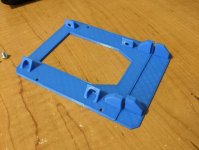 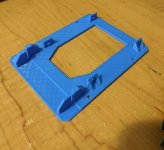 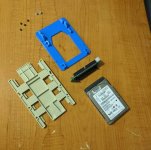 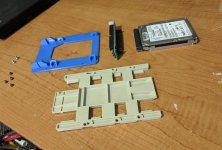 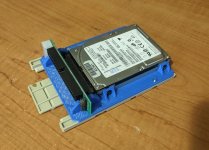 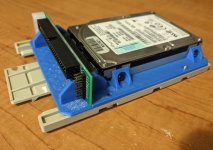 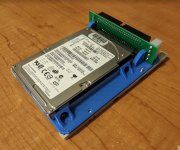 | |
| Posted by: NJRoadfan on 2020-08-06 11:23:49 The later "outrigger" beige PCI PowerMacs use the same rails. | |
| Posted by: johnklos on 2020-08-06 12:07:24 I like the mounting! I just bought a 300 gig 3.5" SCA SCSI drive because I couldn't find a mount for an IBM 2.5" drive. What you have would've likely worked perfectly, but the 300 gig drive was only $25. | |
| Posted by: ScutBoy on 2020-08-06 23:29:32 That 3D printed adapter is awesome - I like that it holds the adapter PCB steady. Would you be willing to share the .stl? | |
| Posted by: LaPorta on 2020-08-07 00:00:48 That's slick. | |
| Posted by: MrFahrenheit on 2020-08-07 04:20:48 Just a warning that not all SCA to 50 pin scsi adapter boards are the same. I struggled for months trying to buy ones that worked with the Mac. At the present time there aren’t any on eBay that will work properly with a Mac. I found a place that still stocks and sells them. It’s at Datastoragecables.com. You have to make sure your board has 3 rows of terminators on it. Many on eBay say they have termination but when you receive it, it’s not the same as what was pictured. I know because I bought some from pretty much every seller and I have a box of adapter boards that just don’t work. Ive bought nearly 50 of the boards from the supplier above and they work perfectly. | |
| 1 > |