68kMLA Classic Interface
This is a version of the 68kMLA forums for viewing on your favorite old mac. Visitors on modern platforms may prefer the main site.
| Click here to select a new forum. | |
| G4 MDD main PSU connector pinout | |
| Posted by: EvieSigma on 2019-10-10 17:54:05 I have a G4 MDD (single 1.25GHz FW400) that doesn't power on, which I'm sure means a dead PSU. I managed to find a spare but I don't know if the spare works. What is the pinout of the main motherboard power connector so I can probe it and see if it's putting out anything? | |
| Posted by: MOS8_030 on 2019-10-10 19:32:31 Here ya' go. http://atxg4.com/mdd.html After the second power supply in my MDD died I finally just installed an ATX PS. It's been working fine for a couple of years now. | |
Posted by: EvieSigma on 2019-10-11 07:48:21Here ya' go.I'd probably do that in the long term but how exactly do you make one fit? | |
| Posted by: MOS8_030 on 2019-10-11 08:22:19 Here's how I mounted mine. I used a couple of sheet metal screws through the top. (under the plastic of course.) I first tried some double-sided foam tape but it wouldn't hold long term. These pictures were taken before I was completely finished. I also had to get an ATX extension cable to be able route the wires behind the optical drives. The power cord routes out through the original plug hole in the back. I also did have to invest in a Molex extraction tool. I tried other methods to remove the pins but finally gave in. I think I paid about $16 for mine, I got it online somewhere. 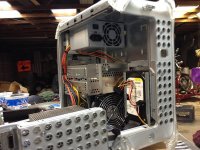 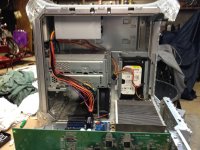 | |
| Posted by: EvieSigma on 2019-10-11 08:57:34 Oh wow, it just fits. I thought it would be a lot tougher than that. | |
Posted by: MOS8_030 on 2019-10-11 09:41:19Oh wow, it just fits. I thought it would be a lot tougher than that.Yeah, it was actually pretty simple after I surrendered and bought the Molex tool. I hate having to buy a tool for a single job but really it was necessary. On one of the pages about the ATX conversion I saw a warning about some systems having problems with deep sleep. I haven't seen that or any issues with my system. I suppose heat could be a problem if I ran the machine really hard but I only use the system every few days mostly for iTunes or browsing the web. | |
| Posted by: EvieSigma on 2019-10-11 09:42:13 How did you get the wiring to clear the GPU though? | |
Posted by: MOS8_030 on 2019-10-11 10:03:16How did you get the wiring to clear the GPU though?ATX extension cable so I could route the wires behind the optical drives like the original PS. I have a full-length GF Ti4600. With a shorter card the extension may not have been necessary. https://www.amazon.com/Cable-Matters-Motherboard-Power-Extension/dp/B01DV1Z66C/ | |
| Posted by: EvieSigma on 2019-10-11 10:11:49 Yeah, I have the same card which is why I asked. | |
| Posted by: Unknown_K on 2019-10-11 11:09:08 Any good websites on how to fix the old QS power supplies? I have at least 3 bad ones in the garage waiting for a cold day to get started on fixing them. | |
Posted by: MOS8_030 on 2019-10-11 11:23:58Any good websites on how to fix the old QS power supplies? I have at least 3 bad ones in the garage waiting for a cold day to get started on fixing them.None that I have found, and I looked pretty hard a few years back, otherwise I would have repaired mine then. Reading around no one seems to have pin pointed a common failure mode, of if they have they haven't shared that info, unless something new has been posted in the last couple of years. You can do the ATX mod to the QS too. But it's a bit more complicated. http://atxg4.com/quicksilver.html | |
| Posted by: Unknown_K on 2019-10-11 11:27:00 Mine died just sitting around and it might just be bad caps. One blows a fuse so I assume it has a shorted output somewhere and is probably not worth messing with. | |
| 1 |