68kMLA Classic Interface
This is a version of the 68kMLA forums for viewing on your favorite old mac. Visitors on modern platforms may prefer the main site.
| Click here to select a new forum. | |
| Macintosh SE screen flickering/changing shape | |
| Posted by: Mighty Jabba on 2019-09-24 16:32:38 I just got in another Mac SE and it’s got a bit of a weird problem. The screen will periodically flicker and get larger horizontally by about a cm. Supposedly it was working perfectly before I got it, but it wasn’t packaged very well by the seller and I’m thinking that something may have gotten knocked out of place. I did try adjusting the picture with the potentiometers on the side but it doesn’t seem to affect the fundamental issue. Any ideas? View attachment 9588B1CA-780D-4D62-813E-B7B3447CB535.MOV | |
| Posted by: Mighty Jabba on 2019-09-26 19:05:46 No ideas on this one? I noticed that it had the old squirrel cage style fan (which is really is quite loud). Somewhere I heard that these fans could potentially cause screen interference, but I don't know if it's related. I'm kind of stumped about where to start diagnosing this since I don't know a lot about CRTs. | |
| Posted by: Chrisssssssss on 2019-09-28 03:36:14 I don't know if it's just me, but I can't get your video to work. Just sayin... | |
Posted by: PB145B on 2019-09-28 05:13:41I don't know if it's just me, but I can't get your video to work. Just sayin...Same here. Doesn’t work for me either. | |
Posted by: Mighty Jabba on 2019-09-28 05:19:35Same here. Doesn’t work for me either.Well darn. I'm just using the forum's built-in uploader and it still displays for me for some reason. Here, I've put it on imgur: https://imgur.com/a/FUEH0gk It gets worse at the end of the clip. | |
| Posted by: jimjimx on 2019-09-29 04:47:31 Looks like the typical J1 solder joints.. Repair those, and go over the rest of the analog board. | |
| Posted by: Mighty Jabba on 2019-09-30 11:56:08 I'm still new to working on the innards of compact macs, but I could handle reflowing some solder joints if you think that might help. | |
| Posted by: jimjimx on 2019-10-10 03:01:30 Sorry if I left you hanging..... J1 is the connector from the deflection coil on the CRT to the analog board. There are 4 wires, I think I remember that they’ll be red, blue, green, yellow. I don’t remember the order. Check the solder joints on the analog board at that connector, and check the connector for brown / black, that will come from inside the connector. If there is brown / black, conditions will only get worse. Change the connector. https://www.digikey.com/product-detail/en/0015311046/WM1042-ND/313615/?itemSeq=287242932 https://www.digikey.com/product-detail/en/0019091049/WM1606-ND/26362/?itemSeq=287243257 https://www.digikey.com/product-detail/en/02-09-5106/WM6388-ND/252899/?itemSeq=287243638 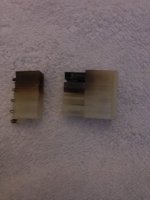 | |
| Posted by: Mighty Jabba on 2019-10-10 11:34:09 Thanks, I haven't had the time or motivation to revisit this one yet but I will. | |
Posted by: smrieck511 on 2023-03-17 18:39:50Sorry if I left you hanging.....I seem to have one somewhat burned pin in my J1 connector (and randomly flickering screen) on my SE analog board...Does anyone know the cause of this issue? Would installing a new connector fix the root cause of the problem? Also, the analog board side of the case where the connector is feels a bit warm after use. Not sure if that's normal. Thanks for any help. | |
Posted by: Phipli on 2023-03-18 02:39:32Also, the analog board side of the case where the connector is feels a bit warm after use. Not sure if that's normal. Thanks for any help.Do not touch the analogue board after use! There is high voltage and big capacitors in there! It's like licking a mains outlet... sort of. | |
Posted by: smrieck511 on 2023-03-18 05:45:38Do not touch the analogue board after use! There is high voltage and big capacitors in there! It's like licking a mains outlet... sort of.Oh i know..i meant with the case on. | |
Posted by: Phipli on 2023-03-18 05:58:04Oh i know..i meant with the case on.Phew! Glad to hear it 🙂 was worried for your family 🙂 | |
Posted by: smrieck511 on 2023-03-18 06:11:19Phew! Glad to hear it 🙂 was worried for your family 🙂ha Thanks! I appreciate it. | |
| 1 |