68kMLA Classic Interface
This is a version of the 68kMLA forums for viewing on your favorite old mac. Visitors on modern platforms may prefer the main site.
| Click here to select a new forum. | |
| A weekend conquest... | |
| Posted by: joshc on 2019-09-03 03:06:45 Having not collected anything in years, I'm back in the game after collecting the following items this past weekend: - Macintosh SE/30 (working) - Macintosh Classic II (doesnt power on) - A second Macintosh Classic II with box, other original packaging, manuals, installation diskettes (has a checkboard style problem on its monitor) - StyleWriter (boxed, manual, new ink cartridge) - ClarisWorks (boxed with manuals and non-original disks) - Two boxes of floppy disks, a couple with copies of WordPerfect 2 and some with old documents on them - A 'non' Apple item (a Thinkpad 380D) 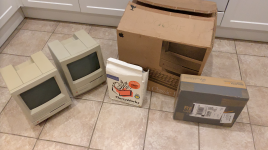 | |
| Posted by: joshc on 2019-09-03 14:02:55 Here's a video I made of the SE/30 - it's a bit too long but I'll aim to make the next video a little more concise! | |
| Posted by: olePigeon on 2019-09-04 10:00:15 I can't remember which, but in one of the System 7 Utilities bundles (Now, Action, Alsoft, etc.) there's a Control Panel (Deflate?) to hide the Balloon Help menu. I find Super Clock a lot more useful than the balloon help. With the help menu hidden, it won't interfere with SuperClock. If you're looking for an alternative, there's also Network Time. It's an NTP based menu clock with the same functions as SuperClock, but it'll sync if you have an internet connection. | |
| Posted by: joshc on 2019-09-04 13:14:36 Thanks @olePigeon I didn't know that, I'll give it a go. I've just picked up another SE/30 which has a network card, soo.... 😎 | |
Posted by: Dog Cow on 2019-09-04 14:04:18I can't remember which, but in one of the System 7 Utilities bundles (Now, Action, Alsoft, etc.) there's a Control Panel (Deflate?) to hide the Balloon Help menu. I find Super Clock a lot more useful than the balloon help.Helium | |
| Posted by: olePigeon on 2019-09-04 14:31:53 @Dog Cow @joshc Yep, that's the one. I couldn't remember the name. It was bundled with a bunch of other utilities. | |
| Posted by: joshc on 2020-04-01 01:11:40 I finally got around to fixing one of the Classic IIs. This one needed a recap of the logicboard, and the floppy drive needed lubricating. Unfortunately both of my Classic IIs only have 2MB RAM and both are missing hard drives (even the hard drive chassis is missing from both), so I'm not sure exactly what my plans are for these machines, I have two SE/30s that are far superior but it also seems a shame to not upgrade the Classic IIs ! First job was to clean the board, just the usual fluff and goo from leaky capacitors: 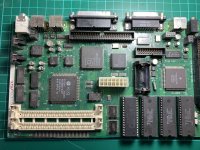 I used the twist method to remove the caps, pushing DOWN on the caps while twisting gently. This worked really well, everything came off cleanly and no damage was done to the pads. With the caps removed, the solder pads were cleaned and the logicboard was bathed in isopropyl alcohol: 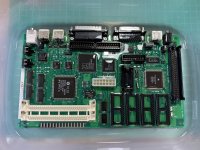 I decided to go with leaded tantalum capacitors this time, I've tried SMD ones before and had some trouble working with them. I clearly need more experience doing this, and as you can tell, my solder job is not tidy - BUT it works. 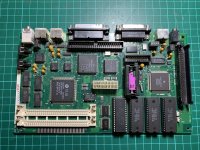 Sound and video is back: 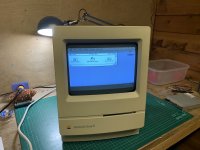 There is a weird distortion of the picture in the upper right hand corner of the display, I am no expert in adjusting CRTs so I don't know where to start, can anyone help? 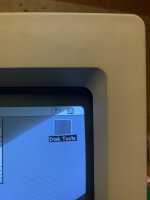 Unfortunately my recap of the other Classic II failed - I had two lifted solder pads, so I'm still evaluating if I should spend more time trying to fix that board, or try to find another Classic II logicboard from somewhere. | |
| Posted by: GregorHouse on 2020-04-23 04:19:40 Even with lifted or missing pads, you could still save it. You can peel the coating on the traces and solder the capacitor, or a cable, directly to the trace. It's not beautiful, but it's effective. Always use solder flux if you try to do this. Also you could follow the traces and solder the capacitor directly to its location using cables. | |
| Posted by: LaPorta on 2020-04-23 04:39:16 Your screen issue could be from a maladjusted magnet on the CRT yoke. I don't have precise instructions for you on this, but if you look it up, you should be able to find some (Pina's guides may touch on it). Like Gregor said, you can salvage that all sorts of ways...even if they don't look nice. If you want it to look somewhat pretty, you can use adhesive copper foil to make a pad of sorts and solder it to that. You can find a roll of that stuff on Amazon for cheap, as it is used in kid's crafts. | |
| 1 |