68kMLA Classic Interface
This is a version of the 68kMLA forums for viewing on your favorite old mac. Visitors on modern platforms may prefer the main site.
| Click here to select a new forum. | |
| Rusty Screw on the Motherboard. Should I be worried? | |
| Posted by: MacFox on 2019-08-30 13:00:19 Hello all, About a year or so ago, I saw a Power Macintosh G4 on ebay that had some rust on the case. After searching online, the consensus seemed to be that rust on a computer case isn't a big deal, so I went ahead and bought the G4. What I didn't notice until recently, however, was that the screw on the top right corner of the motherboard was rusted. I removed the screw only to find that a small bit of rust had formed around the screw hole where the screw had been. Should I be worried? If so, any tips on how to remove the rust? Thanks in advance. | |
Posted by: Dog Cow on 2019-08-30 14:42:26If so, any tips on how to remove the rust?Sandpaper. | |
| Posted by: Trash80toHP_Mini on 2019-08-30 15:40:03 Try vinegar and a Q-Tip first. Coca-Cola is another old school rust remover. They don't compare well in tests you'll find on youboobtube with dedicated rust removal solutions, but they cost nothing or next to nothing by comparison. Baking soda and a Q-Tip (dry) makes for a mild abrasive that's more localized than applying sandpaper. If you've got Soft-Scrub cleaner or the like under the kitchen sink, so much the better. | |
| Posted by: LaPorta on 2019-08-30 15:56:35 This is the perfect use of EvapoRust. Buy some, pour in a small cup. Drop screw in and cover. Come back 12 hours later. Rust totally gone. | |
| Posted by: Trash80toHP_Mini on 2019-08-30 16:05:43 Yep, but MacFox is talking about the rust on the board. One of the home remedies ought to work for that or should be tried before spending money. [😉] | |
| Posted by: MacFox on 2019-09-09 09:55:13 Decided to take a picture of the board. 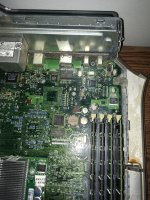 | |
| Posted by: jimjimx on 2019-09-11 22:45:53 The screw is either a #6 or #8, with 32 TPI. From what I remember, it’s an 8. Take it to a hardware store and ask for one in that size that’s stainless. It’ll cost less than $1 The computer was probably just stored someplace that was humid, moist, or damp. | |
| Posted by: Byrd on 2019-09-12 03:03:39 Looks like some superficial water damage all over the top corner of the motherboard and casing. Obviously it dried and isn’t going to kill the system but I’d more be cleaning that section over worrying about a screw. | |
| Posted by: MacFox on 2019-09-12 07:11:52 How should I clean up the water damage? | |
| Posted by: hoi polloi on 2019-09-12 15:31:34 Do all of those ports work? The firewire chip looks a bit corroded. At least it looks like you got a nice CPU upgrade with it! Which one is it? | |
Posted by: MacFox on 2019-09-12 17:44:23Do all of those ports work? The firewire chip looks a bit corroded.I haven’t used the FireWire port in about a year, but it worked when I last used it. The only ports I never tested were the microphone and modem. All the other ports work. I have a USB 2.0 card and gigabit Ethernet card in two of the PCI slots, so I don’t use the built-in USB 1.1 or 10/100 mb Ethernet ports anymore. The CPU upgrade is the main reason I bought this Mac. It’s a 1.5ghz model. I don’t know who made it. I think it was made in 2007 according to a sticker I found on it. | |
| 1 |