68kMLA Classic Interface
This is a version of the 68kMLA forums for viewing on your favorite old mac. Visitors on modern platforms may prefer the main site.
| Click here to select a new forum. | |
| A/UX 1.1.1 iso | |
| Posted by: toshiba1 on 2019-08-24 15:46:43 Hi all, I have a Mac II with the FPU and PMMU so I know it can run A/UX, I found an 'A/UX 1.1.1.iso' and I have this actually running properly in the emulator 'shoebill'. I have the SCSI2SD v5.1, and I used the 'dd' command to write the image to a 2GB SD card like this (see below). And you can see I can list the contents and it seems to be properly setup. I place this SD card into the SCSI2SD and the Mac II boots into this SASH Standalone Shell Window. There are menus, like 'Boot' and 'Run', when I choose 'Boot' what happens is it shows this message (see picture attached) and just hangs. Any advice? gfs-powerbook-g4-59:~ gf$ dd if=Desktop/AUX_1.1.1.iso of=/dev/rdisk1 195912+0 records in 195912+0 records out 100306944 bytes transferred in 590.743029 secs (169798 bytes/sec) gfs-powerbook-g4-59:~ gf$ diskutil list /dev/disk0 #: type name size identifier 0: Apple_partition_scheme *74.5 GB disk0 1: Apple_partition_map 31.5 KB disk0s1 2: Apple_HFS Tiger 74.4 GB disk0s3 /dev/disk1 #: type name size identifier 0: Apple_partition_scheme *1.9 GB disk1 1: Apple_HFS SASH Partition 2.0 MB disk1s1 2: Apple_partition_map 31.5 KB disk1s2 3: Apple_Driver 16.0 KB disk1s3 4: Apple_UNIX_SVR2 3.0 MB disk1s5 5: Apple_UNIX_SVR2 54.3 MB disk1s6 6: Apple_UNIX_SVR2 14.0 MB disk1s7 7: Apple_UNIX_SVR2 3.0 MB disk1s8 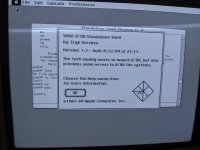 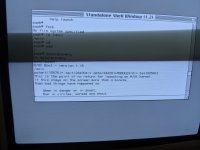 | |
| Posted by: uyjulian on 2019-08-24 21:36:47 Which graphic card are you using? Also, make sure you aren't using any ROM upgrades, such as BMOW's ROM-inator II. | |
| Posted by: pcamen on 2019-08-24 22:40:34 Anyone know where to get a fully installed shoebill VM with A/UX installed? I’d love to play with A/UX but don’t have the patience to figure it all out myself. | |
| Posted by: toshiba1 on 2019-08-24 23:29:53 Using a normal Macintosh color display card, and stock Mac II ROM. Nothing special. | |
Posted by: uyjulian on 2019-08-25 00:16:48Anyone know where to get a fully installed shoebill VM with A/UX installed? I’d love to play with A/UX but don’t have the patience to figure it all out myself.Try looking on Macintosh Garden. Using a normal Macintosh color display card, and stock Mac II ROM. Nothing special.Which specific card? "Macintosh II Video Card", "Macintosh II High Resolution Video Card", or a different one? | |
| Posted by: toshiba1 on 2019-08-25 07:47:05 The video card has the text: "1989/1990 Apple Computer" "Macintosh Display Card" "630-0400" | |
| Posted by: toshiba1 on 2019-08-25 07:53:36 You guys are great =) Thank you for asking about the video card! I put my older "Macintosh II Video Card" into the Mac II and A/UX 1.1.1 boots up properly =) By the way I obtained this .iso from https://winworldpc.com/product/a-ux/1x Thank you very much! | |
| 1 |