68kMLA Classic Interface
This is a version of the 68kMLA forums for viewing on your favorite old mac. Visitors on modern platforms may prefer the main site.
| Click here to select a new forum. | |
| Mac IIci capacitor damage | |
| Posted by: Storm on 2019-08-17 03:22:29 Hi, I'm new to this wonderful forum and I just got a really cheap IIci with a little bit of work to do. It seems the SMD-capacitors leaked a little bit and left some components with nasty green legs 🙁 I already got replacement caps and removed the old ones very carefully. As I can see the pads are still in "working" order. Any recommendations for cleaning the green stuff? 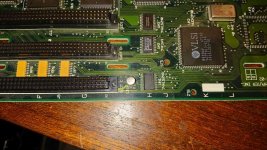 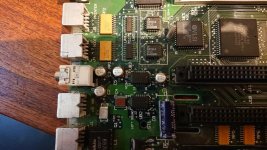 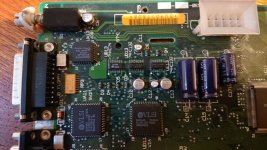 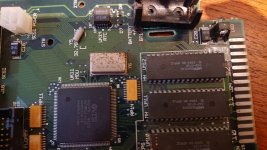 | |
| Posted by: Jinnai on 2019-08-17 09:13:42 Isopropyl alcohol | |
| Posted by: Storm on 2019-08-18 05:57:43 Ok thanks I will try that. What are my chances that the components still work when they got the green stuff on it? Is there a schematic where I can find the types of the IC's so I can replace them if needed? | |
| Posted by: Compgeke on 2019-08-18 06:07:29 Generally as long as it's just green fuzz, you'll be able to clean it off and it'll just work(tm). There are some exceptions, like in a Mac IIcx the cap leakage likes to ruin the power-on circuitry and you'll never be able to turn the computer off again but that's a minor issue. More or less all the IC part numbers are directly on top of the chip. A few are Apple proprietary but those wouldn't be available 2nd hand anyway unless you pulled from another board. | |
| Posted by: Storm on 2019-08-18 06:10:11 Ok lets hope it works out 🙂 I cannot read anything on some IC's, they seem to have no part numbers on it. For example the UB2-Chip for left sound or the one for the right | |
| Posted by: bibilit on 2019-08-18 09:57:40 Your board shows signs of battery damage at some point (rusty battery holder) and rust in the board itself. Look under the battery holder, some traces can be damaged. | |
| Posted by: Storm on 2019-08-19 12:46:03 I just replaced all the capacitors on the logic board and the power supply. Now when I turn it on (via button on the rear), it powers up but shows only a grey screen with no chime. I also tried different memory sticks in both banks but that didn't help. Any idea whats wrong with it now? | |
| Posted by: Compgeke on 2019-08-19 18:21:59 Did you clean the board, and I mean really clean the board after recapping? Cap goo gets under chips and causes weird issues until really cleaned. | |
| Posted by: Jinnai on 2019-08-19 19:02:56 I had an SE30 that didn't work after a recap and did work after another washing. It also had a bad stick of RAM. | |
Posted by: Storm on 2019-08-20 00:32:36Did you clean the board, and I mean really clean the board after recapping? Cap goo gets under chips and causes weird issues until really cleaned.Yes. Jinnai recommended using isopropyl alcohol but that didn't help that much with the green stuff on the IC-legs. Maybe there is some goo left under the chips. I have a hot-air-station but I'm a little bit afraid to do that on the logic board. Is a pre-heater needed for desoldering the two sound-chips for example? I suspect there is some goo left under them | |
| Posted by: bibilit on 2019-08-20 01:52:27 rotten traces probably. The battery is close to the Rom chips, so i bet several traces are cut. I will remove the battery holder and check continuity. I had exactly the same problem with a IIci not so long ago, same behavior, gray screen, no sound. I tracked the problem under the battery holder and made a repair on the other side of the board to keep things invisible. for a test, i used a SE/30 Rom in the Rom connector and changed the jumper in the logic Board, got a chime but no picture, made the repair.. switched back to original setup and got a working IIci 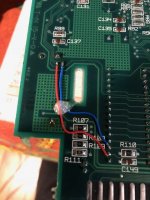 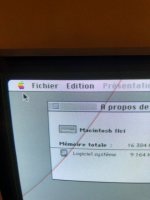 | |
| Posted by: Storm on 2019-08-20 02:00:25 Merci! I will check that out when I'm at home again | |
| Posted by: Storm on 2019-08-20 09:56:39 Ok one of the traces you fixed was also cut and one another on the upper side. I fixed both but still the same issue. Grey screen and no chime. Next I will try to clean the board | |
| Posted by: bibilit on 2019-08-20 22:58:56 Probably another trace faulty. Let us know | |
| Posted by: Storm on 2019-08-21 04:55:32 I found out that some of the 74HC132 and 74HC74 were damaged (Power Circuit) by the cap goo. I've desoldered them and ordered new ones. Maybe that's an issue too. Some pins of these chips were broken | |
| 1 |