68kMLA Classic Interface
This is a version of the 68kMLA forums for viewing on your favorite old mac. Visitors on modern platforms may prefer the main site.
| Click here to select a new forum. | |
| Mac Classic II Flyback | |
| Posted by: TroyK on 2016-01-25 21:02:05 Hi everyone, I'm just curious as to which flyback transformers are compatible with the Classic II. The one in mine is fine, no cracks in the casing or weird smells, but I've heard they can be a failure point. I've done some searching on part number 157-0129, but nothing comes up. I saw a seller on eBay (artmix) that sells them, however I'm not sure if they would work. I guess my whole point is how worried should I be about the flyback failing? And if it does fail someday, what would my options be for replacement? Thank you! 🙂 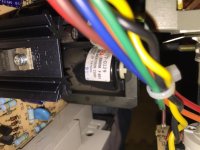 | |
| Posted by: CelGen on 2016-01-25 21:12:41 Typically the flybacks fail when the coil seals shrink or crack, causing arcing and overdriving of the coil which eventually overheats and shorts a winding. When I see the signs of carbon tracking or cracked insulation I coat the areas with GE silicone and that takes care of it. | |
| Posted by: uniserver on 2016-01-25 23:09:41 I wouldn't worry about flyback for any machine past the Mac SE, once they installed the cooling fan, those major failures went away, well other then caps. but those are passives. | |
| Posted by: uniserver on 2016-01-25 23:12:02 and the flyback that artmix sells is only compatible with (early) Macintosh Classic I analog boards, (later) Mac Classic analog boards, and all Mac Classic II analog boards used a whole different flyback. | |
| Posted by: TroyK on 2016-01-26 00:18:33 Good to know! My Classic II is almost up and running. It still needs the analog board redone as it's having issues (wobbly screen, doesn't always chime). I've been doing some reading that's pointed to an opto-isolator being the cause of some problems. I imagine the caps need replacing as well, because if I leave it on for a while the wobbly screen goes away. Still need a hard drive or something to boot off of. Almost there! 🙂 | |
| Posted by: uniserver on 2016-01-26 02:18:36 yeah its the caps. they are dead. usually when the opto is bad you get nothing. or massive delay before power up. get those SMPS output caps changed out asap. | |
Posted by: Elfen on 2016-01-26 08:25:47and the flyback that artmix sells is only compatible with (early) Macintosh Classic I analog boards, (later) Mac Classic analog boards, and all Mac Classic II analog boards used a whole different flyback.Interesting. Other than the resistor block on the transformers, I was told it was better to use the transformer from the Classic Mac on the older Macs as they were of the same specs and have been used in the older Macs in the past (my SE\30 has such a transformer in it that was put in back in the late 90s). The Larry Pina Books seen to agree with this notion as well. Answer me this - are they the same in that they would work on both Classics and older compacts or they can't or at least not supposed too? The only transformer I know that does not work is the Color Classic because that is for an entirely different video circuit. | |
| Posted by: uniserver on 2016-01-26 08:35:55 artmix's flyback is brand new, he must have paid some company to make them new… his works in all of these models. 128k - 512k - plus - se - se/30 - Early Classic, not in the later classic… or the Classic II. yes you can take a flyback from a (early classic ab) and use it in a 128k ab. | |
| Posted by: Elfen on 2016-01-26 19:18:10 OK Uniserver. It makes sense. | |
| Posted by: TroyK on 2016-01-26 21:27:06 Got some time today and took another look at the Classic II. One new thing I'm noticing is that every so often there is a delay. When this does happen, it will sit there pretty much dead for five or ten seconds then power up. So the optoisolator could be an issue then? I was thinking about replacing it anyways for good measure. I've attached a photo of the screen I sometimes get at startup, just vertical black bars. The logic board has been re-capped so I'm assuming it's just the board isn't getting the right amount of power to start up. Funny thing, I was working on this machine over a year ago, then life got in the way. It's been sitting in my closet since until I decided to pull it out the other day. 😛 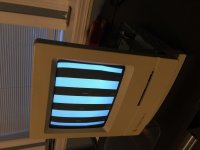 | |
| Posted by: Elfen on 2016-01-26 22:05:05 Bars on the Classic II usually means the logic board needs recapping, and it would fix it 90% of the time (but not always). Its usually a RAM or RAM socket failure somewhere. A Wobbly screen is one of the following: a the coil near the transformer, large cap, high voltage diode and transistor. The coil itself is not that it's going bad but the solder holding it in place and giving it electrical connection is going bad and you need to desolder it, clean it up and solder it with fresh solder and flux. Also check the connector for the yoke as well as they tend to go bad in the same way and you need to desolder and resolder the joints with fresh solder and flux. Have you checked the voltages with a meter? You can check for 5V and 12V at the hard drive power connector. | |
| Posted by: uniserver on 2016-01-27 03:23:36 yeah that problem, and is completely related to the main board... you have to clean up the cap goo.. even if you re-cap these things your self... you have to get that conductive cap good off.... and even when you do get that cap goo off... make sure to burn it in for 2 to 4 hours... especially if you are going to sell your machine to some poor sap... the last thing you want to do is sell it as WORKING and they get it and an hour later the thing dies because of a partially rotted trace decides to pop. | |
| Posted by: Paralel on 2016-01-27 20:02:26 I had that exact same image on my Classic II, was cured by going through the dishwasher (said machine was eventually recapped by Uniserver) | |
| Posted by: TroyK on 2016-02-16 00:58:25 Thought I would post a little update. I've replaced the optoisolator and it's definitely more stable now. Still going to replace those caps obviously. I also got a hard drive off Ebay, a 160MB Quantum Prodrive ELS. Seems to work pretty good. Interestingly the hard drive causes the screen's geometry to go all wacky, the lower right corner gets pushed up a little. Must be the magnets. 😛 | |
| Posted by: uniserver on 2016-02-16 02:09:41 i think the cap goo is what makes the opto go bad. those tin cans are leaking.. also the HD drawing on the weak almost dead 12v rail is what is making the screen image colapse. dead caps. | |
| Posted by: uniserver on 2016-02-16 02:15:49 to me its like trying to diagnose a transmission with out changing the filter and fluid first... with an acting up automatic transmission change the filter and fluid. and chances are the filter and fluid should have been changed long time ago. With the caps... people try to diagnose something with cooked leaking caps. The caps are dead ... the wear item. I'v done SO many Classic and Classic II analog boards... i have only once replaced an opto isolator. the first thing caps get removed, then gets a clean... the clean has to be good as that cap goo is conductive, as the opto is right there near the output caps, the goo travels, then new caps get installed. i have never met a Classic or Classic II ab that didn't need caps sometimes its only evident once you remove the caps first. then you see the nasty..... /monthly_06_2014/post-2052-0-06463800-1403200924.jpg">View attachment 3233 | |
| Posted by: joethezombie on 2016-02-16 08:00:42 Ack! Don't show that kind of stuff first thing in the morning! :O | |
| Posted by: naruse on 2024-09-19 20:34:12 Hi there!, sorry for necro bumping this post, I just exchanged a really well conditioned fly back transformer from an early mac classic (the one you can swap CRTs from and to older Mac’s) into a Mac SE/30 and it worked wonderfully! | |
| Posted by: falen5 on 2024-09-24 13:53:32 To add to that - Last week I transplanted the flyback from a Plus to a 128K as per advice from this forum - worked perfectly | |
| 1 |