68kMLA Classic Interface
This is a version of the 68kMLA forums for viewing on your favorite old mac. Visitors on modern platforms may prefer the main site.
| Click here to select a new forum. | |
| Powerbook 180c Screen Artifacts | |
| Posted by: MaxVCad on 2019-06-28 15:11:03 I've been working on repairing this Powerbook 180c for the past week or so.. Initially the LCD was working fine, with some minor horizontal artifacts when I would open windows like in Photo 3. As of a few days ago, it operates more like Photo 2. There's a buzzing noise emitting from the four areas I put red boxes around and if I apply pressure to certain spots on those things it will temporarily improve the LCD. Although even when the LCD is in its best state, there seems to be a black horizontal line right through the center of the screen like in Photo 1. FYI there was some glare when I took these photos, there's no light spot in the top-right corner. I took everything apart today which is when I noticed a brownish material covering the four things I put the red boxes around. I cleaned them off with rubbing alcohol which did improve things briefly, and I think cleaning them allows me to more easily 'fix' the screen by applying pressure to them / getting them to stop buzzing. Any ideas on how to sort this out? I've read some posts about replacing the inverters but I don't see any leaky / bad looking inverters around the LCD. I think my only issue is with these 4 buzzing things. I need them to stop buzzing and start WORKING! 🙂 Is this possible? From what I've read, it seems those things aren't really serviceable and I may need a new screen. If that's the case, do any of you have one you'd be willing to sell? 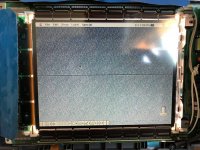 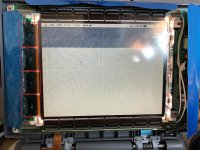 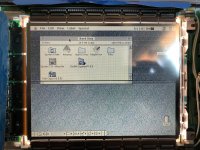 | |
| Posted by: Byrd on 2019-06-29 05:45:26 Hi Max, thanks for the pics - I've not taken apart a 180c LCD lately to recall if these connectors are reseatable; are there capacitors behind the board itself? If cleaning and pressure on these connectors helps, I'd be looking at cleaning and reclaiming the connectors down (making up some sort of custom clamp with screws, small spacers). | |
| Posted by: MaxVCad on 2019-06-29 19:09:47 Hmm, can you explain a bit more about the clamping idea you have? I don't really understand what these things do or even how they're connected. There are a bunch of wires beneath the plastic things, but I don't get why each plastic thing has a little processor on top.. Or whatever that is. | |
| 1 |