68kMLA Classic Interface
This is a version of the 68kMLA forums for viewing on your favorite old mac. Visitors on modern platforms may prefer the main site.
| Click here to select a new forum. | |
| Micron Xceed w/ Grayscale Adapter Questions | |
| Posted by: maceffects on 2019-06-24 12:20:30 So I finally managed to obtain a Micron xceed with the Grayscale adapter, it set me back $1000 which I considered a bargain compared to the one that sold on the Bay for $2000+. My question is, is the card plug and play or are drivers needed before installing? If required, what version (if any) should I use? And lastly can it be used in conjunction with the TwinSpark plus 50mhz upgrade? | |
| Posted by: omidimo on 2019-06-24 12:30:05 Congrats! You can use it with the TwinSpark, but not with Turbo 040. | |
| Posted by: EvilCapitalist on 2019-06-24 12:32:04 Congrats and welcome to the grayscale club! You'll need the driver to enable internal grayscale which you can snag from the Mac Driver Museum mirror (thanks, @pcamen!) and it should work fine with a 68030/50MHz upgrade. The only card I know for a fact it doesn't play nicely with is the Turbo '040, as @omidimo mentioned. | |
| Posted by: Crutch on 2019-06-24 12:32:33 The card is plug & play. I run mine with (i.e., plugged into the top of) my 50Mhz Diimo SE/30 accelerator and it works great, and fits (but my Diimo is the SE/30 PDS kind with passthru that doesn’t need a TwinSpark ... it does not work with the TwinSpark + 040 as omidimo noted). @EvilCapitalist your response just popped up ... I don’t think that driver is actually necessary. Just pull up the Monitors control panel, it should let you set to 256 grays. | |
| Posted by: omidimo on 2019-06-24 12:37:47 An additional purchase I made for my SE/30 was a better PSU from Artmix (when he made them), and replaced the fan to help with airflow. | |
Posted by: Trash80toHP_Mini on 2019-06-24 13:00:15@EvilCapitalist your response just popped up ... I don’t think that driver is actually necessary. Just pull up the Monitors control panel, it should let you set to 256 grays.Concur, I outlined why no Declaration ROM/Slot Manager card can act as a startup screen without the required baseline drivers being available long before a Mac hits a startup disk and loading drivers in another thread. That subject might make for an interesting thread topic on its own. The driver (a Control Panel in all cases of which I am aware offhand) offers added flexibility for using drivers in DeclROM required for any supported resolution/bit depth combination. The Control Panel might possibly be required for PRAM setup to get grayscale output from the Xceed up and running for the :huh: and Happy Mac screens, but I doubt it. With no sense lines detected on its external monitor connector, I'd think the Micron Xceed would kick into grayscale mode during initialization as the default as there would be no other reason for the card to have been installed in the SE/30 given that machine state but grayscale output. Should the Xceed card fail to initialize during the startup sequence, the SE/30 would certainly default to its internal B&W Video ROM setup, giving the appearance that the Xceed card had come up in single-bit mode? All guesswork of course, but not entirely wild or uneducated I should hope. :blink: | |
| Posted by: EvilCapitalist on 2019-06-24 13:23:18 I'll have to check that on mine. If I'm remembering correctly the card started in B&W and I had to manually select 256 grays through the Monitors Control Panel after I installed the enabler. | |
| Posted by: Trash80toHP_Mini on 2019-06-24 15:24:12 Cool, waiting patiently for that answer. Is the "enabler" a driver/INIT per se, a Control Panel, or both? I'm willing to bet a shiny nickel the Xceed card will boot right up into a grayscale :huh: screen with the SE/30 Video ROM pulled long before the Happy Mac Screen appears. Could very well be wrong about that theory, but I doubt it. The Xceed Declaration ROM almost has to contain code that sends built-in video buffering/registers into a comatose state in the hardware initialization sequence long before the CPU has the first thought about video output. That's a much wilder guess, but that's my theory until convinced otherwise. I've never taken any interest in this particular Unicorn/Money Pit from Micron, or the SE/30 at all for that matter until a DOA Mobo example (Recap Disaster) showed up on my doorstep in trade when someone requested a redundant LC475 I had on hand that was unloved and in need of a bit of TLC. I was easily resurrected and a the SE/30 finally got a heart transplant and some goodies in trade when another member requested bits from the two foot plus 1400 stack. It's amazing how disinterest or idle interests in the hobby can morph into obsessions with the unexpected appearance of new toys. As the RCPII/IIsi work undertaken for the "SE/30's bane" Rocket Powered SuperIIsi project migrated to its nemesis, I was finally bitten well and good by the SE/30 bug. ProtoCache1 adapter and NuBus in SE/30 projects quickly ensued, pushing the SuperIIsi aside after required feasibility studies were completed successfully. Let's swing this post right straight back to the first paragraph and your Micron Xceed testing and then back out onto another tangent. My current obsession (most of the time) is finding a workable path to developing a dedicated, internal only GS Card for the SE/30. Figuring out the workings of the Xceed in terms of its poleaxing of internal video operations is right up there on the to do list. If we can fathom that mystery, the most serious roadblock to development of a new GS Card will have been cleared . . . maybe. Such would also answer the most basic of questions about initial testing for adapting the Fartallon LC PDS NIC to the SE/30. These various projects are tangled together like a half full packing box of assorted Mac, PC and Sun cables that hasn't seen the light of day through a series of four moves and in and out of threedifferent storage rooms at various times but for ransacking of its contents, making random substitutions with a generous application of topsy-turvy rearrangement of various boxen thrown into the mix at every location. 8-o | |
| Posted by: K Trueno on 2019-06-24 15:41:14 Congrats! Build pics would be awesome! I am one of a few looking for one as well, but I am learning to be patient! | |
| Posted by: EvilCapitalist on 2019-06-29 16:40:18 So, I stand corrected. I didn't even have the Control Panel extension installed on my machine, but the grayscale option was there. Installed the extension, which states that it adds functionality to the Monitors Control Panel and I have one more calibration choice on the Options page but that's about it. When I reset the PRAM though the computer started up in B&W mode and I had to select 256 grays again. Monitors Control Panel looked the same with or without the Control Panel extension installed 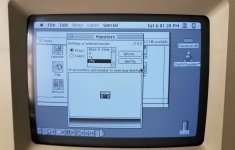 The only difference was under the Options page. One more calibration option and a different icon. No Control Panel extension: 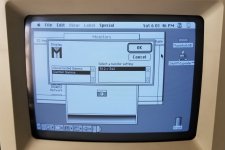 Control Panel extension installed: 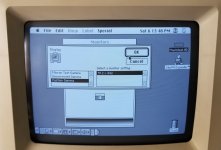 I'm running version 2.0 of the Control Panel extension, I don't know if a newer version adds anything additional. | |
| Posted by: MacAbre on 2021-11-07 22:59:30 MODERATOR NOTE: The OP requested this be deleted because they believe it may have been a false alarm, they believe the root cause was probably an issue with the wiring harness changing position when they swapped a physical hard drive for an SCSI2SD. This note is being put here instead of deleting because this post was already responded to. Spoiler content hidden. | |
| Posted by: EvilCapitalist on 2021-11-08 05:18:19 Good Morning, Welcome, and most of all, Congrats! Those cards are incredibly hard to come by now, not that they were ever easy to find before. From what you're describing it almost sounds like for whatever reason the card is trying to drive the internal display at a resolution it wasn't expecting, and very much didn't like. Did the behavior change with a PRAM reset? Any other changes to the restored SE/30 in terms of different ROM, accelerator, other add-ons? Assuming that machine has already been recapped? I've run my XCEED card both with and without the driver and not experienced anything like you described. | |
| Posted by: Crutch on 2021-11-08 05:38:38 “My son and I” = awesome, transgenerational 68k Mac hobbydom! My card is (at first glance) identical to yours and runs fine without the driver. PRAM zap is a good idea to start with (just pull the battery for a minute, assuming you have one in there). | |
Posted by: Gorgonops on 2021-11-08 12:08:01I've run my XCEED card both with and without the driver and not experienced anything like you described. My card is (at first glance) identical to yours and runs fine without the driver. FWIW, the user requested we hide his post because he now believes the whole thing may have simply been an electrical problem caused by repositioning the wire harness when swapping the original "real" hard drive for a SCSI2SD. Hopefully they'll be able to determine this for certain and will update. | |
| Posted by: MacAbre on 2021-11-08 14:02:03 Thanks EvilCapitalist and Crutch! As Gorgonops said, I goofed in my original posting. The SCSCI2SD board was positioned so as to allow SD card access through the "expansion port" on the back of the case. As you might imagine, this was placing a fair amount of pressure on the 5-connector harness, which is attached to the XCEED yoke board (among other things). I removed the SCSI2SD when I connected the old SCSI disk, so I was performing a two-variable experiment, and likely drew the wrong conclusion: This morning I tried running a clean 7.5.5 install with no XCEED driver from the SCSI2SD, and it ran just fine. This is consistent with the behavior that everyone else observed. Of course the PRAM contents have also changed, so I still don't know with absolute certainty what was causing the problem, but I strongly suspect that it was the poor positioning of SCSI2SD board. I will be careful not to abuse that harness in the future 😉 While I have your attention, my son and I are now playing with the XCEED drivers trying to get some control over the gamma settings, and it's a bit flaky: With both the 1.0 and 2.01 drivers, selecting a setting other than the one that's currently selected (initially "Custom Gamma Settings" or some such) causes the previously selected setting to vanish from the list! The only way I've found to get it back is to swap drivers (in the control panels folder) and reboot. Also, with the 1.0 driver, pressing option-"Options" does not bring up the gamma setting window. With the 2.01 driver, the settings panel does come up, initially populated with the current parameters, but they quickly zero themselves out of their own accord, and the resulting panel does not let us make new gamma configurations. Simply put, the gamma configuration panel doesn't worth with either version of the driver versions that we tested. We have not yet tried versions 3.0 and 3.5 (which were distributed with the fancier MacroColor 30 HR cards), and have thus far failed to find any information on the topic on the web. Do you folks have any sage advice? Thanks. Oh, and to answer EvilCapitalist's question, the SE/30 has 68 meg of memory (four 16 meg SIMMs and four 1 meg SIMMs), and a SCSI2SD board in lieu of a SCSI disk. Also we replaced the original fan with a Noctua. Otherwise it is bone stock. It's running the original ROM. The logic board was expertly recapped by Mac84 (Steve). | |
Posted by: Blib on 2022-10-23 07:58:21Thanks EvilCapitalist and Crutch! As Gorgonops said, I goofed in my original posting. The SCSCI2SD board was positioned so as to allow SD card access through the "expansion port" on the back of the case. As you might imagine, this was placing a fair amount of pressure on the 5-connector harness, which is attached to the XCEED yoke board (among other things). I removed the SCSI2SD when I connected the old SCSI disk, so I was performing a two-variable experiment, and likely drew the wrong conclusion: This morning I tried running a clean 7.5.5 install with no XCEED driver from the SCSI2SD, and it ran just fine. This is consistent with the behavior that everyone else observed. Of course the PRAM contents have also changed, so I still don't know with absolute certainty what was causing the problem, but I strongly suspect that it was the poor positioning of SCSI2SD board. I will be careful not to abuse that harness in the future 😉Did you ever manage to get the gamma adjustment to work? I have exactly the same issue 🙁 In fact, I also had the same issue you mentioned having at the start - no 256 colour/greys option in the monitors control panel. I fixed it by jiggling the boards and harness too. Probably a cracked solder joint somewhere. But the dark gamma setting is driving me a little nuts. I have to crank the brightness right up on the screen (to the point I can see the raster) - which isn't going to do the screen any good. I get exactly the same results from the control panels as you. Does anyone know if it's possible to manually edit the equivalent of a cfg file or something? Presumably the configs are saved somewhere? Mac is an SE/30 with BMOW ROMinator II ROM, 128Mb RAM, SCSI2SDv6, Diimo '030 50MHz, System 7.5.5. Apart from the gamma issue, the machine is running beautifully. | |
| Posted by: Crutch on 2022-10-23 12:19:16 Did you adjust the pot on the CRT neck board? there is a little pot on there that de-muddies the grays quite a lot. It’s not easy to see. | |
| 1 |