68kMLA Classic Interface
This is a version of the 68kMLA forums for viewing on your favorite old mac. Visitors on modern platforms may prefer the main site.
| Click here to select a new forum. | |
| Any suggestions for an M0110A keyboard with a dead spacebar and semi-dead "V" key? | |
| Posted by: Huxley on 2019-05-30 22:48:47 So my project to resurrect my recently-acquired Mac Plus is making real progress today - I've got fresh ROM's installed and completely tore down / cleaned / greased / rebuilt the floppy drive, and the machine will boot now. Hooray! However, I've got a new funky problem to resolve: The Mac Plus came to me with a relatively-clean-looking M0110A keyboard (the Plus style keyboard with the integrated number pad). The keyboard looks good and feels good, and most of the keys work fine. However, the "V" key is very spotty - it only occasionally registers when pressed VERY hard intermittently, and the space bar is completely dead. I've completely disassembled the keyboard (case removed, all key-caps removed) and cleaned it out reasonably well (decades of dust bunnies in there!), but the two keys remain stubbornly broken. I've been reading through older threads here and poking around in some of the repair guide PDF's that float around, and it seems like my options are: 1. Soak the keyboard in high-proof alcohol for an uncertain amount of time - maybe this will help? 2. Spray WD-40 down into the key-switch in the hopes of... something? 3. Run the whole thing through my dishwasher(!?) 4. Give up and buy another keyboard What would be your next step if you were in my shoes here? Any and all suggestions are welcome, but please keep in mind that my soldering skills are minimal at best... Thanks! Huxley | |
| Posted by: bibilit on 2019-05-30 23:16:55 Remove the faulty keys (soldered) and disassemble them, probably not making contact . | |
| Posted by: dochilli on 2019-05-31 02:16:04 Yes, that was the reason for a faulty key in my Plus keyboard. I desoldered the key, opened it and repaired it with aluminium foil. If I remember right, the golden contact was broken. Pay attention to the spring! 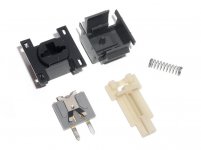 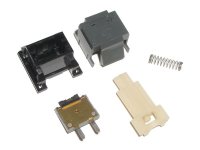 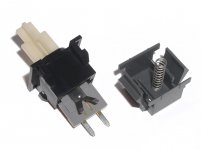 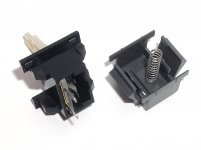 | |
| Posted by: Crutch on 2019-05-31 04:41:16 I have had the WD40 trick work for me on these keyboards. I don’t know why, but as I recall Pina recommends it in Macintosh Repair and Upgrade Secrets. Of course if all else fails you can swap out with a key switch from a donor keyboard. | |
| Posted by: Huxley on 2019-05-31 21:25:47 Wanted to post a quick update: I was able to de-solder the two dead switches and (after much effort and worry that I was about to rip them to pieces) extract them from the keyboard. I then disassembled both switches, carefully cleaned them out and bent the little X-shaped spring back into the main 'chamber' of the switch, reassembled, reinstalled and re-soldered them... and it worked!! Thanks you guys - really appreciate the guidance as always 😀 | |
| 1 |