68kMLA Classic Interface
This is a version of the 68kMLA forums for viewing on your favorite old mac. Visitors on modern platforms may prefer the main site.
| Click here to select a new forum. | |
| Monitor Solution for Macintosh IIci? | |
| Posted by: gryffinwings on 2019-05-16 08:51:24 Does anyone have a monitor solution for the Macintosh IIci that doesn't break the bank, proper CRTs are not easy to find or they are expensive on eBay. I would also like the solution to work with a PowerPC Macintosh 7200/90 that I got at the same time. Thoughts? Thanks in advance for any advice provided. | |
| Posted by: olePigeon on 2019-05-16 09:40:49 I'd recommend a 17" or 19" LCD monitor that's 1280x1024. It scales perfectly to 640x480, which is a nice fallback resolution or if your old Mac loses its resolution settings like after a PRAM reset. I also have a couple games that only run at 640x480. You can find 17" and 19" LCDs used (and occasionally new) for around $50-$60 shipped. Just make sure you get in writing that the LCD is free of dead and/or stuck pixels. If you don't mind spending $100, you can get a brand new one from most online stores like B&H or Adorama with free shipping and no tax. You'll also want to pick up an adapter like this one. Older Macs don't always play nice with LCDs, and the adapter can help with that. | |
Posted by: gryffinwings on 2019-05-16 09:46:28I'd recommend a 17" or 19" LCD monitor that's 1280x1024. It scales perfectly to 640x480, which is a nice fallback resolution or if your old Mac loses its resolution settings like after a PRAM reset. I also have a couple games that only run at 640x480. You can find 17" and 19" LCDs used (and occasionally new) for around $50-$60 shipped. Just make sure you get in writing that the LCD is free of dead and/or stuck pixels. If you don't mind spending $100, you can get a brand new one from most online stores like B&H or Adorama with free shipping and no tax.So... I already have an DELL LCD with a VGA connection, I'll take a look at the adapter. | |
| Posted by: Cory5412 on 2019-05-16 17:38:50 The linked adapter should be suitable for a IIci, but another idea for your 7200, which supports multisync video, is to find a db15 to hd15 video cable or an adapter without switches. (Or: you'll spend a lot of time re-configuring the switches on the adapter between 640x480, which is what the IIci generally supports, and 1024x768 or 1152x870, which I believe is the maximum a stock 7200 can run. (At some point 1280x1024 was added but I forget which models have it.) One gotcha is that the IIci is said not to support the plain 60Hz VGA video mode, but most reasonably good LCDs (dell UltraSharp in particular) should be able to handle 67Hz input. The onboard video of the IIci only supports up to around 640x480, perhaps 670x800, however there are video cards that can support more. | |
| Posted by: Cory5412 on 2019-05-16 17:41:27 Another recent-ish thread on IIci graphics: | |
| Posted by: Crutch on 2019-05-16 20:20:00 I recently bought one of these switchless adapters to see my IIci video on an LCD VGA screen. Works great. C2G 02902 Mac DB15 Male to VGA... https://www.amazon.com/dp/B0002J1JAE?ref=ppx_pop_mob_ap_share | |
Posted by: gryffinwings on 2019-05-17 07:40:32I recently bought one of these switchless adapters to see my IIci video on an LCD VGA screen. Works great. C2G 02902 Mac DB15 Male to VGA... https://www.amazon.com/dp/B0002J1JAE?ref=ppx_pop_mob_ap_shareInteresting, what model monitor are you using? I have a couple of older Dell LCD monitors that I can use. Do you have just a factory IIci or have you done anything to it? | |
| Posted by: gryffinwings on 2019-05-17 18:29:53 So... I found a local electronics recycling company and found out after I left that they do indeed have a monitor that might work: Model: Apple Color Plus 14" Display Model No: M1787 The guy that contacted me tells me that the monitor has been tested and works, however, the power switch is acting up and need to put something on it to keep it on. He says the button appears to be loose and doesn't think it's pushing far enough for the switch to lock. I was quoted $35. What do you guys think? | |
| Posted by: Crutch on 2019-05-18 13:39:16 It’s sort of a funny story. I found a Daystar Turbo 040 accelerator on a Japanese auction site for a reasonable price and bought it for my SE/303 ... but not being able to read Japanese, it turns out that Daystar 040 accelerator came inside a perfectly good IIci with a RasterOps video card. I took out the 040 card and sold the IIci + RasterOps on eBay after playing with it for a while. Anyway I use that adapter with a “Loncevon” 7” VGA LCD I bought on Amazon for about $50. I got it just for testing old video cards, but it’s perfectly usable as a tiny monitor for a IIci. | |
| Posted by: Cory5412 on 2019-05-18 19:16:40 Just to be completely clear, was the adapter connected to the IIci's onboard video, or the RasterOps video card? As an early Mac with an integrated graphics system, the IIci has relatively unique output capabilities, so it would be good to know, for super sure. | |
Posted by: UnaClocker on 2019-05-18 21:50:44So... I found a local electronics recycling company and found out after I left that they do indeed have a monitor that might work:Yes, I run this monitor on my IIci. It works excellent! It's the perfect monitor for this machine. 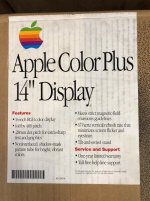 | |
Posted by: gryffinwings on 2019-05-19 14:05:06Yes, I run this monitor on my IIci. It works excellent! It's the perfect monitor for this machine.Thank you for the information, I wasn't quite sure. I'm looking at picking it up tomorrow with the anticipation of having to fix the power switch. | |
| Posted by: UnaClocker on 2019-05-19 18:52:46 They may THINK the power switch is broken. Don't be too hasty. The power switch is ignored if there's no video signal coming into the monitor. Automatic sleep mode. I've pressed my like new monitor's button a few times going WTH?! And then turned on the computer and it instantly lit up. Too smart for it's own good. | |
Posted by: gryffinwings on 2020-03-30 16:08:30Another recent-ish thread on IIci graphics:I'll take a look, the switchless one I got didn't work for the IIci, for LC III it does. Yes, I run this monitor on my IIci. It works excellent! It's the perfect monitor for this machine. They may THINK the power switch is broken. Don't be too hasty. The power switch is ignored if there's no video signal coming into the monitor. Automatic sleep mode. I've pressed my like new monitor's button a few times going WTH?! And then turned on the computer and it instantly lit up. Too smart for it's own good.I've got this same monitor, however, when connected to the computer and power is turned on, the monitor does not come on by itself, I have to hold the power button in to keep it powered on, otherwise, it works, not sure how to proceed. | |
| Posted by: Kaa on 2020-03-30 16:53:51 I use this adapter: https://www.ebay.com/itm/Apple-Macintosh-PC-Mac-Monitor-Adapter-DB15-to-HD15-VGA-NEC-MultiSync-XV15/254499477704 Works with the onboard video of my IIci, Q700, LCIII. I have to use a switch type with my G3s. The monitor I use is a Viewsonic VA521 for all the machines. It's on older one with VGA input: https://www.viewsonic.com/eu/products/lcd/va521.php | |
Posted by: Cory5412 on 2020-03-30 17:16:35I'll take a look, the switchless one I got didn't work for the IIci, for LC III it does.That tracks. IIci doesn't support multisync and I'm like 85-90% sure the LCIII does. Works with the onboard video of my IIci, Q700, LCIII. I have to use a switch type with my G3s.That's Really Interesting - I have nearly that same adapter (I don't remember if it has any labeling, but it looks the same, it was probably packed in with a couple dozen different monitors mac connection kits) and it works fine (In fact, I got it with) my beige G3. Also interesting that it works on the IIci, is that with the onboard video? I wonder if there's some sort of presets that some of these adapters have. It wouldn't surprise me if Apple's own and ones say viewsonic distributed were wired differently, for example. (Apple's won monitors often have sense lines compatible with older macs anyway, so that might be another hint in some scenarios.) | |
| Posted by: LaPorta on 2020-03-30 18:34:31 The NEC adapter mentioned by Kaa works really well. I have it connected to my custom-for-my-kids Quadra 630 to a Dell 19" LCD from the early 2000s. Can switch from 640x480 through 1024x768, no issue. No settings to fool with, just works. | |
Posted by: Kaa on 2020-03-30 18:36:38is that with the onboard video?Yes, that is with the onboard Video. The Adapters I linked to are NOS made by NEC (they say NECmultisync on them). They are made specifically for Mac of course. I remember seeing a settings guide for the switch type recently, but can't remember exactly where. Maybe Operator Headgap site with Bob's Tech Tips which are kind of difficult to sift through. | |
| Posted by: gryffinwings on 2020-03-31 21:32:02 Well, I've gotten the Apple Color Plus 14" Display apart and tested the switch and it will only function when I keep it pressed in, confirmed with a continuity test with my multimeter. So now I have a switch on order from China, probably take a month to get here, or something. 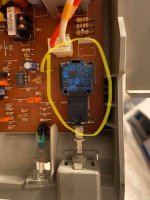 | |
Posted by: Crutch on 2023-06-10 05:21:45I recently bought one of these switchless adapters to see my IIci video on an LCD VGA screen. Works great. C2G 02902 Mac DB15 Male to VGA... https://www.amazon.com/dp/B0002J1JAE?ref=ppx_pop_mob_ap_shareSorry to necrothread but I want to clarify this because I think this post is misleading (and even confusing my own memory): I am pretty sure I got this switchless adapter to work with a IIci using a RasterOps video card (which I mentioned in this thread but didn’t explicitly say I was using with the adapter), not built-in video. Apologies for confusing at least one person plus myself. | |
| 1 |