68kMLA Classic Interface
This is a version of the 68kMLA forums for viewing on your favorite old mac. Visitors on modern platforms may prefer the main site.
| Click here to select a new forum. | |
| PB Duo 2300c display problems | |
| Posted by: MikeatOSX on 2016-01-20 02:03:12 Some months ago I got a PowerBook Duo 2300c with a broken LCD display (first pic). Now I got a "working" 2300c display with stripes(second pic). 🙁 Could the inverter of the second display be defective? BTW: the PB 2300c is working perfectly with a PB Duo 280c display, but I need it back on my 280c. 🙂 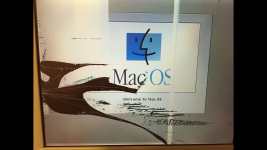 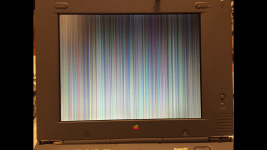 | |
| Posted by: MikeatOSX on 2016-01-20 02:21:28 This is my PB Duo 2300c with the working 280c screen (left). On the right side there is my second PB 2300 c with it's standard display.  | |
| Posted by: Elfen on 2016-01-20 08:57:45 Dead link on the bottom one. But it's not the inverter; the inverter is used to convert 5v to some high voltage to turn on the florescent bulb inside the LCD display. Since the screen lights up, the inverter is OK. I have the same problem with a 1400c/117 and its the LCD Drivers along the internal frame of the LCD Casing. It is best to find a "new" screen and just replace it from a dead 2300 or 280. | |
| Posted by: MikeatOSX on 2016-01-20 09:27:03 Thank you! It’s a pity: Quite unlikely to find a "new" 2300c LCD again, which is not damaged. So I'll do nothing. 🙂 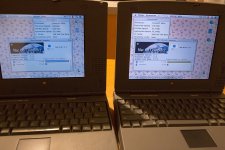 | |
| Posted by: techknight on 2016-01-20 12:56:21 I have one, but your on the wrong side of the world. Also the screen with the stripes Looks like a bad logic board. Have you tried a good screen on the stripes unit? Its very hard to follow your post so I dont know. A bad ribbon cable will cause that as well. | |
Posted by: MikeatOSX on 2016-01-20 13:12:59I have one, but your on the wrong side of the world.Thanks!I got the display (without unit) from the right side of the world. 🙂 The logic board is ok, as I've mounted a 280c display on my unit now and it works. (last picture above, unit on left side). | |
| Posted by: aplmak on 2016-01-20 17:57:02 Although I haven't seen leaky caps in the display on the 2300c yet.. there are a bunch of them in there.. not too many... there are 5 smd electroyitics in the display portion... I'd read the take apart manual when you take apart the screen... (lots of small brittle plastic parts to break)... Reading the take apart instructions is worth it!!! Here are the pics of the caps I've found... 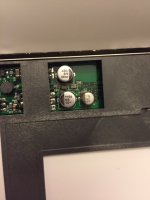 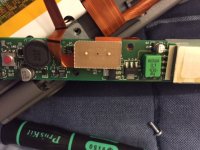 But as techknight has said... display cables do that line thing... maybe it's the connection of the cable inside the display. | |
Posted by: Elfen on 2016-01-20 22:30:58Also the screen with the stripes Looks like a bad logic board. Have you tried a good screen on the stripes unit? Its very hard to follow your post so I dont know.Not to jump or highjack the thread, I got 2 PB's with this issue - the 1400c/117 and a 150 (I think its a 150, could be a 180), and I thought it was the logic board so I got dead machines to swap the screens. Turns out the dead machines were not dead, just needed a minor fix to get them going; but swapping the screens and boards it turns out that the screens themselves were bad and not the logic boards. You're saying that it can be the cable? Which cable - the main one that goes to the logic board or one of the minor ones that goes from the side circuit boards to the LCD? If the fix is that simple, it would have saved years of headaches... | |
Posted by: MikeatOSX on 2016-01-21 08:05:10Here are the pics of the caps I've found...Thanks, I already took apart the display of my first (LCD broken) PB 2300c, so I know I must be carefull. Re-assembling also is no real fun with PB Duos (center cover clutch !) and it's easy to destroy the display cable. | |
| Posted by: aplmak on 2016-01-21 11:27:48 I am not certain if it is the cable or the caps... But the caps should probably be replaced.. I bought tantalum replacements for mine. I try to do ALL my display's with tantalum so there is no reason to go back in them ever again. I just wanted to make sure I emphasized the take apart as it can be quite delicate.. Didn't want to see you break any little tabs... 🙂 🙂 Sad when it happens... And these machines plastics are getting so brittle... it's a crap shoot sometimes when you take them apart.. All my black macs I don't even attempt to remove or touch anything.. I find even with just the slightest movement of the black plastic macs things break.. you can be as gentle as possible but the plastics just have no more ability to flex AT ALL!!! Elfen I bet it is the main ribbon cable... not the other one.. the other one controls the backlight I think... I don't currently have this issue on any of mine so I don't know what it could be... I'm just throwing my thoughts out there... | |
| Posted by: techknight on 2016-01-21 17:52:31 the stripes arnt created by the backlight! lets steer away from that. I am thinking the main cable from logic to screen. But a loose/bad ribbon from the buffers to the panel itself can do this, although its really rare. | |
| Posted by: Elfen on 2016-01-21 19:37:26 Since it looks like I might be snowed in during the weekend, I am going to try it in between staying warm, hunting caribou and cooking meals.... | |
| Posted by: CC_333 on 2016-01-22 13:35:03 I have an '06 MacBook that does this intermittently, with two different display cables. I've concluded subsequently that the LCD itself must be bad. That being said, the cable isn't necessarily the problem. Sometimes, it could simply be a dead LCD. The broken one still produces a partial picture where it's not broken, so we can assume the cable is probably OK. Have you tried the "new" panel with that cable? c | |
Posted by: MikeatOSX on 2016-01-22 14:23:11Have you tried the "new" panel with that cable?I have the "old" display with the broken screen (see pic in post #1 above) and the "new" display with stripes. At this time I still have the Duo 280c display mounted on my Duo 2300c, but I'll swap the two Duo 2300c cables in the next days to see what will happen, when I try it with the Duo 2300c. | |
| Posted by: techknight on 2016-01-31 06:21:31 it must be a rare thing, I have never seen an Older LCD fail like that unless it was cracked, or etc... But me not seeing it doesnt mean that it can't happen! Now, modern today cheap junk televisions, All the time I see this! and its the t-con. Old LCD displays didnt use t-cons as they were parallel. LVDS display are serial, so they need a t-con/converter. | |
| Posted by: gsteemso on 2016-02-03 20:31:31 My 2300c gradually became unusable due to coloured vertical 1-pixel stripes just like those, about 15 years ago. The really good Mac shop I took it to explained that it happens because the ribbon cable from logic board to screen passes through the hinge, and gets flexed every time the lid moves. My observations bore that out, as the number and size of obscuring stripes could be reduced by careful angling of the lid; of course, it was guaranteed to still degrade beyond usability at some point, and I foolishly gave it away when it did. Of course, now the same affliction is beginning to creep over my recently acquired PB540c. In recent years, I have occasionally given thought to running a Kickstarter or the like to have new ones made—though in light of how every model of PowerBook probably uses a different cable, I do not know how feasible it might actually be. | |
| Posted by: MikeatOSX on 2016-02-04 01:50:00 Mounting the PowerBook 2300c center clutch cover can easily damage the video ribbon cable. 🙁 | |
| Posted by: galgot on 2016-02-04 06:13:56 Funny (!?), I got the same problem with a iBook clamshell, that one: https://68kmla.org/forums/index.php?/topic/25205-galgots-new-stuff/page-3&do=findComment&comment=285312 came with a still working but broken lcd (Samsung) , changed it together with the cable (new one is an IBM) , I get backlight but lines just like that... So took another Samsung lcd (working) from a Tangerine Clamshell, for testing, thinking maybe it was a problem with the IBM screen not being compatible. Same result, lines... Why was it working with the original broken lcd ? Only reason I can think of is that I damaged the board disassembling it, but don't know how as I didn't removed the board from the case and the cables connections looks fine. As I have another Clamshell with a failed backlight, I thought I could exchange with that IBM lcd , at have that one repaired at least... Did it, but still no backlight !! Even if I change the inverter ! Frustrating. Sorry for thread hijack. | |
| Posted by: MikeatOSX on 2016-02-04 15:00:23 I don't like working on PowerBook displays, as there are so many things that can get wrong. 🙁 | |
| 1 |