68kMLA Classic Interface
This is a version of the 68kMLA forums for viewing on your favorite old mac. Visitors on modern platforms may prefer the main site.
| Click here to select a new forum. | |
| SE/30: FloppyEMU & ROMinator II, System 6 MultiFinder issue | |
| Posted by: JDW on 2019-05-06 00:13:04 I have a fully recapped SE/30 with 128MB RAM, ROMinator II Mega (with stock software still on it), and I'm booting from a FloppyEMU in HD20 mode. Even though FloppyEMU is basically a floppy emulator that connects to Macs via the floppy port, "HD20 mode" allows me to create a disk image (in my case, just over 200MB) on the SD card of the FloppyEMU and boot from it, just as an Apple HD20 hard disk would boot (via the floppy port). Normally the SE/30 cannot boot from an HD20, but the ROMinator II fixes that problem and allows booting from the FloppyEMU in HD20 mode and even from a real HD20. Currently, I am using System 6.0.8 on my FloppyEMU. Everything works fine and as expected EXCEPT for MultiFinder. For some reason I don't understand, MultiFinder won't load when I boot System 6 from my FloppyEMU in HD20 mode. (You always know when MultiFinder loads because you can see a little icon in the upper right of the menubar. When MultiFinder doesn't load, as in my case, that icon is missing.) No matter what I do, I can't get MultiFinder to load when booting from the FloppyEMU in HD20 mode. Yet if I boot from a spinning platter HDD (external SCSI drive) into System 6.0.8, MultiFinder loads just fine. I've tried copying MultiFinder from my HDD to my FloppyEMU without success, and I've tried a fresh copy of MultiFinder from System 6.0.8 install disks too, which doesn't work either. (I am booting in 24-bit addressing mode.) Those of you who have both a ROMinator II and FloppyEMU in HD20 mode booting System 6, have you experienced this problem with MultiFinder? | |
| Posted by: Dog Cow on 2019-05-06 11:31:21 What happens if you boot from your FloppyEmu, then switch-launch into MultiFinder by double-clicking its icon while holding Command and Option on the keyboard? | |
| Posted by: JDW on 2019-05-06 16:31:11 Remember, I said there is no MultiFinder icon appearing in the menu bar when I boot System 6.0.8 from my floppyEMU. So I must assume you are suggesting that I double click the icon of the MultiFinder file itself within the System Folder, correct? | |
Posted by: superjer2000 on 2019-05-06 18:47:09Remember, I said there is no MultiFinder icon appearing in the menu bar when I boot System 6.0.8 from my floppyEMU. So I must assume you are suggesting that I double click the icon of the MultiFinder file itself within the System Folder, correct?That's exactly what he meant. Wouldn't it have been easier to just try that though than ask this question? | |
| Posted by: JDW on 2019-05-06 18:51:10 No, it would not have been easier to try because I won't have a chance to test it for another 8 hours, and due to the time difference between you and me (in Japan), I wanted to ask a question and get your reply now so I didn't have to ask later, should I test later and find your trick does nothing but give me an error message. | |
Posted by: Dog Cow on 2019-05-06 21:33:13you are suggesting that I double click the icon of the MultiFinder file itself within the System Folder, correct?Correct. Also, did you choose Set Startup... from the Special menu and ensure that the MultiFinder radio button is selected? | |
| Posted by: JDW on 2019-05-07 01:10:51 As I expected, I get an error dialog box when double-clicking the MultiFinder icon inside the System Folder when booted either from my FloppyEMU on an actual SE/30 or when booting miniVmac with the same *.dsk image. 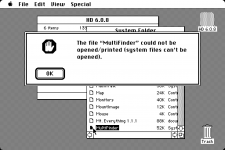 You can download my DSK here. Try it on your own FloppyEMU in HD20 mode or just boot the MacPlus version of miniVmac with it. | |
Posted by: Dog Cow on 2019-05-07 09:00:30I get an error dialog box when double-clicking the MultiFinder icon inside the System Folder1.) Be sure to hold down the Command and Option keys when you double-click the MultiFInder icon in the System Folder. This command forces the Finder to try to launch an icon whose file type is not APPL. 2.) Next, choose Set Startup... from the Special menu and select the MultiFinder radio button. Your disk image's boot blocks are currently set with Finder as the initial application, not MultiFinder. The Set Startup... command will change this. | |
Posted by: JDW on 2019-05-07 17:28:371.) Be sure to hold down the Command and Option keys when you double-click the MultiFInder icon in the System Folder. This command forces the Finder to try to launch an icon whose file type is not APPL.@Dog Cow You are the man! I've not tested it with my FloppyEMU attached to my SE/30 yet, but your beautiful advice worked perfectly in miniVmac! An absolutely wonderful solution. A thousand thanks for your specific advice that solved this problem! | |
| 1 |