68kMLA Classic Interface
This is a version of the 68kMLA forums for viewing on your favorite old mac. Visitors on modern platforms may prefer the main site.
| Click here to select a new forum. | |
| Mac Plus screen issue | |
| Posted by: gkmaia on 2019-04-27 11:37:18 I am struggling a bit to identify this fault. The computer beeps once and reads the system disk apparently fine but the only image I get is the attached one. See image attached. Following the manual I found here on the forum seems my voltages seem ok. I did read on a post yesterday (https://68kmla.org/forums/index.php?/topic/23533-plus-with-horizontal-sweep-lines/) that my issue could be caused by a fault on 7438. But it seems to be fine. So far seems the power block of the analog board is working fine. But the sweep block is not rendering the image. I could be wrong... Anyone had a similar issue? And some advise on how to approach it? J4 1 - 0v 2 - x 3 - square wave 4 - 0v 5 - 4.7v 6 - 5v 7 - 0v 8 - -12v 9 - 0v 10 - +12v 11 - 4.6v U3 4 - 330v - 20ms square wave LM 4 - 12v 11 - -12v 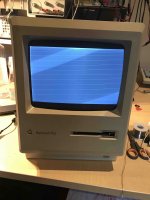 | |
| Posted by: Gsbtom on 2019-04-29 19:22:40 DMS (from your post on that other thread) is Pina’s Dead Mac Scrolls book. A quick google should find it in PDF form (not sure if allowed to post link here). Looks like your problem might be described on page 54. 54 The Dead Mac Scrolls Replacements available, see link in this post (the whole thread is probably worth a read): | |
| Posted by: gkmaia on 2019-04-29 20:02:50 Thanks mate! I was trying to figure out what was this DMS thing... thanks for the tip. Amazing book! It is pretty much it. I did test the 7438 and all gates seem fine. I ordered a new one anyway. Lets see if that is it. 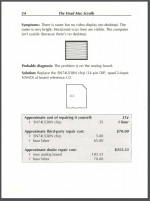 | |
| Posted by: gkmaia on 2019-05-06 00:24:44 I just replaced the LS38 logic and nothing. Still the same issue. will try page 169 as may be a transistor.... keep you posted! | |
| Posted by: gkmaia on 2019-05-06 12:38:31 Did some more extensive checks. Replaced the LS38. Checked most of the transistors around the LS38 and nothing. Still the same issue. Also re-soldered the large connector on the logic board just to make sure. Nothing. Any ideas?! Other things to try? | |
| Posted by: LaPorta on 2019-05-06 15:54:32 Could it be something as simple as a bad solder joint? | |
| Posted by: gkmaia on 2019-05-06 16:46:59 Could be but I have redone all the joints on the analog board. Fluxed and added a bit of new solder. Unlikely it is that. I will check continuity on all cables and see if I find anything. | |
| Posted by: Gsbtom on 2019-05-06 18:19:11 Silly question, but does the brightness knob do anything? Maybe the brightness cutoff is set to max? | |
| Posted by: gkmaia on 2019-05-06 18:28:43 No silly question. Any comment is welcome. That is a tricky one. Wish I had schematics with voltages and waveforms to test against. If the brightness you refer if the one in the front under the screen. It works as intended as brightness control. But messing with it does not remove the horizontal lines. | |
| Posted by: Gsbtom on 2019-05-06 18:46:01 There’s a brightness cutoff pot on the board as well, though that seems unlikely. Mac Repair Secrets does have some schematics, see https://vintageapple.org/macbooks/pdf/Macintosh_Repair_&_Upgrade_Secrets_1990.pdf also, check Q3 and see if there’s any discoloring on the heat sink. Edit: On page 104 of Mac Repair Secrets, it suggests maybe the LAG on the logic board might be bad. | |
Posted by: gkmaia on 2019-05-07 02:14:58There’s a brightness cutoff pot on the board as well, though that seems unlikely.I know what could be then... I am reading the Mac Plus logic is grounded to chassis and I discharged the CRT to chassis without a resistor. Apparently the logic board is sensible to that. Makes no sense to be the analog as I replaced the ICs and tested all transistors. Are you able to show me which one on the board the LAG chip? Or just its marking will be enough. | |
| Posted by: gkmaia on 2019-05-07 02:19:39 Just found it! 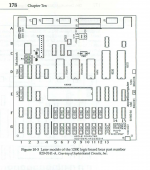 | |
| Posted by: Gsbtom on 2019-05-08 06:28:13 Remember the Plus logic board layout is different. Also, I’m guessing at this stage what the issue could be. | |
Posted by: gkmaia on 2019-05-08 13:36:57Remember the Plus logic board layout is different. Also, I’m guessing at this stage what the issue could be.Yes me too. I am reluctant to go and buy a logic board without covering all possible issues with the analog board. All books mention about replacing U2 but none mention which gate of U2 controls the horizontal signal. If I knew that I could trace all between U2 and CRT and see if I find something. | |
| 1 |