68kMLA Classic Interface
This is a version of the 68kMLA forums for viewing on your favorite old mac. Visitors on modern platforms may prefer the main site.
| Click here to select a new forum. | |
| Apple CD SC question | |
| Posted by: Recaptcha on 2019-04-23 07:30:26 Hi, I acquired a CD SC for a good price. The little eject gear was split and needed to be repaired and the focus gain was a bit low. Now, It works fine. 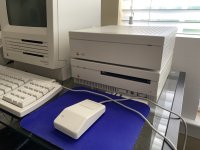 I've used it to boot 7.5.1 on the SE, but my question is, system 6 seems to be more or less dumb of this device. I gave it a driver, and every disk I insert is either the wrong formatting or needs repairs. What was this thing used for in '88? Is there any way to get audio CD support on system 6? Thanks! | |
| Posted by: bibilit on 2019-04-23 08:31:11 This item is prone to capacitors failure. IIRC audio can only be produced through a pair of speakers connected to the back of it. | |
| Posted by: BadGoldEagle on 2019-04-23 10:29:13 The lens on mine was pretty dirty as well... I had to take it apart and clean it with isopropanol and a q tip. What type of CDs did you try it with? Give plain Audio CDs a go. They tend to work better with units that need servicing (something to do with the surface being easier for the laser to read compared to pressed data CDs or CD-Rs, the latter being really difficult to get working...) And bibilit is again absolutely right. Sound does NOT pass through SCSI. You need a pair of speakers connected at the back. It also won't start playing immediately. So you definitely need software to interact with it. You can get it here: http://macintoshgarden.org/apps/applecd150 (The 150 is the successor to the successor of the CD SC) but that program is backwards compatible and works with 6.0.5 or later And finally, yes, unfortunately, caps are a problem on these units... | |
| Posted by: Recaptcha on 2019-04-23 10:53:18 Ok thanks. I did investigate some of the caps, they seem to be ok. I should probably check out the bottom board as well. can I use the headphones jack? | |
| Posted by: BadGoldEagle on 2019-04-23 11:24:33 Should work. | |
Posted by: Recaptcha on 2019-04-23 11:36:40The lens on mine was pretty dirty as well... I had to take it apart and clean it with isopropanol and a q tip.Just to let you know, Rubbing alcohol will fog the laser lens, and It is a bit too strong for such a delicate application. Rotating a dry q-tip in a rolling fashion on the lens is the best. I do know that sound doesn't pass through the scsi, I was wondering about a controller, and now (thanks to you guys), I have that controller (software). Unit reads normal CD audio without any issues, and CD-R's don't work. At all. After cleaning the lens, I should be able to lower the focus gain. | |
| Posted by: unity on 2019-04-23 12:07:44 Rubbing alcohol is isopropyl alcohol and fine for the glass lens. Heck, even Nikon recommends using it on their heavily coated professional lenses. They key is not to apply it and let it dry on the surface, you have to work the surface until clean. | |
Posted by: Recaptcha on 2019-04-24 09:39:11Rubbing alcohol is isopropyl alcohol and fine for the glass lens. Heck, even Nikon recommends using it on their heavily coated professional lenses. They key is not to apply it and let it dry on the surface, you have to work the surface until clean....To each his own I guess... I am amazed at this new software. My CD SC plays audio cd's great, and the CD remote desk accessory is so neat! So glad I bought this rare piece to add to my collection. Thanks everyone for your help! | |
| Posted by: gpbonneau on 2019-04-25 04:38:21 If you have problem with caps in the future, read this : http://www.asterontech.com/Asterontech/next_cdrom_refurb.html But not sure the drive is the same for CD SC ad CD SC Plus... bibilit has done that on mine ;-) and works great now, a vintage juke-box 🙂 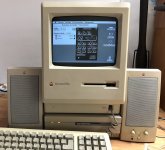 | |
| Posted by: Recaptcha on 2019-04-27 08:52:35 Ok, so I did end up replacing many caps, and after a lot of testing. It has no issues at all. I love this thing!!!! 🙂) Also, It seems to have no issues reading CD-R's. I tried many of varying brands and scratch levels, and it works fine. | |
| Posted by: CC_333 on 2019-04-27 12:14:56 Nice job there! I think it should be able to read CD-Rs OK. It's CD-RWs (the re writable ones) that generally don't work too well. c | |
| Posted by: Recaptcha on 2019-06-06 18:55:04 Well, that little eject gear connected to the spindle motor broke totally... But I didn't give up on this unit! I found a gear (old broken CD changer) that was the perfect teeth size, and after some widening of the hole, the gear fits and works better than the old! I always figured I wouldn't get far on that old gear... But now, it will last for a long time! 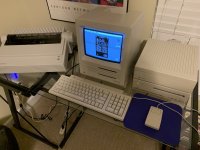 | |
| Posted by: LaPorta on 2019-06-21 07:54:48 Man, that's a really nice setup you have. Did you retrobrite those units? | |
Posted by: Recaptcha on 2019-06-21 17:10:59Man, that's a really nice setup you have. Did you retrobrite those units?:lol: Thanks! No, I haven’t needed to retrobrite anything. I have been quite lucky. | |
| 1 |