68kMLA Classic Interface
This is a version of the 68kMLA forums for viewing on your favorite old mac. Visitors on modern platforms may prefer the main site.
| Click here to select a new forum. | |
| Macintosh Classic guest user, no write privileges | |
| Posted by: FROTZMAN on 2019-04-13 22:51:03 Recently got a good deal on a Macintosh classic from ebay. When trying to copy some software from a floppy to the hard drive I was met with a do not have permission error. Upon futher inspection it showed I'm logged in as guest (pictured). It must be an old public library computer or something. Is there any way to fix this? This is my first compact mac. 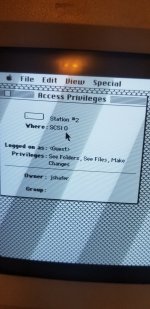 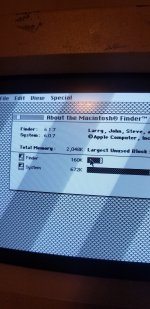 | |
| Posted by: unity on 2019-04-13 23:46:12 Try booting with extensions off. Probably will not work because in theory protection software will not allow it. Worth a shot. Next you can try booting from the ROM. Hold 'Apple-Option-x-o' , those four keys all at once, immediately after the startup chime. This will boot you into System 6 at a hardware level. Then you hopefully access the drive and disable the protection software. | |
| Posted by: FROTZMAN on 2019-04-14 04:32:12 Well first I tried booting from ROM no luck.(pictured error) then I tried booting without extensions but file guard stayed active anyway. Sooo I deleted file guard. Which I'm very surprised it let me do... now my system pops up asking for password on boot and I can't boot from ROM. :O 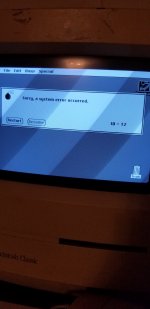 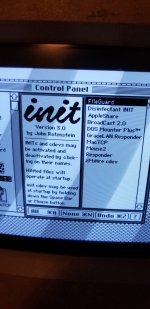 | |
| Posted by: unity on 2019-04-14 11:25:22 Theory: There is something on the boot sector of the drive that is causing a crash when mounting the drive - something that is either intentional OR a trigger to display something like "This drive is protected..." and its simply not compatible with the ROM system version, resulting in a crash. Because you get pretty close to a full boot. I would disconnect the internal hard drive and try booting from ROM and see how far it gets. If that works you may have to sway to a different drive OR find some way to format that drive without crashing the finder first. | |
| Posted by: FROTZMAN on 2019-04-14 12:25:36 I like your theory. That sounds very plausible to me. Figured unplugging the internal drive would be the next step. I have a trax coming in the mail. Will jump back in when that gets here. Thank you for your help! | |
| Posted by: dochilli on 2019-04-23 03:36:23 Did you try to boot with a floppy disk? System 6.0.8 can be booted from a floppy. | |
| Posted by: corgski on 2019-05-01 11:04:36 That error code is saying that something in the software is triggering a breakpoint but there's no debugger installed (the default minimal prompt that appears when you press the interrupt button without a debugger doesn't have any breakpoint handling.) Set up a floppy image with macsbug installed and you should be able to continue execution by typing "G<return>" at the debugger prompt. This is a handy reference for system 6/system 7 error codes. http://www.macwizard.com/errors.html | |
| 1 |