68kMLA Classic Interface
This is a version of the 68kMLA forums for viewing on your favorite old mac. Visitors on modern platforms may prefer the main site.
| Click here to select a new forum. | |
| Macintosh Plus clicking fast after flyback replacement and recap | |
| Posted by: Nathanplus on 2019-03-04 14:41:13 So I'm starting a new topic to update my old one. Check out the whole story on my original issue. After finally getting a new fly back for my mac plus the fast ticking never changed. I checked the voltages on the caps and sure enough the flyback still is not getting enough power. So what I did was first heat up the caps to see if any of the 33 and 22uf caps are bad. They didn't change any thing other than speed up the ticking a little. I have never got it to stop ticking while using the heatgun. Then I thought it was my motherboard so I drowned it in vinegar carefully using an exact-o knife on corrosion and blew under neath every chip on the board to get crud out. This obviously it didn't do anything. Also during all that I cleaned the cable and tried the voltage pot, to see if the voltage was too much or too little. Nothing changed can someone point me in the right direction I'm still at a dead end. | |
| Posted by: Nathanplus on 2019-03-04 15:12:37 One thing I didn't mention is that I did not replace the poly caps. I would think that they were still good but maybe not Idk | |
Posted by: Nathanplus on 2019-03-04 16:07:52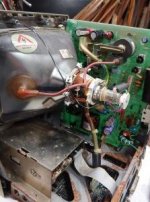 sorry it looks crappy I use a LG phone. I cleaned both boards really good so its only the case and the steel that is corroded sorry it looks crappy I use a LG phone. I cleaned both boards really good so its only the case and the steel that is corroded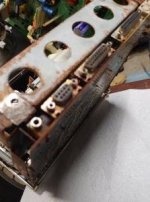 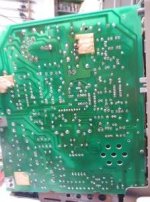 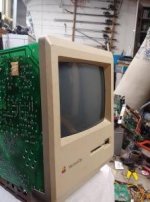 | |
| Posted by: Nathanplus on 2019-03-04 16:15:09 One last thing if I didn't mention. When I was diagnosing it still ticked when the motherboard's plug was disconnected, so its the analog board | |
| Posted by: LaPorta on 2019-03-04 16:31:57 So...you replaced the electrolytic caps on the analog board? | |
| Posted by: Nathanplus on 2019-03-04 17:20:12 Yes, I replaced the ones I could and tested the ones I could not. The ones I didn't test completely were the smaller 33 and 22uf 16v caps. | |
| Posted by: Nathanplus on 2019-03-04 17:21:04 And replaced the two X2 4700pf and the X 0.1 uf | |
| Posted by: LaPorta on 2019-03-04 17:23:47 Also...did you replace C1? And what type of cap was used? | |
| Posted by: Nathanplus on 2019-03-04 17:26:46 Not C1, I used a cap tester and I got the correct capacity rating. I mean if I have to I will replace it, but it did read correctly so Idk. | |
| Posted by: Nathanplus on 2019-03-04 17:36:11 Wait the yolk plug solider is cracked I think that might be a problem let me check real quick | |
| Posted by: LaPorta on 2019-03-04 17:38:44 Yes all connector joints should be re-flowed, I thought you stated you already did that. | |
| Posted by: Nathanplus on 2019-03-04 17:48:28 I did until I looked under the sticky pad. Well I re-flowed a lot of suspicious solider joints and nothing. So I still have no idea whats happening I also forgot to mention i did test the diodes and transistors by the flyback, they were all good. I also tested the optocoupler, it turned out good too. | |
| Posted by: LaPorta on 2019-03-04 18:00:13 Personally I’d replace all caps...every last one, including C1. Especially C1. Even if these test good capacitance, it is very likely that they suffer from high resistance with age, which you won’t be testing. Just remember you need a non-polarized cap for C1. | |
| Posted by: Nathanplus on 2019-03-04 18:04:16 Right, I'll try my best to get all caps. I really was not measuring resistance meter I was using this capasitence tester. I pulled out the cap and measured it.  | |
| Posted by: Johnnya101 on 2019-03-04 18:52:07 Check out a pdf of the Dead Mac Scrolls. Might help find your issue. Probably something that isnt a cap. | |
| Posted by: Nathanplus on 2019-03-04 19:14:15 Ok I'll look | |
| Posted by: Nathanplus on 2019-03-04 19:25:03 This sounds about right. But I don't know exactly, I checked all the other solutions and this is the best. I also just tested it and I am getting a resistance. Does that mean its good? I mean absolutely I'll do it any way because its just $5. I just want someone to confirm that CR5 is positively dead. 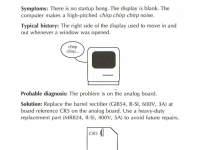 | |
| Posted by: LaPorta on 2019-03-04 20:26:51 Didn’t know you had access to online Pina...I have the real books. Johnny has a good point there. Also try Macintosh Repair and Upgrade Secrets...sometimes I find that one more helpful. | |
Posted by: Nathanplus on 2019-03-05 12:40:14Didn’t know you had access to online Pina...I have the real books. Johnny has a good point there. Also try Macintosh Repair and Upgrade Secrets...sometimes I find that one more helpful.Awesome I found that both cr21 and cr20 are shorted. Thanks I'll get back to both of you when I get it working 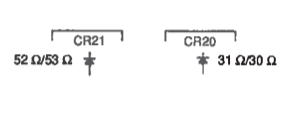 | |
| 1 |