68kMLA Classic Interface
This is a version of the 68kMLA forums for viewing on your favorite old mac. Visitors on modern platforms may prefer the main site.
| Click here to select a new forum. | |
| Powerbook 140 Lines on bottom half of screen and clicking sounds | |
| Posted by: Johnnya101 on 2019-02-15 15:54:15 Mission success in transplanting a 160 display cable to my 140! Screen is super duper bright and contrast and brightness work... well... like new! Screen is crisp and clean for the most part. But of course, like always, theres an issue. The bottom half of the screen has lines on it, but ONLY the bottom half! Bad screen, logic board, cable...? Cable has good continuity so I would hope its not that. Hope this is a known and easy fix? Also some ghosting on the top left. Looks like what would happen on an unrecapped LCD. ALL CAPS REPLACED on LCD and inverter (You can tell. SUPER bright screen! 🙂 ). RECAPPED PSU! Also I noticed that after not using the speaker for a minute, and if I go to the sound control panel and change the volume, theres a loud click right before it plays the sound. I also noticed just messing around in the OS there is a click once in a while. ??? Is it just warming up after decades of rest? No battery installed.    | |
| Posted by: Johnnya101 on 2019-02-15 16:15:21 Better photo. My phone keeps putting the photo out of focus as you can see above. Reseated the ribbon cable to LCD. No change. Tried shaking the thing a little and flexing the cable. No change. Caps all appear to be correct polarity. Really hope this isnt a bad screen... Speaker still clicks every now and then. Adjusting contrast and brightness dont do anything with relation of the lines. Edit: Apparently after some research the ghosting is normal for a pasive matrix, and mine looks far better than some. Doesnt bother me, just was wondering. But those darn lines do! 🙁 Edit Edit: Could it be the inverter? Got that recapped though. Would an inverter do this?  | |
| Posted by: Johnnya101 on 2019-02-15 17:43:27 Reseated LCD cable on the inverter AND LCD itself. Nothing. Edit: Is a 160 inverter compatible with a 140? Maybe I should swap them out and see what happens. I really dont think its the ribbon cable since I tested for continuity. LCD doesnt appear to be the culprit either just from looking at it. After looking at Apples service manual. Apple seems to think the LCD or interconnect board. No mention of the inverter. Also mentions a display cable shim, but this cable seems to already have one, plus its a tight fit...? Any ideas? Edit again: Inverter on a 160 has different outputs. Interconnect board looks different too. | |
| Posted by: Johnnya101 on 2019-02-15 18:32:26 Well, the inverter after Ive looked into it some more only controls backlight and contrast. So thats out. That leaves the interconnect board, LCD, maybe cable (Even though its been tested?. At this point I've tried reconnecting the video cable (both ends) multiple times, pressed around the border of the LCD to see if there's a bad connection in it, smacked the screen to check for a loose connection. Nothing has done anything. The screen is exactly split in half. Surely someone can pinpoint what to check next? I have a known good 160 I can swap the display cable from but I'd hate to have to dismantle my third Powerbook within 24 hours. | |
| Posted by: AwkwardPotato on 2019-02-16 08:20:39 Maybe there's a corroded trace on the LCD's PCB? | |
| Posted by: Johnnya101 on 2019-02-16 08:30:06 I can post a photo of the entire LCD later today. It was kind of corroded before recapping, but my recapper appeared to have cleaned most of it up. I'd hate for this to go to waste. | |
| Posted by: Jinnai on 2019-02-16 13:57:38 The only thing I'd know how to try to fix it is swapping in other parts... | |
| Posted by: Johnnya101 on 2019-02-16 14:06:14 If I had another 140 I'd swap the LCD. I do have a 160 LCD... But I'd probably damage it when swapping it. Different things. | |
| Posted by: Jinnai on 2019-02-16 14:16:35 Yeah. Also like I said in PM - and I will say I'm no electronics engineering expert and could be totally wrong about how this works - I think there logically should be a multiplexer or demultiplexer IC on the board to handle the input and send it to the correct line on the screen. It might have a bad connection to one of it's pins. | |
| Posted by: Johnnya101 on 2019-02-16 14:21:01 Ok folks, here is a photo of the front and back of the LCD PCB. Jinnai, I'm not too good with electronics either , but have any idea where abouts that stuff is? In the meantime, it's buzzing time.   | |
| Posted by: Johnnya101 on 2019-02-16 14:57:54 Haven't found anything obviously wrong. Just wiped it down a little more with alcohol and a qtip. Guess I'll try and see if that little amount of cleaning made a difference. Looking more like one of the ics might be bad. | |
| Posted by: Jinnai on 2019-02-16 15:19:28 Well, lets look at the chips we can read. The LA5316 chip is a Variable Divided Voltage generator. I can't read any other chips, but I would look for chips between the LCD ribbon coming from the main unit and the bottom half of the LCD, and Google their model numbers to see what they do. | |
| Posted by: Johnnya101 on 2019-02-16 15:34:23 I've tested all of the connections, all good. I'll just list it up for sale, I'm not really good with this stuff. Jinnai, if ya want a project 140, it could be yours! Lol. | |
| Posted by: Johnnya101 on 2019-02-17 17:13:29 @TechEdison Here are some better photos of the area I would presume you were talking about. See anything off? Are these side cables the ones responsible for what Im seeing? (Note: Any whiteish residue is from me attempting to clean with alcohol) (Bottom of panel is bottom of LCD installed)  (Bottom of photo is bottom of LCD installed)  | |
| Posted by: TechEdison on 2019-02-19 12:09:20 These two spots jump out at me. 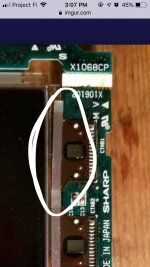 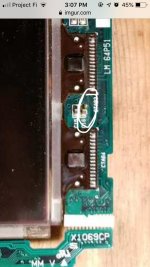 | |
| Posted by: Johnnya101 on 2019-02-19 12:21:38 @TechEdison Heres a better photo. What do you see wrong in the first photo? The second? Theres a strip of glue that runs down the side that covered those components, giving them the dirty look. Its just glue.  | |
| Posted by: Johnnya101 on 2019-02-19 12:24:10 Also, the top circled area is the top part of the screen, so I dont think its related to the issue. Another photo  | |
| Posted by: Johnnya101 on 2019-02-19 12:55:46 Wait a minute. Are you seeing this?  Lets look a little closer...  Theres a speck of solder shorting out that trace, which was worn down to copper, allowing it to bond and potentially short out that trace. It checks out, its on the bottom half of the LCD. Ill see what I can do. Definitley does not looks like it is supposed to look like that. | |
| Posted by: Johnnya101 on 2019-02-19 13:01:36 Trace/solder fixed. Crossing my fingers...  | |
| 1 > |