68kMLA Classic Interface
This is a version of the 68kMLA forums for viewing on your favorite old mac. Visitors on modern platforms may prefer the main site.
| Click here to select a new forum. | |
| Need Testing Help with Mac External 400K/800K Drive | |
| Posted by: bigmessowires on 2019-02-02 15:31:18 If you have a multimeter and a Macintosh External 400K or 800K floppy drive (models M0130 or M0131), I could use your help with a quick test. Put your meter in continuity check mode (where it beeps if there's a short circuit), and test for continuity between pin 9 of the drive's connector and any other pin. See the photo for the location of pin 9. You need to make sure your multimeter probes are only touching one pin at a time, and aren't touching the metal shield around the pins, in order to avoid false positives on the test. Hopefully pin 9 is not connected to anything. But I'm a bit suspicious it may be connected internally to pin 7 or 8, or possibly others. I don't have either of these drives, so I can't do the check myself. This is for exploring some crazy daisy-chain ideas for the Floppy Emu. Thank you! 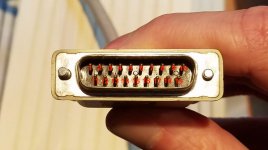 | |
| Posted by: joethezombie on 2019-02-02 15:44:06 M0130 here, it does not appear that pin 9 is connected to any other pin or the housing. | |
| Posted by: bigmessowires on 2019-02-02 15:54:40 Thank you sir!! Can anyone else confirm? M0131? | |
| Posted by: Johnnya101 on 2019-02-02 16:09:17 I have an A9M0106... Thats the 800k with manual eject button. | |
| Posted by: bigmessowires on 2019-02-02 16:17:12 I only need info from the M0130 and M0131 for now, but thanks! I have an A9M0106 here and it's OK. | |
| Posted by: jimjimx on 2019-02-10 22:38:05 I have an 0131 I can get around to in the morning, but, do you want a drive on the other end, or unplugged inside the case? I can do either. | |
| Posted by: jimjimx on 2019-02-11 15:46:58 Well, I was going to do that, but apparently I put it someplace VERY safe, and can’t find it.... But I found my SD to 40 pin ide card, that I need for the iBook G4.... I’ll continue to look............. | |
| Posted by: jimjimx on 2019-02-21 04:21:25 I found it and tested it without drive connected, and pin 9 is not connected to any other pins. | |
| 1 |