68kMLA Classic Interface
This is a version of the 68kMLA forums for viewing on your favorite old mac. Visitors on modern platforms may prefer the main site.
| Click here to select a new forum. | |
| LCIII with no sound | |
| Posted by: Byte Knight on 2019-01-23 21:17:38 Hey guys, Here's a weird issue - my LCIII speaker was making some static noises for a few days and now there is no sound at all while in Mac mode, but when I launch my IIe card the sound works fine. The volume is cranked all the way up on the Mac end. I've read that bad caps can cause sound issues, but why would it work in IIe mode then? Any idea what's wrong? Thanks in advance! | |
| Posted by: AwkwardPotato on 2019-01-24 07:43:39 Caps are definitely suspect if there were static noises. I believe the LC PDS has its own line for sound so that might explain why the IIe card audio works but the motherboard audio doesn't. | |
Posted by: Byte Knight on 2019-01-24 08:59:09Caps are definitely suspect if there were static noises. I believe the LC PDS has its own line for sound so that might explain why the IIe card audio works but the motherboard audio doesn't.Good to know - thanks. I'll start by replacing the caps. Does anyone have a good source for the caps? | |
| Posted by: AlpineRaven on 2019-01-26 04:46:41 more commonly after recap - the sound chip is likely to be shortened due cap leak Cheers AP | |
| Posted by: AwkwardPotato on 2019-01-26 12:11:57 A list of the capacitors can be found here on maccaps.com. Parts can be purchased on Mouser, look for Nichicon or Panasonic SMD aluminum electrolytics. Don't do the repair in the way shown in the linked image though, use surface-mount parts for all of the caps unless you absolutely have to use through-hole ones. Also, make sure to wash the board after removing the old parts first (scrubbing with a toothbrush in dish soap & tap water with a distilled water rinse at the end works well). | |
| Posted by: Byte Knight on 2019-01-26 18:10:02 Thanks for the info - I ended up sending the board off to mac-caps.com. Not a fan of surface mount soldering... | |
| Posted by: LaPorta on 2019-01-26 18:27:50 I thought maccaps was out of commission? I think a few of us on here would do it for you... | |
| Posted by: nglevin on 2019-01-26 18:35:36 I’d rather not speak of locked threads again. With that said, I don’t believe that business was resolved. Given how many members were unable to get boards back from him, Maccaps.com is not a good vendor to work with. | |
| Posted by: LaPorta on 2019-01-26 18:37:06 No comment on any dealings. Simple statement of a business that I believe no longer exists. | |
| Posted by: nglevin on 2019-01-26 18:40:29 Amen to that. :/ I’m as surprised as you are. | |
| Posted by: AwkwardPotato on 2019-01-26 20:39:52 Jeez, I'm sorry. I should've remembered to mention not to do that when I linked the image from his site. 🙁 | |
Posted by: Byte Knight on 2019-01-27 06:50:03Jeez, I'm sorry. I should've remembered to mention not to do that when I linked the image from his site. 🙁I had already sent my board out so no worries. I had no idea that there were issues with maccaps.com - I sent a Mac Classic board to him a few years ago and had no problems... | |
| Posted by: maceffects on 2019-01-27 15:58:11 The issues are much more recent, but we will not go into details. But to echo what everyone said, caps are the most likely cause mixed with electrolytic fluid on the board. | |
| Posted by: Byte Knight on 2019-03-13 17:14:33 So about a month later and after much begging, I got my board back recapped. Unfortunately I still have no sound. Is there a way to test the sound chip (344S033-B) to see if it's the culprit? Thanks! | |
| Posted by: AwkwardPotato on 2019-03-13 18:52:32 Glad to hear you got your board back. I'm not sure if there's a way to test the sound chip in software (hopefully somebody else can chime in on this), but here's part of the schematic relevant to the sound circuitry for the LC III: 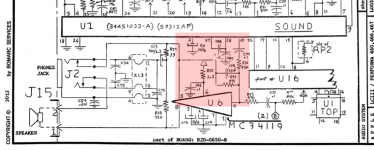 Pin 10 of the chip labelled 'U1' is the sound output for the Mac, while the shape labeled 'B' is the sound output for the IIe card. Since you're getting the IIe sound, I'd assume the traces between the speaker and amplifier (labeled 'U6') are all good. As such, I'd recommend making sure there's continuity between Pin 10 of U1 and C77, between C77 and R36, and between R36 and C74 and R55 and pin 4 of U6. Hopefully that makes some sense :-/ | |
| Posted by: Byte Knight on 2019-03-13 19:43:40 Thanks for the detailed suggestions and schematics. Continuity is good between all of those points. Looking more like the sound chip? I should note that there's no sound coming through the headphones jack as well. | |
| Posted by: AlpineRaven on 2019-03-13 20:35:00 Recently had LC520 board with no sound, swapped with known working sound chip and voila - it worked! It was shorted/resulted from cap leak. Cheers AP | |
| Posted by: AwkwardPotato on 2019-03-13 20:57:49 Yeah, if you've got continuity between all those points, I wouldn't be surprised if the sound chip is the problem. Just wanted to make sure it wasn't something else first, since the sound chip is a custom Apple ASIC and it might be difficult to find a replacement for it. | |
| 1 |