68kMLA Classic Interface
This is a version of the 68kMLA forums for viewing on your favorite old mac. Visitors on modern platforms may prefer the main site.
| Click here to select a new forum. | |
| looking for image of MacPaint/Macwrite floppy... | |
| Posted by: flowers on 2019-01-21 12:28:06 Hello! I'm, looking for an image (disk copy 4.2) of the old floppy MacPaint/MacWrite... i would like to over-write a not working copy ( 690-500B)... ^_^ thank you! Michele | |
| Posted by: BadGoldEagle on 2019-01-21 13:51:15 Hey there, Is that what you’re looking for? It might not be the exact same revision but close enough I would say... https://macgui.com/downloads/?file_id=20092 | |
| Posted by: flowers on 2019-01-21 14:33:06 Uh! .. Seems to be perfect 🙂.. i download it; let me see tomorrow ( now here is quiet late ) if it works with DiskCopy42. The revision is not a problem.. ^_^ thank you Michele | |
| Posted by: flowers on 2019-01-21 23:45:01 I try to read the .IMG file in my Quadra but seems to be for other Disk Copy then 4.2 release. Maybe is for 6.3.3... I've SheepShaver installed on my macbook.. i play little bit with it as to me it frees to frequently.. but nice, honestly impressive ^_^ So... I try now to read the .-IMG file there where disk Copy is 6... .. but it tunes an error. (see attached image); My idea is then to convert the img to the disk copy 4.2 format as i see it can be done... but maybe the .IMG loose its fork ... i do not know Question: Can i instal on a System 7.5.5 the Disk Copy 6.3.3 and also Maintain waking the Disk Copy 4.2 ?  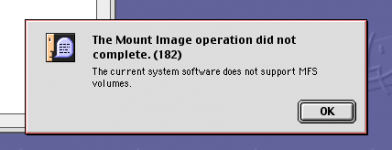 | |
Posted by: CC_333 on 2019-01-22 01:30:48Question: Can i instal on a System 7.5.5 the Disk Copy 6.3.3 and also Maintain waking the Disk Copy 4.2 ?Yes. Disk Copy 6.3.3 can run on 7.5.x (and I think 7.0 or 7.1 as well), and Disk Copy 4.2 is compatible with at least System 6 and newer. As for the rest, I'm not sure. c | |
| Posted by: flowers on 2019-01-22 02:47:33 now thinking twice.. the message about the tried mount of an MFS image in MACOS9 as the right refuse beeing not supported... but trying to do the conversion from .img to disk copy 4.2 do not work.. so maybe the reason can be : - the img file is not compatible for disk copy 6... - the img file has some problem just thinking 🙂 | |
| Posted by: CC_333 on 2019-01-22 02:56:48 Well, Mac OS 9 doesn't support MFS at all. Period. You can only go up to 7.6.1, and even at that, you only have read-only support. I've read of something called MFSLives or some such that you might try out. I'm not sure if it works on 9 though (it is aimed primarily at Mac OS 8.0 and 8.1 I think). c | |
| Posted by: flowers on 2019-01-22 03:52:34 yes ok; but back to the original request, i'm looking of an image fo Macwrite/Macpaint (400K - MFS) that i can copy back into my floppy .. using a Quadra with a 7.5.5 installed in and with Diskcopy 4.2... the image i download seems to be not working also in an "emulated true Sheepshaver" MACOS9 where the disckcopy is 6.xx. as my idea was.. i get it in the emulated MAC0s9 as .img and convert to disckcopy4.2 .image format... but seems that it do not work. If i try the function . convert too.. i get the error as in the picture... so seems that the Diskcopy i've into my MACOS9 sheepshaver installation doesn't work with this .img file... 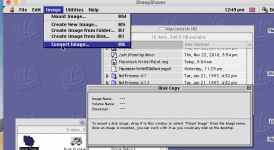 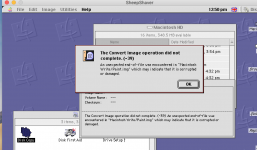 | |
| Posted by: BadGoldEagle on 2019-01-22 05:28:25 Try DiskDup+ on your quadra, it works a lot better with old floppy images compared to DC4.2 in my experience. V2.7 is the best IMO. http://macintoshgarden.org/apps/diskdup Edit: if the image can be used to boot Mini vMac then the image is all right. Don’t try OS9 too much as you might corrupt the image. I’ve seen that happen a lot. You’d be better off starting over with DiskDup and a ‘brand new’ image. | |
| Posted by: flowers on 2019-01-22 06:55:43 Dear BadGoldEagle... you are right... with DiskDup it works 🙂 as by reference, this image contain write2.2 and paint 1.4 .. i think is the release by 1984 the B series.. so thank you so much! Michele ^_^ | |
| Posted by: BadGoldEagle on 2019-01-22 07:53:10 That's great to hear. Have fun! | |
| 1 |