68kMLA Classic Interface
This is a version of the 68kMLA forums for viewing on your favorite old mac. Visitors on modern platforms may prefer the main site.
| Click here to select a new forum. | |
| Building a Spotify player for my Mac SE/30 | |
| Posted by: ants on 2018-12-16 15:27:57 Hi all, I built a Spotify player for my Macintosh SE/30:  The app is called MacPlayer and works thanks to the magic of Spotify Connect. The speaker itself streams and plays the music, and the Mac simply tells the speaker which song to play (as well as volume, current playlist, shuffle mode and other settings). Communication is over Wifi:  The first version is pretty basic, it just plays your Spotify playlists. You can browse tracks, and the app displays 1-bit album art, which I think is a bit of fun: 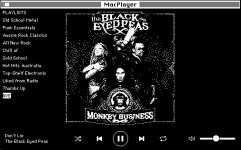 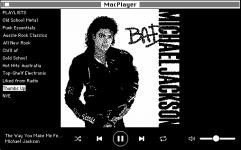  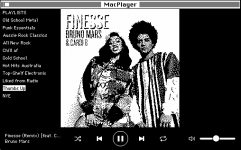 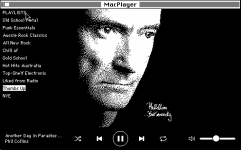 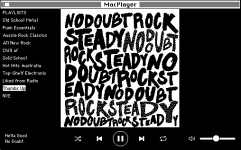 You can also choose which device to play from via the Devices menu: 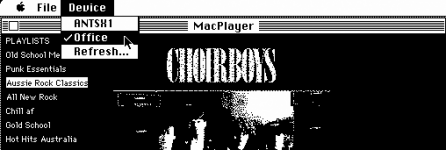 The app performs well on a stock SE/30, although it does rely on a bit of help from the on-board OpenWRT Wifi router to handle the HTTPS communication with the Spotify API. The router has stunnel installed on it, which acts as a HTTP to HTTPS tunnel. I updated the MacWifi Extension to allow the Mac to create SSL tunnels on the router as needed. Here’s a video of how the app performs (no music unfortunately due to Copyright): Another problem I had to solve was authenticating the app with a Spotify account. Like most modern web API’s, Spotify uses OAuth to allow third party apps to access their services. However the OAuth flow requires a modern web browser for users to enter their login details. To overcome this, I wrote an OAuth bridge for vintage Macs which delegates the login part of the process to another device such as a smartphone. The first steps are handled on the Mac: 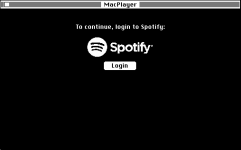 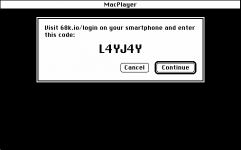 And then completed on a modern device:  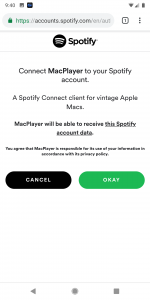  The final hurdle was with text encoding. The modern web uses UTF-8 for encoding text - which is a variant of Unicode. However, Unicode support was only available on PowerPC Macs as of MacOS 8.5, prior to that it was Apple’s own MacRoman encoding. I was able to port a Unix library, libiconv, to the Mac which performs a “best guess” conversion between UTF-8 and MacRoman – so far from my testing it’s been flawless (on English text). If you’d like to give MacPlayer a go, you’ll need the following:
Just note that the first version is pretty limited, and probably buggy 🙂 Looking ahead, I’d like to get the app more functional – and colour monitor support is definitely on the wish list – but for now I’m going to take a break and enjoy the fruits of my labour. | |
| Posted by: nglevin on 2018-12-16 15:46:05 I am not a Spotify user but those screenshots are super coooool! 😎 This was done with Retro68? I should probably be making time to learn to build something with that toolkit. | |
| Posted by: nickpunt on 2018-12-16 16:00:30 Brilliant! I was waiting for this to drop since you mentioned it. Congrats on the build. Seems with the Oauth flow you've paved the way for a few more services too. Re: Spotify connect device, looks like that would include Raspberry Pi as well - https://github.com/dtcooper/raspotify @nglevin yep looks like it was built in Retro68 according to the GitHub readme https://github.com/antscode/MacPlayer | |
| Posted by: CC_333 on 2018-12-16 22:04:56 This is pretty spiffy! Any chance you could make it work with Amazon Music as well? Or is the underlying architecture too different? Maybe on better/higher end 68k Macs and/or OldWorld PPCs, you can allow for the option of playing audio through the computer's built-in sound? It'd likely sound quite bad on the SE/30 with its puny mono speaker, but on a Mac with better sound, it could be passable? An OpenWRT wifi router, such as the GL-AR300M.I *really* need to get myself one of these sometime!! c | |
| Posted by: Retro Rider on 2018-12-17 10:38:32 Damn, I may just get a ethernet card just to try this out! | |
| Posted by: eameso on 2018-12-17 11:06:24 Would this work with an imac G3? | |
| Posted by: metta on 2018-12-17 13:08:59 I’m so excited to try this out, fantastic project!!! | |
| Posted by: sambapati87 on 2018-12-17 13:42:38 This is incredible. Idea: it's probably easier for a lot of people to stand up a small HTTP proxy on their local network that communicates with Spotify over HTTPS, rather than requiring that dedicated WiFI hardware. I think that would allow this to work regardless of how you're getting your TCP/IP party on... the "Spotify API URL" could presumably be added to the preferences of this app to enable something like that? Would love to see this eventually take advantage slightly more modern Macs (OS 9-era?) with color album art, and possibly fewer workarounds required! This is a perfect excuse to put my Duo w/ Ethernet mini dock into use sitting on top of my receiver 🙂 Side note: seeing the WiFi antenna sticking out of the back of the SE/30 made my jaw drop. So cool, don't think I've seen that before. | |
| Posted by: MacFox on 2018-12-17 14:35:48 Very impressive. | |
| Posted by: techknight on 2018-12-17 15:29:57 Dude. This could have been a darn good RetroChallenge project. Wow. Impressive. But, what is 68k.io? and how is it in involved? | |
| Posted by: nickpunt on 2018-12-17 17:39:45 @techknight 68k.io is a simple page that hits the Spotify API to grab a short code that you need to confirm your device's authorization. Seems you'd need to be logged into Spotify via your browser and then 68k.io just displays a page to grab the short key to confirm connection. That requires HTTPS & modern web browser as Ants mentioned. It doesn't look like it stores credentials or anything. | |
| Posted by: KnobsNSwitches on 2018-12-17 17:50:50 Well done. I love this. | |
Posted by: techknight on 2018-12-17 18:08:50@techknight 68k.io is a simple page that hits the Spotify API to grab a short code that you need to confirm your device's authorization. Seems you'd need to be logged into Spotify via your browser and then 68k.io just displays a page to grab the short key to confirm connection. That requires HTTPS & modern web browser as Ants mentioned. It doesn't look like it stores credentials or anything.Maybe, but I dont see the 68k.io code, so to me, its abstracted so I cant see how it REALLY works. Would be awesome to me to see it so I could understand it better. Because there are gaps here personally I would like to fullfill. For a minute, I thought 68k.io was an internal webserver that ran on the openwrt platform or something, but it isnt. its an actual webserver with an actual https cert. | |
Posted by: ants on 2018-12-17 18:11:27Seems with the Oauth flow you've paved the way for a few more services tooI created 2 separate GitHub projects for the OAuth stuff:
Any chance you could make it work with Amazon Music as well?There doesn't seem to be much of an API for Amazon Music that I can find. Also, Spotify is the only streaming provider I'm aware of that streams music from the target device - and not from the source device, if that makes sense? Would this work with an imac G3?If the imac is running a classic version of MacOS - or OS X with classic support, then maybe? You'd still need an OpenWRT router though. | |
| Posted by: 3583Bytes on 2018-12-17 20:39:13 This is so awesome, great job. Next can we run this on an iMac G3? | |
| Posted by: BadGoldEagle on 2018-12-18 01:56:33 Awesomesauce. Unfortunately I don't have Spotify or my SE/30 on hand to try it out... It would be interesting to see if a stock SE/30 can pull audio from say Youtube and push it to speakers like yours. Perhaps in v2.0? @3583Bytes, it should work fine on the G3 (those things can run 68k code without any serious modding) | |
| Posted by: joethezombie on 2018-12-18 10:34:29 Absolutely amazing! I can't wait to try this out!! @ants, I seriously LOVE you! [:I] | |
| Posted by: ants on 2018-12-18 22:27:19 Thanks @joethezombie 😛 Check this out, Daniel Ek, CEO of Spotify retweeted my project! (via Steve, who wrote the PICT code I used in the app):  There's my 15 minutes of fame right there 😀 | |
| Posted by: CC_333 on 2018-12-19 06:30:05 Indeed! c | |
| 1 > |