68kMLA Classic Interface
This is a version of the 68kMLA forums for viewing on your favorite old mac. Visitors on modern platforms may prefer the main site.
| Click here to select a new forum. | |
| Next up...Mac 512k | |
| Posted by: LaPorta on 2018-12-10 18:39:12 Now that my Portable is done, next on my list is my 512k. I got this little guy around 2000/2001 on eBay when I was in high school for $5 (about the going rate then). It worked, but the front upper corners of the front bezel were cracked off (I epoxied these then). I haven’t started it up for about 14 years or so. At that time, it exhibited symptoms of bad solder joints (screen off; banging on the left side brought the screen on). That will be easy to rectify. A re-cap is in order, of course. Other than that, there’s a few questions I have. Is there anywhere, other than a donor analog board, that I can get the same style battery holder? The negative side holding hinge broke off. Is there somewhere to get equivalent square, double-sided adhesive sponge that holds on the plastic sheet on the side of the analog board? I like to keep things original. 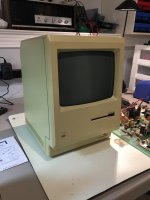 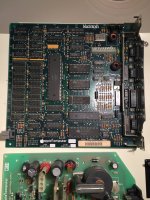 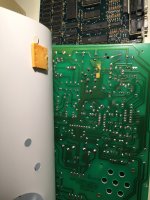 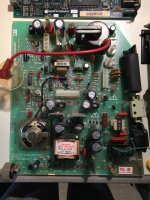 | |
| Posted by: LaPorta on 2018-12-29 22:08:17 Well, re-cap completed, connectors re-flowed, and it fires up wonderfully. One issue: Disk drive will not eject. I will have to pull it and see if it is a lubrication issue or just the eject motor. Anyone else have this issue before? It reads disks and starts the system just fine. | |
| Posted by: bibilit on 2018-12-30 00:55:54 What kind of floppy drive have you got ? the 400k or the 800 k, the last one is known for having a small gear going bad in the ejecting motor side. | |
| Posted by: LaPorta on 2018-12-30 06:27:10 800, I neglected to mention it is a 512ke. It has not been turned on in probably close to 18 years, and the drive was ok then...I heard no noise nor cracking sound...but I guess I’ll hsve to see. | |
| Posted by: The MAC MANIAC! on 2018-12-30 10:26:38 I would say that it may be the ejection motor. also can you eject it from the paperclip hole? | |
| Posted by: LaPorta on 2018-12-30 11:59:11 Manual eject works no problem. Got the disk out right away. I suppose I should also test a known good drive. | |
| Posted by: tappdarden on 2019-01-01 16:24:57 Yeah i just fixed three drives with that same problem. All with broken teeth on that one gear. its easy to pull out the eject motor and open it up and check. Its pretty obvious if thats the problem.. Somebody on ebay sells replacement 3D printed gears. otherwise, could just need a good cleaning. Maybe both. | |
Posted by: Dog Cow on 2019-01-01 21:18:08One issue: Disk drive will not eject... Anyone else have this issue before? It reads disks and starts the system just fine.As others have said, it's probably a stripped gear in the ejector. Here's how to fix the Mac 800K Disk Drive Eject Mechanism | |
| Posted by: LaPorta on 2019-01-02 09:57:24 Ok, a little more information after a little troubleshooting. I swapped in some other 800k drives, and ran into the "red stripe vs yellow stripe" cable issue - I sorted that out. I attached in the original drive and ran into a peculiar issue: With the case off, it makes a "ticking" sound with the drive connected, and it not being accessed. If it starts to access the drive, the ticking disappears. Also odd: the first time I used the drive, the seek time was incredibly slow...it took a good 5-plus minutes to start the machine because the drive sought the tracks so slowly. I've never seen that before. So after that, I figured the hell with that, I disconnected the internal and hooked up an external 800k. This worked fine with no issue, though the same ticking sound was present until the drive started to work. I also discovered that I had some intermittent flicker issues when inserting disks: I assume there are a few solder joints that need re-doing that I did not account for. I then used another 800k internal drive that I had internally, and that worked as well, no issue. I even went back to the original internal and that worked fine...so, I have no idea what that crazy long seek time thing was before, and unfortunately I got no video of it. The attached video illustrates the "ticking" sound and some of the video issue. I found out that hitting the table or the analog board directly will cause the video flicker, so it must be a solder joint issue. I still don't know what causes the ticking, can anyone provide insight? View attachment 25858 | |
Posted by: Dog Cow on 2019-01-02 14:02:19With the case off, it makes a "ticking" sound with the drive connected, and it not being accessed. If it starts to access the drive, the ticking disappears. I still don't know what causes the ticking, can anyone provide insight?I don't know either, but it's a typical situation. It's very quiet, isn't it? I would get the screen flicker issue sorted out first. | |
| Posted by: Johnnya101 on 2019-01-02 14:12:01 Isnt that typical of some of those drives? Thought I read that somewhere... Dead Mac Scrolls maybe? | |
| Posted by: LaPorta on 2019-01-02 14:29:25 The disk drive wire issue definitely is (per Dead Mac Scrolls), that's how I sorted it out. Is that ticking noise present in your guys machines? If it is, I'll just chalk it up to that. Otherwise it works great.. Also, it is not the gear, that is in fine shape, so it's either the motor or whats controlling the motor. | |
| Posted by: just.in.time on 2019-01-02 14:52:56 I want to say that my Plus (800k as well of course) also makes the drive tick noise. I’ll verify tonight. | |
| Posted by: Dog Cow on 2019-01-02 17:10:32 My Macintosh Plus and 512Ke both make a soft ticking noise when no disk is inserted in the drive. | |
| Posted by: LaPorta on 2019-01-02 18:37:10 Perhaps this is why I never noticed it with the cover on as it is so soft, but the cover off made it more apparent. So long as it’s normal behavior, then good deal. Thanks everyone for the help. ill have to figure out what the disk drive issue is. separate question: anyone replace the mini caps that are on the disk drives? Is there any need? | |
Posted by: Dog Cow on 2019-01-02 19:07:08Perhaps this is why I never noticed it with the cover on as it is so soft, but the cover off made it more apparent. So long as it’s normal behavior, then good deal. Thanks everyone for the help.This was a known issue in 1987. It was caused by intermittent load on the power supply from the floppy drive. So the ticking is actually coming from a transformer on the analog board, but is ultimately caused by the Sony 800K drive. Read all about it: Ticking Mac | |
Posted by: just.in.time on 2019-01-02 19:33:21I want to say that my Plus (800k as well of course) also makes the drive tick noise. I’ll verify tonight.Following up. Can confirm, my Plus does indeed do the ticking noice after the memory check completes. his was a known issue in 1987. It was caused by intermittent load on the power supply from the floppy drive. So the ticking is actually coming from a transformer on the analog board, but is ultimately caused by the Sony 800K drive. Read all about it: Ticking MacVery cool, thanks for that 🙂 Learned something new today. I always just figured my Plus's disk drive had issues but paid it no attention since it seemed to read and write okay. | |
| Posted by: LaPorta on 2019-01-03 05:51:37 Very interesting! That’s very neat to see. I’m happy it’s just how the machine was designed and not something I bungled in the repair. Now, to take my newly-adhered plastic backing off the analog board to resolder connections... | |
| Posted by: LaPorta on 2019-01-04 18:53:45 Ok so a few updates: tracked down the cold solder joint, resoldered it and a few others, and the analog board is good to go. I can rock it back and forth: no issue. second: a few of you were correct - one gear was stripped and useless in the eject motor. Is this one of the ones that replacements are available for? EDIT: it is, I found them, and ordered a set of four. 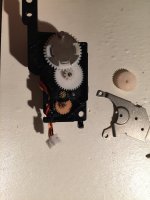 | |
| 1 > |