68kMLA Classic Interface
This is a version of the 68kMLA forums for viewing on your favorite old mac. Visitors on modern platforms may prefer the main site.
| Click here to select a new forum. | |
| A/UX dual boot problems | |
| Posted by: LarBob on 2018-11-26 18:32:13 Hey all, I'm having issues with dual booting a regular Mac OS system + A/UX. I have the A/UX part working, the issue is that it refuses to boot from the Mac OS system disk. When I select it with the Startup control panel and reboot, it reboots off of the MacPartition anyway. Here is a picture of my partition setup (is it because the Untitled partition is an "Additional Macintosh volume"? What's the best way to fix this?) 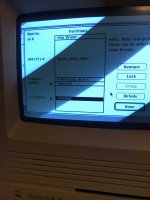 | |
| Posted by: CC_333 on 2018-11-26 18:38:19 I assume MacPartition is the minimal Mac OS needed for bootstrapping A/UX? I'm not really sure what to do here. Is there a way to boot into that minimal Mac OS and not initiate the bootstrapping process? c | |
Posted by: LarBob on 2018-11-26 19:46:00I assume MacPartition is the minimal Mac OS needed for bootstrapping A/UX?You can cancel the A/UX startup, but that still wouldn't fix the issue of me not being able to boot off of the other partition. | |
| Posted by: LarBob on 2018-11-27 13:01:30 I tried using the "System Picker" utility, which led to a Happy Mac at reboot, then an automatic reboot, and then blinking question floppy. So no dice there. | |
| Posted by: LarBob on 2018-11-27 17:33:51 Ah, I needed to use a newer startup disk picker. The one from 7.5.3 seems to work fine. | |
| Posted by: beachycove on 2019-12-08 05:56:04 Old thread, but I've been using System Picker, which not only allows you to boot from the MacPartition, but also allows you to copy the contents to a folder on another partition/ drive and boot from it like any other System folder. | |
| 1 |