68kMLA Classic Interface
This is a version of the 68kMLA forums for viewing on your favorite old mac. Visitors on modern platforms may prefer the main site.
| Click here to select a new forum. | |
| SE/30 display crashing to black with a raspberry sound | |
| Posted by: macclassic on 2018-11-24 16:28:04 I am having multiple problems with my SE/30 at the moment, grey screens with no bong, sad Mac errors and simasimac screens but the one I want to fix first is when it boots successfully and then without warning makes a raspberry sound with an accompanying T shaped flash on screen and the display goes black ! Does this sound like the power supply or the flyback transformer problem? | |
| Posted by: Johnnya101 on 2018-11-24 17:52:10 Well... Ill start it off. Age old question. How are the capacitors? Analog board and logic board, probably even the power supply should ALL be recapped for a reliable mac. Cant even begin to diagnose for the most part without replacing them all. Kind of sounds like a power supply issue to me, as it sounds like power cuts out at once. Does the fan shut off with it? Is it silent? Or is it just the screen? | |
| Posted by: macclassic on 2018-11-25 03:35:25 Hi johnnya, I recapped the logic board with tantalum capacitors but the condition of the caps on the analog board + power supply is unknown as I swapped in a working unit a couple of years ago. I have a lot of RAM installed and when I took half of it out, because I thought some had gone bad, it booted fine and ran longer before the "bzzz" with the onscreen flash and the screen going black, and the fan continues to run so it's just the screen. | |
| Posted by: just.in.time on 2018-11-25 18:38:29 @macclassic I agree with @Johnnya101, that sounds like your power supply is dropping out. Specifically, for me, that T shaped flash you are seeing. The sound almost identical to the flash you would see if the machine was running and you suddenly yanked out the power cable. Additionally, the raspberry (I’m assuming fart) sound emitted from the speaker at the same time could be from the power dropping off at the logic board not quite instantly, but near instant (say a span of 100 milliseconds). The fan will continue to spin until the voltages coming off the PSU get really low, with just some gradual loss of RPM on the way down. So if your PSU is dropping the 12/5 volt rails suddenly to 8 or 9 and 3 volts, I’d expect most of what you are describing, but the fan to keep going at a decent pace. Luckily, the SE/30 has an external floppy disk port. That is probably the easiest place to monitor the voltages from. There are several mappings around the internet that describe which pins are the ground, +5, +12, and -12. Likely the capacitors, though there are also some potentiometers to manually adjust the voltage by some weird ratio. Yours may just be shorting out in relation to how much amperage is being loaded onto the PSU (so less ram, less power needed, longer time before short causing voltage drop off???) at any rate, start with a voltmeter and track your PSU. You don’t even need to open the case for that. Good luck! | |
| Posted by: macclassic on 2018-11-26 08:18:30 Thanks, just.in.time, I will try and replicate the display crash and then test the voltages on the external disk port and also see if the fan slows down, but I don't know how to test for -12 [:I] As I have a special tool 🙂 I'm going to check the card on on the yoke and it's pins for signs of arcing too. 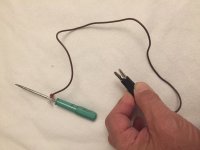 | |
| Posted by: dochilli on 2018-11-27 04:04:33 Measuring the voltages: 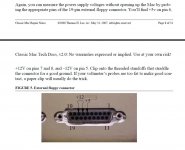 | |
| Posted by: macclassic on 2018-11-27 09:20:56 I tested pin number 8 on the external drive connector and it showed a maximum of 12.27 volts and a minimum of 21.22 volts whether my SE/30 booted fine or didn't boot with a black screen, did a chime of death and a simasimac screen, or froze after a "bzzz" which didn't make the screen go black! So I'm going to have a look at the pins on the end of the screen first, but I'm still open to suggestions 🙂 | |
| Posted by: Paralel on 2018-11-27 10:16:14 Minimum of 21.22? Did you put your decimal in the wrong place or invert your first two numbers? | |
| Posted by: macclassic on 2018-11-27 14:39:29 Ooops!, that should have been 12.22 volts | |
| Posted by: macclassic on 2018-11-28 20:01:19 UPDATE ! I removed the old and put fresh solder on the flyback transformer joints and on the two CRT connectors on the Anologue board, and literally flossed the pins on the end of the CRT, which were a dark blue , with a touch of silver polish, pictures to follow. Result! as rge raspberry is gone. Next problem, it's the ethernet card that's causing the boot problems !!! I definitely need help with that :~( | |
Posted by: macclassic on 2018-11-28 20:02:41UPDATE ! | |
| Posted by: macclassic on 2018-11-29 03:53:01 Blue pins on the CRT before and after, plus another dry joint on the Analog board at P1 I think 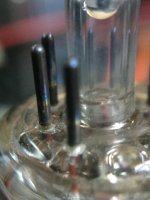 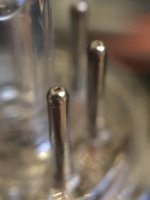 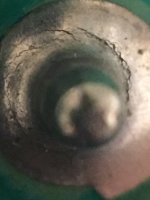 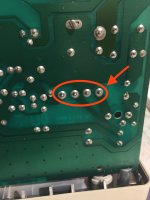 | |
| Posted by: macclassic on 2018-11-30 16:20:27 “Bzzzz” It’s back :vent: and after yet another inspection of the analogue board I found three more suspect joints 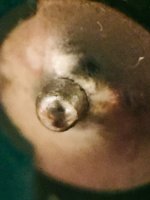 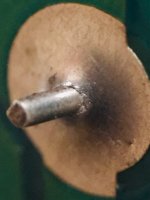 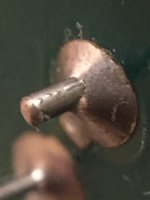 | |
| Posted by: techknight on 2018-12-01 10:30:59 you cant solder just 1 joint and move on. These analog boards are known for bad solder joints, you have to resolder the entire board. no getting around that one. Some have it worse than others, usually due to the number of hours on them. If a bunch of them are bad, its probably a high hours unit. Especially if the glue on the flyback isnt yellow anymore, but brown. | |
| Posted by: macclassic on 2018-12-02 03:54:19 Hi Techknight, ... but the glue on my flyback transformer is still yellow [🙂] and I think the fault lies elsewhere, so I'm now resolved to some serious checking of the logic board according to schematics as I'm still getting the "bzzz" but now it causes a freeze instead of a black screen and that's progress. | |
| Posted by: techknight on 2018-12-02 06:32:06 We need video and audio of this "noise" which will tell at least me, where you need to look. | |
| Posted by: macclassic on 2018-12-04 14:56:05 Hear the sound in the linked video, this currently produces a freeze https://drive.google.com/file/d/1SibxgDg2GXzSS3FbXpL_kLLB7dQUK-g1/view?usp=sharing Plus a frame of the event from the video! /monthly_2018_12/1572186381_ScreenShot2018-12-04at22_59_34.png.801be75b48b80fea998979c2535384fb.png | |
| Posted by: techknight on 2018-12-04 15:29:18 Power Supply. | |
| Posted by: macclassic on 2018-12-04 15:51:03 Thanks, but what do you thinks happening? a part broken winding or something else? and can I fix it. | |
| 1 > |