68kMLA Classic Interface
This is a version of the 68kMLA forums for viewing on your favorite old mac. Visitors on modern platforms may prefer the main site.
| Click here to select a new forum. | |
| Question about retrobrighting a Color Classic | |
| Posted by: mraroid on 2018-11-23 13:49:08 Hi folks... I have a question about retrobrighting my color classic. I see that when I go in from the back, I can pop out the color apple logo on the front. So far, so good. But the front of the CC has some text saying Macintosh, Quicktime and Color Classic. When I retrobright the front of the CC, will doing so lighten up the black text on the front? And if so, what do I do about it? Also, any tips on how to properly retrobright the keyboard? I am a little afraid to paint it with the goop and have it ruin my keyboard. Thoughts? mraroid | |
| Posted by: Daniël on 2018-11-23 15:20:01 I haven't heard of retrobright affecting the printed text on plastics such as on the Macs and on keyboards. I don't think you should worry about that, try it on a more inconspicuous location first if you're still nervous about it, to see if it has such an effect. | |
| Posted by: Johnnya101 on 2018-11-23 17:02:29 Ive done multiple retrobriting sessions. It does not harm the text for the most part as long as you dont over do it. It may affect the inner metallic gray paint. I REALLY REALLY STRONGLY am against painting on the thicker mix and putting plastic wrap over it. Ive ruined a couple of things that way and Ive followed the steps correctly... By submerging the parts you cant really mess up or overdo it, Wish I would have done that instead... | |
Posted by: mraroid on 2018-11-23 18:39:28By submerging the parts you cant really mess up or overdo it, Wish I would have done that instead...Johnnya101.... Can you tell me more about how you submerg your parts? mraroid | |
| Posted by: Johnnya101 on 2018-11-23 18:49:39 I only submerged small things like a spacebar and a mouse. They came out perfect. For my SE/30 case, as an example, I got the hair developer peroxide stuff and brushed it on, then put plastic wrap over it. Every half hour Id take it off and brush it around. For the most part, it came out great, except for some burn on the top of the case. I did a IIGS and a Classic II which were ruined from this method (Both common computers luckily) doing the same thing as the SE/30. I also did a monitor which came out okay. If you submerge, then you cannot mess up since everything gets the same amount of peroxide. Submerge (Better) vs brush (Harder to control). | |
| Posted by: PotatoFi on 2018-12-01 21:42:15 Here's a quick list of things I've retrobrighted, and my notes around that:
| |
| Posted by: mraroid on 2018-12-02 11:02:20 This question is directed to folks living in the US. Which product brand name do you buy? Did you find a brand name product that worked better then others? Do you cut your solution with water to get the % mix that you want, or do you buy the % mixture you want and not mix it with water? It seems like I would need more than a small bottle of this stuff. Where do folks go to buy a larger bottle that beauty salons might buy? Ebay? Or perhaps a beauty salon web site for supplies? Thanks so much. mraroid | |
| Posted by: PotatoFi on 2018-12-02 11:11:43 The brand is Salon Care. White jug or bottle. Red text is cream, blue text is liquid. Sally Beauty Supply sells bottles and 1-gallon jugs. Don’t be shy, just walk in and say you’re looking for Salon Care hydrogen peroxide and they’ll help you out. I let them know that it wasn’t for treating hair, and they immediately directed me to the Salon Care (which is what I was after) saying it was cheaper and optimal if I just wanted hydrogen peroxide. Sally Beauty is very common here in Idaho, I’ll bet you’ve got them in Oregon. If you don’t have Sally Beauty, try another beauty supply store. As for percentages... the 8-Bit Guy just dumps a bottle in a tub. Not sure what his mixture is. I would hazard a guess of 1-part 30 proof hydrogen peroxide to 3 parts water mixture? No idea, really. I’ve done full submersion with cheap 3 percent bottles from Walmart and it worked just fine (albeit a bit slow when I tried to reuse the same liquid). P.S. I’ve got video footage of me retrobrighting an Apple Keyboard II a couple of weeks ago. I really want to get that posted soon. | |
| Posted by: mraroid on 2018-12-02 11:26:44 PotatoFi... Thank you for your post. I just looked, and yes, I have a Sally Beauty Supply store in my city. What % of hydrogen peroxide is Salon Care? Would I hurt anything using it directly, or do you suggest that I cut it with something (like water maybe?). I need to do a Color Classic and if I can figure out how, the keyboard. I do not think I will have any issues with the mouse, but I am unsure of how to do the keyboard. All the keys pop off, right? I would hate to get liquid in my keyboard.... Thanks again, mraroid | |
| Posted by: PotatoFi on 2018-12-02 20:27:34 Which keyboard do you have? What % of hydrogen peroxide is Salon Care?30 proof is the highest you can get in Idaho without a license. I have heard that it is 12 percent? I'm sure though. | |
| Posted by: mraroid on 2018-12-05 12:38:23 PotatoFi.... It is this one. I think it is newer than the original, but not sure. I am willing to buy another keyboard on ebay or some place if it could take the hydrogen peroxide bath better.... mraroid 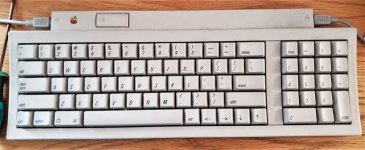 | |
| Posted by: PotatoFi on 2018-12-10 12:58:33 That's the exact keyboard that I just retrobrighted! Maybe the photo is deceiving... but yours looks nice and white. It looks about the same as mine does, post-retrobrite. Before: 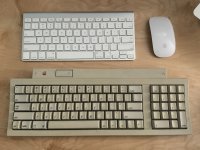 After: 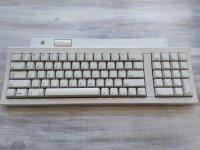 Based on that, do you think your keyboard still needs it, or is your photo playing tricks on me? | |
| Posted by: mraroid on 2018-12-10 13:37:03 my photo did not show the yellow as much as it should. But I thik I will worry about the keyboard later and just get my case done. mraroid | |
| Posted by: PotatoFi on 2018-12-10 13:52:40 I would recommend doing the keyboard first, seems like lower-risk. I'm SUPER close to having a video done to walk you through the process if you're willing to wait a few days. I've been tied up on my own Macintosh SE. 🙂 | |
| Posted by: mraroid on 2018-12-11 08:05:53 PotatoFi.... I will wait until I can see your video. No rush. I live in Oregon USA, the land of no sun until maybe April 2019. So I can do it indoors under lights maybe? If not, I will wait until the sun comes out. Thanks for your help, mraroid | |
Posted by: LaPorta on 2018-12-11 10:33:08That's the exact keyboard that I just retrobrighted! Maybe the photo is deceiving... but yours looks nice and white. It looks about the same as mine does, post-retrobrite.Did you inadvertently put your power key in backwards? | |
Posted by: PotatoFi on 2018-12-11 10:54:50Did you inadvertently put your power key in backwards?Haha nice catch! Looks like I did. Luckily that is a very easy fix. | |
| Posted by: mraroid on 2018-12-11 11:05:58 Wow! It has always been that way. I will fix it. Thanks for the help! mraroid | |
| 1 |