68kMLA Classic Interface
This is a version of the 68kMLA forums for viewing on your favorite old mac. Visitors on modern platforms may prefer the main site.
| Click here to select a new forum. | |
| chime of death with D2 signal looking weird - any ideas? | |
| Posted by: Boris Bokowski on 2018-11-23 00:28:11 I'm trying to repair an SE/30 that didn't start at all (black screen). I've made some progress - after recapping, cleaning the board, and replacing UD8 and UE8 which were badly corroded, I get chimes of death and the screen is showing a checkerboard pattern with a few vertical lines, looking exactly the same as from this post: https://68kmla.org/forums/index.php?/topic/53785-se30-simasimaclinesno-video-trying-to-fix-it/&do=findComment&comment=573411 I've checked all the address and data lines for continuity, plus the signals that arrive at the RAM SIMMs, and found no broken traces. Using an oscilloscope, I looked at the address and data lines arriving at the RAM, and found a few data lines that look weird (see picture). For example, D2 sometimes doesn't reach the right levels. This is not happening all the time, but most of the time, and shows up on other data lines as well (D12, D22, D26). I get the same picture whether or not RAM is installed; if I remove the ROM, the address lines look reasonable but (as expected?) nothing happens on the data lines at all. Any ideas? 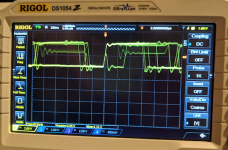 | |
| Posted by: dochilli on 2018-11-26 00:54:38 Could be the multiplexers. I had a similiar problem, changed the F258 and had success. | |
| Posted by: Bolle on 2018-11-28 00:05:12 What would the RAM address multiplexers have to do with the data lines? You can also check termination diodes D4 to D19 on the back of the board. If they go bad and short out the data lines will leak to ground. | |
| Posted by: Boris Bokowski on 2018-11-28 00:17:57 Thank you for your responses and ideas. I was also wondering how the address multiplexers could have anything to do with the data lines, and have checked the diodes but they seem fine. I've replaced the 68030 to see if there was anything wrong with it, but that didn't change anything. My latest discovery is that the signals on certain address lines (specifically RABF6, RABF9, RABF10) do correlate with the reduced voltage seen on D2. Perhaps some more cleaning of the board? | |
| Posted by: Boris Bokowski on 2018-11-28 00:24:58 Here's what this looks like on the scope (D2 yellow, RABF6 cyan): 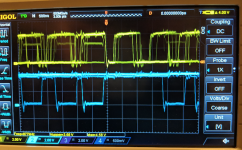 | |
| Posted by: Bolle on 2018-11-28 00:27:56 Weird. Dumb question: you did try different RAM or at least swapped banks A and B? What happens with only Bank A populated? | |
| Posted by: Boris Bokowski on 2018-11-28 01:57:39 Yes, I've tried different RAM; also I forgot to note that my measurements were taken without any RAM SIMMs in the board. | |
| Posted by: techknight on 2018-11-28 18:00:43 Something is loading those lines down. Probably cap goo in the board itself, or a short somewhere. Check the resistances and capacitances on each data line, to each of the rails (GND/5V) and compare/contrast. | |
| 1 |