68kMLA Classic Interface
This is a version of the 68kMLA forums for viewing on your favorite old mac. Visitors on modern platforms may prefer the main site.
| Click here to select a new forum. | |
| My Portable is up next... | |
| Posted by: LaPorta on 2018-11-10 20:02:24 Hey everyone, After completing my Mac II, now I am turning my efforts to my Mac Portable. Over the years it slowly stopped working (bad caps, no doubt), and I am setting out to get it going again. First, I am looking to make a stealth battery...namely, a new lead acid cell in the original's shell. I am sure someone has done it before...if anyone has info, let me know, otherwise I am going to start this from scratch. | |
| Posted by: Westinghouse on 2018-11-15 19:30:05 [No message] | |
| Posted by: LaPorta on 2018-11-16 12:28:36 Thanks...looks like a hell of a time. Will the acetone not somehow destroy the battery label on the original case? Don’t want to mess it up. I got a new one to drop in already. got my caps from mouser, but some were too big in diameter (my fault). Those should be in over the next two days. | |
| Posted by: LaPorta on 2018-11-16 19:00:29 Ok, that’s the last time I use a half-baked idea for another post. Look what happened to my battery after 1 seconds in acetone (let alone the recommended 4 hours). Now it’s ruined. 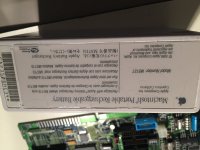 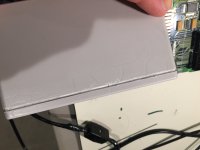 | |
| Posted by: LaPorta on 2018-11-18 10:09:12 The I finished the recap. It appears my new 6V battery does not have enough continuous amps to run the thing (says 1.8 amps at start). I’ll have to get another. Seems something else isn’t working, however. I did get it to power up with the regular AC adaptor and battery combined. Startup chime was clear. Died when the HD started up, though, so I figured not enough amps for that. Started up with just the floppy drive. The video is all distorted, horizontal and vertical random lines, weird stuff. However, it did start from a system floppy. The disk was read and sounded like it started up. Pressing command-E appropriately ejected the disk, so I know at the very least it got to the Finder and the processor, RAM, floppy drive, etc. are working. Now...what could be the video issue? I hooked up an external monitor, and that did not work, either. Could the video circuitry be bad? This Portable was previously powered with a 3A PowerBook adaptor, could this have fried something? Where should I look? As an aside, any specific battery anyone could recommend as a replacement, possibly from Amazon? | |
| Posted by: M235i on 2018-11-19 04:14:35 I think there is/was a service that would either refurbish or retrofit Mac Portable batteries. The name totally escapes me right now, but i'll see if I can track it down. I know there is some (understandable) doubt about sending our Apple stuff out to an external 3rd-party, but it since the battery is already dead, I guess it would be worth the shot. | |
| Posted by: LaPorta on 2018-11-19 06:14:10 That’s interesting...I’m heading to a dedicated battery store today to get a direct replacement. My real issue is the video problem. Is it because of some sort of power management issue, or is the video processing system damaged somehow? Are there caps that directly influence this that I may have not installed properly/may have been bad? Any suggestions are welcome. | |
| Posted by: ScutBoy on 2018-11-19 08:30:09 Member Alaska360 makes a replacement in a 3d printed case. He has - or at least had - them on eBay. I have one in my Portable and it works great. | |
| Posted by: Johnnya101 on 2018-11-20 12:33:52 Can also confirm that Alaska's batteries are nice. Just dont forget to charge it often! Mine went dead after a year of no use. | |
| Posted by: LaPorta on 2018-11-20 19:18:04 Well...hot damn. Picked up a compatible Cyclon battery, and she works. I modified the battery connections to make it easier to connect. The screen stuff appears to be a touchy connection that I can’t pinpoint, but it is working now. The Connor HD spins up, but there is nothing coming up and there is nothing available on SCSI scan (it’s probably shot). I have this other issue that has plagued this machine from the start: unless the contrast is set all the way up, or all the way down, the screen has rolling vertical lines up and down...what might cause that? now looking to pop a SCSI2SD in here...  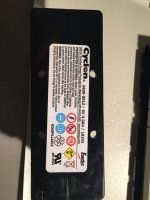 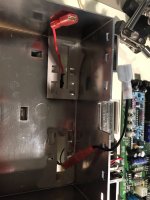 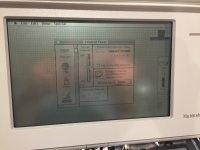 | |
| Posted by: LaPorta on 2018-11-21 21:54:49 I got some good photos of my “comes and goes” graphics glitches. Would something loose cause this? It doesn’t appear to be the screen itself. Most of the time it’s perfect, like the last picture. Sometimes it seems to be after power has been removed for a bit. 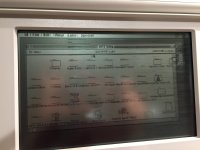 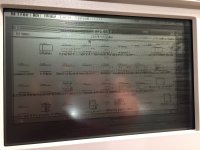 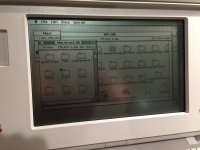 | |
| Posted by: LaPorta on 2018-11-21 22:08:31 Even more weirdness...it appears to only happen in and off when my SCSI drive is attached at the external port. It appears to more be the weight of the cable (as it gets far worse if I tilt the machine back and the cable bends, making the picture totally distorted). If so, is something back there being bent by the weight of the cable, like a bad solder joint? Any suggestions? | |
| Posted by: techknight on 2018-11-22 11:00:50 You probably have an intermittent Via or maybe the solder joint at the Video IC. the Video IC sits between the PMU and the sound chips. | |
| Posted by: Juror22 on 2018-11-22 19:09:29 I'm glad someone is helping you with the video issue. I know this is a bit late to help you with your battery, but there are better ways to separate the battery halves than soaking it in nail polish remover (acetone). Using a tiny amount pipetted into the seam helped me to separate my portable batteries cleanly and quickly. I had also read about the soaking thing, but having worked with acetone before, I knew that was not the way to go. You can also thin it out with alcohol, so that it is weaker and works more slowly (read easier to control the effects). | |
| Posted by: LaPorta on 2018-11-22 19:13:29 So, i re-flowed every pin on the VIA and VIDEO ICs. Still giving me issues. I performed continuity tests between every neighboring pin, no shorts. It appears that torquing part of the board is what makes this happen. I’m uncertain as to find what it is that is causing it. Could it be a bad trace that is intermittently connecting? Lifting up the right side of the machine makes it happen, so it just has to be something there. Any other solder joints that might cause this? You can see in the first pic, after I lifted the front right corner...the lower, lifting the rear right. 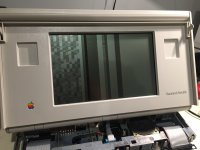 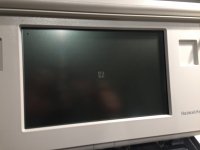 | |
| Posted by: techknight on 2018-11-23 09:24:02 Thats what I was trying to say. its either a Via or a solder joint. Since you took care of the solder joints, then its likely a trace/via. And the most likely damaged area would be near where the 3 47uf caps used to sit, to the corner of the video IC. | |
| Posted by: LaPorta on 2018-11-23 09:27:17 Thanks...I’ll take a look there. Perhaps my solder job wasn’t the finest. as an aside, any insight into the rolling vertical lines I experience when the contrast is anywhere but 100% or 0%? That was happening when I got it over 18 years ago, so it’s nothing new. | |
| Posted by: LaPorta on 2018-11-23 19:50:08 Techknight, thanks to you, I pulled the three caps, found a slightly exposed trace, and coated over it. That plus better sized caps that I put in, and the issue is gone. Thank you very much! The final thing is that contrast issue... | |
| Posted by: techknight on 2018-11-27 15:39:48 next to the right hand side keyboard/mouse connector, there are 2 small SOT23 transistors. That drives the contrast waveform on the LCD panel. the LCD panel itself can do this, or noise in the contast PWM signal will do this. I think there is a couple smoothing caps there that need checked. You can check those transistors as well for opens or shorts. I will have to go back and take a look at the schematic to give you exact part number locations. | |
| 1 > |