68kMLA Classic Interface
This is a version of the 68kMLA forums for viewing on your favorite old mac. Visitors on modern platforms may prefer the main site.
| Click here to select a new forum. | |
| Need to get my floppy drive out | |
| Posted by: Blake on 2018-10-04 09:17:05 I need to get in my macintosh plus to fix the floppy drive, can someone send me instructions on how to get it out, ive been haveing a hard time finding them. Can you also send me instructions on how to diacharge the crt | |
| Posted by: MOS8_030 on 2018-10-04 15:07:28 http://www.maccaps.com/MacCaps/Repair_books.html Download the Dead Mac Scrolls and Macintosh Repair & Upgrade Secrets. | |
| Posted by: bibilit on 2018-10-04 23:45:50 Remove the logic board first, then remove the floppy drive unit (4 screws present in the chassis) | |
| Posted by: Zippy Zapp on 2018-10-05 09:28:27 Here is a link to the service manual: http://tim.id.au/laptops/apple/legacy/macintosh_plus.pdf | |
| Posted by: Blake on 2018-10-12 08:32:20 Will it be nessary to discharge the crt tough? i got it open and it looks like i can easly avoid it | |
Posted by: Retro Rider on 2018-10-12 08:55:39Will it be nessary to discharge the crt tough? i got it open and it looks like i can easly avoid itIf you just need to fix the floppy drive? Then, no. You just need to remove the logic board (here's a video, it starts where he's removing the logic board) then just unscrew the screws on the bottom of the floppy drive cage (see picture) then you just remove it. I really recommend checking out this page because it tells you how to clean the floppy drive for the Mac Plus. Also, be careful with the screws that hold the cage and the drive together. they can be very hard to unscrew 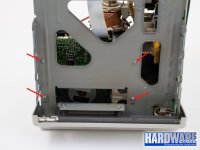 | |
| Posted by: Blake on 2018-10-12 09:12:11 Ok thank you very much i will be shure to start working on my mac when i get home | |
| 1 |