68kMLA Classic Interface
This is a version of the 68kMLA forums for viewing on your favorite old mac. Visitors on modern platforms may prefer the main site.
| Click here to select a new forum. | |
| System Saver And Hard Drive Enclosure | |
| Posted by: MacintoshMan1999 on 2018-09-27 01:37:53 I recently acquired a Kensington System Saver and a fairly unique hard drive enclosure, I was wondering if there is a way to match the color of my platinum plus to the beige color of the fan. The Ehman Hard Drive enclosure seems to be unique to me, but maybe it’s not. The Ehman name seems to not be common, but again it might not be It has 2-grounded AC sockets on the back and a small clear window on the bottom. Thanks, Jack | |
| Posted by: MacintoshMan1999 on 2018-09-29 14:05:08 I just got the Quantum Grand Prix 2GB hard drive I ordered in the mail, could anyone please give me some advice and/or tips to install it? Thanks, Jack 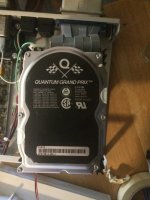 | |
| Posted by: olePigeon on 2018-09-29 16:37:43 Ehman made all sorts of things back in the day, from monitors to video cards and hard drives. Unless the hard drive has an Apple ROM, you'll need a 3rd party utility to erase it and set it up to work with your Macintosh. Something like FWB Hard Disk Toolkit or Lido will do the trick. | |
| Posted by: MacintoshMan1999 on 2018-09-29 17:16:47 Alright, where would I get such software? Would here be good? https://rescuemyclassicmac.com/buyadisk/buyadisk.html | |
Posted by: MacintoshMan1999 on 2018-09-29 17:19:01Unless the hard drive has an Apple ROM, you'll need a 3rd party utility to erase it and set it up to work with your Macintosh. Something like FWB Hard Disk Toolkit or Lido will do the trick.The hard drive came wiped | |
| Posted by: MacintoshMan1999 on 2018-09-29 17:33:55 A couple more things, the case are has a SCSI ID dial on the back that goes 1-9 then 0. But I’m not sure where it’s supposed to connect to. The drive perhaps? But the drive has no connector where the SCSI ID selector could plug in. The drive came with only one jumper on the back, is there supposed to be more than that? Thanks, Jack | |
| Posted by: olePigeon on 2018-09-29 19:35:13 https://www.seagate.com/files/staticfiles/maxtor/en_us/documentation/quantum_jumper_settings/grand_prix_scsi_jumpers.pdf On the circuit board side of the drive, you'll see a jumper area (A0, A1, A2.) Typically the SCSI case should have a jumper block connected to the rotary dial. You connect the jump block to the jumpers as shown in the PDF. Hopefully it's the correct size. If not, then you can just put regular jumpers in there and set the ID manually. The rotary dial probably ignores 8 & 9, only 0-7 matter. | |
Posted by: Dog Cow on 2018-09-30 08:55:54Alright, where would I get such software?That site is for people who have no friends. A friend here at 68kmla can send you some disks. I'll do it if no one else does. | |
| Posted by: Trash80toHP_Mini on 2018-09-30 11:58:25 What oP said. :approve: Ehman Engineering is a fairly common name from the ZFP peripherals era. Does your drive look like something from the IBM PC or PC AT family cases? Got pics? | |
Posted by: MacintoshMan1999 on 2018-09-30 14:29:23What oP said. :approve: Ehman Engineering is a fairly common name from the ZFP peripherals era. Does your drive look like something from the IBM PC or PC AT family cases? Got pics?I wish, those looked cool! But anyway here are some pictures: 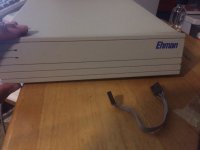 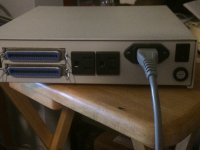 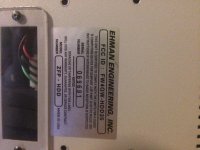 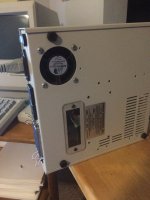 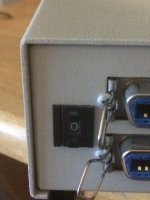 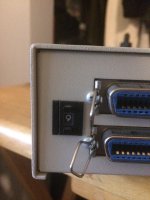 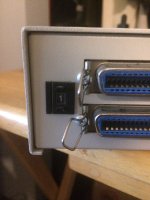 | |
Posted by: MacintoshMan1999 on 2018-09-30 14:35:08https://www.seagate.com/files/staticfiles/maxtor/en_us/documentation/quantum_jumper_settings/grand_prix_scsi_jumpers.pdfHere are some pictures of the cable: The flat end goes to the dial The rectangular one? I’m not sure. 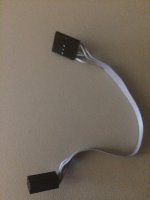 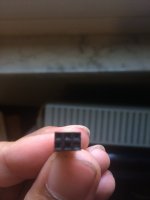 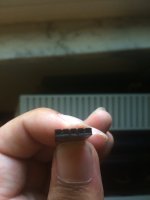 | |
Posted by: MacintoshMan1999 on 2018-09-30 14:39:47https://www.seagate.com/files/staticfiles/maxtor/en_us/documentation/quantum_jumper_settings/grand_prix_scsi_jumpers.pdfForgot to add pictures of drive: 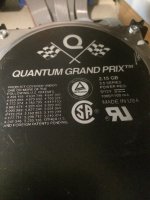 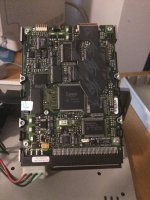 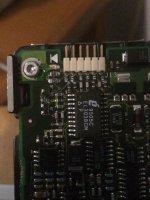 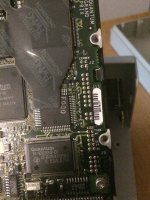 | |
| Posted by: olePigeon on 2018-09-30 15:18:18 Connect the 6 pin block to the A0-A3 pins near the front of the drive. Looks like yours is slightly different from the manual. Then 5 pin end goes to the rotary dial. | |
Posted by: MacintoshMan1999 on 2018-09-30 15:42:49Connect the 6 pin block to the A0-A3 pins near the front of the drive. Looks like yours is slightly different from the manual.Here? 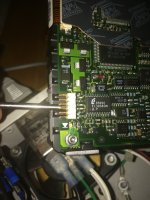 | |
| Posted by: olePigeon on 2018-09-30 16:55:20 Yes. If you look closely behind the jumpers, you'll see little white letters. They'll say A0, A1, A2, and (A3) (you don't need A3 since yours isn't 68-pin SCSI.) Connect the block to the A0-A2. You might have to flip it the other direction if the IDs don't correspond to the rotary. | |
| Posted by: Trash80toHP_Mini on 2018-09-30 17:50:23 Nice looking case. Looks like you've got a 3.5" drive in an Ehman branded (front bezeled) generic 5.25" HDD enclosure. Clear windows were commonly used to install/remove SIP termination resistor strips. What lucky Compact will be raised to a more ergonomically correct height atop your ZFP HDD? | |
Posted by: MacintoshMan1999 on 2018-09-30 18:18:54Yes. If you look closely behind the jumpers, you'll see little white letters. They'll say A0, A1, A2, and (A3) (you don't need A3 since yours isn't 68-pin SCSI.)Well, the cable doesn’t seem to be long enough to reach. I’ll try... | |
| Posted by: Trash80toHP_Mini on 2018-09-30 22:08:09 Switch/cable/box are for a 5.25" drive so you'll have to modify something because the 3.5" drive is set too far forward. Easiest solution would be to set the ID with jumpers. If it came with a single jumper installed, it's because the cable was too short and the drive was set to SCSI ID 1, 2 or 4 depending on position. edit: forgot about that switch pic. If it was set to "1" when you got it, the jumper was likely shorting A0 and the readout was set to match the header ID setup. | |
| Posted by: MacintoshMan1999 on 2018-09-30 22:58:16 The jumper wasn’t setting the SCSI ID (at least I think), the drive came with the jumper across EP (Enable Parity). Do I need that setting? Because right now it’s going across TE (Terminaton Enable). I’m thinking I am going to need 1 or 2 more jumpers. Whenever I try to initialize the HD the Mac doesn’t see it, the Mac always says it failed to find a suitable hard drive even though it’s wired to the SCSI port. | |
| 1 > |