68kMLA Classic Interface
This is a version of the 68kMLA forums for viewing on your favorite old mac. Visitors on modern platforms may prefer the main site.
| Click here to select a new forum. | |
| Any ideas on how to remove this SE logic board | |
| Posted by: OleLila on 2018-09-25 12:11:15 This is my first post on the forum and despite searching here and elsewhere, I have not been able to locate anyone with this issue. I like to think it is because I have a rare machine here, but the answer maybe obvious. Regardless of outcome, I just do not like the thought of an unusual find leaking caps and battery to the point of no repair. I had obtained a Macintosh SE with a Radius full page display and Radius accelerator (version 1.8) about 9 months ago. I thought when it arrived I would take the logic board out, remove the battery and maybe recap it. On opening the case I found I can remove the video card portion of the radius expansion, but there is also an accelerator board that lies on top of and parallel to the original main board. I can't imagine how they put this together without either major flexing of the accelerator board or taking the frame apart then spot welding it back together. The slot on the accelerator card for the video card protrudes through the metal frame, it does not allow the main board to slide enough to clear the tabs for removal. Below are some pictures, I think the second one shows the primary issue, if you can imagine trying to take out the SE's logic board and having that slot butt against the frame. I've had this machine apart several times and if there is a simple answer, I'm ready to hear it. Thank you. 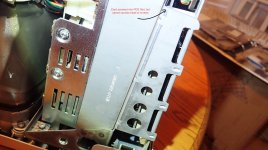 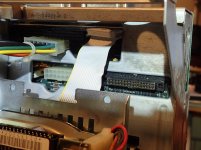 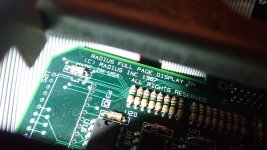 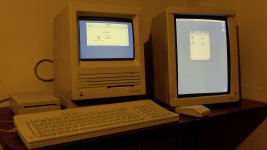 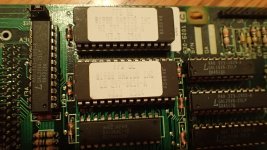 | |
| Posted by: Realitystorm on 2018-09-25 12:41:13 I have an SE too. The board doesn't need to slide out completely, there are notches and tabs, sliding the board back about an inch should line up the tabs and the notches letting you remove the board. See page 14 http://www.ccadams.org/se/MacSEservice.pdf | |
| Posted by: Crutch on 2018-09-25 12:41:21 My SE/30 logic board won’t slide at all either without knocking down the custom ROM I have which is slightly too tall. I always just GENTLY pry the metal guides on the right (power supply) side back just slightly with a screwdriver and just angle it out. No sliding necessary. I’d think if you do that you can get at the screw heads to unscrew the PDS card? | |
| Posted by: EvilCapitalist on 2018-09-25 13:27:52 I've got an accelerator in my SE as well and the only way to get the board out is to do like Crutch said, you have to *gently* pull the frame holding it outwards (away from the board) and then angle the motherboard so you can drop it straight down. It's not an easy process, especially when you're trying to put everything back together, but so far as I know that's your only option. | |
| Posted by: OleLila on 2018-09-25 13:41:14 Great. Thank you...I will try the gentle prying of the steel frame and post results. | |
| Posted by: trag on 2018-09-26 14:16:25 Gently prying the frame was the recommended installation method in at least some of the upgrades' manuals. | |
| Posted by: OleLila on 2018-09-26 16:29:38 Nice...not sure how gentle...I'd say very, very firm sustained traction with a third hand to pop out the board. Thank you very much for the quick responses. Now have to find the time to recap...I did not appreciate leaking from the battery or capacitors. 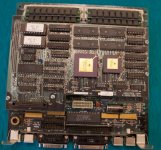  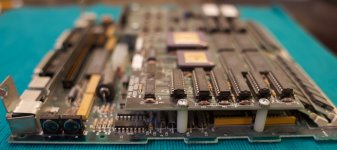 | |
| Posted by: Bolle on 2018-09-27 21:42:09 SEs logicboards usually don’t need a recap. I’d say get the battery out and leave it the way it is as long as everything works. The power supply however might need new caps. | |
| Posted by: ArmorAlley on 2018-09-28 03:15:59 I have 2 SEs, both with batteries affixed in them. Can I just snip the cables at either side of the battery and leave it like this or will this cause damage? | |
| Posted by: Bolle on 2018-09-28 03:48:38 Yep, just cut them. Take care not to scratch the logicboard while doing so but that's about all the damage that could possibly happen. | |
| 1 |