68kMLA Classic Interface
This is a version of the 68kMLA forums for viewing on your favorite old mac. Visitors on modern platforms may prefer the main site.
| Click here to select a new forum. | |
| SCSI2SD external cable type? | |
| Posted by: bilbomacuser on 2018-09-22 08:16:41 I just got a SCSI2SD v5.1 and connected it to the internal SCSI cable in my Macintosh LCII. I booted from the System 6.7 startup disk, and from the System 7.01 disk tools disk, and in both cases it tells me that it cannot find any SCSI devices. I've set up the card with the suggested drive name/ID. I'm wondering whether it's because the disks are too old, so I was going to try connecting it via the external SCSI port of a Performa 7100. I have the adaptor for the SCSI2SD, but when I looked through my old SCSI cables I discovered they were also DB25 to Centronics 50 (I think). I assume I need Mac SCSI DB25 to DB25 (male to male) - but haven't been able to find such a think. Am I correct in thinking this is the cable I need? Without the external SCSI cable, is there anything else I should try? I don't have an easy way of getting the modified SCSI utility onto a floppy disk, but from what I've read if the appropriate device name/ID are used then it shouldn't matter. | |
| Posted by: Zippy Zapp on 2018-09-22 08:38:26 Hello, I would try some other combinations of name/ID. Apparently they have to be exact. I know Seagate works as most, if not all of my Seagate SCSI drives are seen by the Disk Tools and Drive Setup apps without patching. As for the Cable, yes you will need a DB25 to DB25 SCSI cable. Zip drives, and other devices used this cable. Also the V5.1 has a terminator that is software controllable. Did you configure the termination? | |
| Posted by: bilbomacuser on 2018-09-22 08:53:26 Thanks. Your reply has prompted me to have another look at the settings. I've discovered it's still showing the default settings (vendor codesrc) so presumably it didn't save the settings that I entered. I'll have another go. Updated: I now see that you have to "Save to device". Updated: It now recognises it! Many thanks. | |
| Posted by: tanaquil on 2018-09-22 14:10:50 If anyone else reads this thread and has similar problems, the recommended Seagate settings didn't work for me at all but generic Quantum Fireball settings did. SCSI2SD voodoo... Glad you got yours working. | |
| Posted by: bilbomacuser on 2018-09-22 14:28:54 Thanks for the reply. Actually, it could see the SCSI drive, but I'm now getting "Format verification failed". I've tried 2 different 4GB SD cards, with the limit set to 2GB. I wonder if I should try the Quantum Fireball settings? What happened when you used the Seagate settings? | |
| Posted by: tanaquil on 2018-09-22 15:54:00 When I used Seagate settings, I could never get the computer(s) to recognize the drives at all. I have no idea why. You could try setting one of the drives at something lower than 2GB, as well. I've heard that can help. In my case I don't recall that it made any difference. | |
| Posted by: Zippy Zapp on 2018-09-22 20:10:42 Glad you got it working. Like @tanaquil mentioned, I would also make a smaller drive. Start with something smaller like 500MB and see if that works. | |
| Posted by: bilbomacuser on 2018-09-22 23:48:17 Thanks I'll try the smaller drive setting. From what I've read, if the drive is set to larger than 2GB it will allow you to make up to 8 2GB partitions - so at least in theory a drive size or 2GB (or more) shouldn't be a problem. But I'll try it anyway. I'm using a 4GB SD card, so I could set up 4 x 1GB drives. This link was mentioned in another thread: http://chrislawson.net/writing/macdaniel/010219cl.shtml Interestingly the Apple utility didn't recognise the drive when I set it to Quantum Fireball. | |
| Posted by: bilbomacuser on 2018-09-23 01:34:41 So, using poor troubleshooting technique, I reduced the device size to 1GB AND changed quirks mode from None to Apple - and now it works. I don't think I'd read anywhere that you need to change the quirks mode setting - but presumably it makes sense! I've installed Leopard onto a USB memory stick so I'll now see if that can read/write to the SD card to copy software on! | |
| Posted by: bilbomacuser on 2018-09-23 01:48:45 Random question: is there a way, or if so, what is the best way to make disk images of floppy disks in System 7.0.1? Also is there a System 7 utility that can create floppy disks from disk images? | |
| Posted by: tanaquil on 2018-09-23 05:14:35 Glad you got it working! As for the Apple utility, I have had mixed success even with the patched version of HD setup and always use Lido now. Disk Copy 6 can mount images to desktop, and either DC 4 or 6 can write them to physical disks, but you have to do the writing on a computer that had the capability to write floppies built in - the cutoff was around the G3 era. (Edited because I initially misread your question, but anyway Disk Copy 6 is what you want for greatest flexibility. DC 4.2 is recommended if you are making archival copies from original floppy disks. DiskDup and ShrinkWrap are also useful.) | |
| Posted by: ben68 on 2018-09-23 07:26:56 I'd love to see a step by step of what you did. I still have an SCSCI2SD that I need to install and will likely run into all the same problems you did! | |
Posted by: bilbomacuser on 2018-09-23 08:33:03I'd love to see a step by step of what you did. I still have an SCSCI2SD that I need to install and will likely run into all the same problems you did!So as far as I recall, the following should work 1). Download the latest version of scsi2sd-util and if necessary the latest firmware (mine already had 4.8.0 on it) 2) Plug into my modern Mac using a USB cable and insert SD card 3) Set Quirks mode to Apple, then as per the Thread "Fitting a SCSI2SD in a 68k Mac" I did these steps: Set the vendor to the string " SEAGATE" (yes, there is a single space in front of SEAGATE for a total of 8 characters) Set the product ID to the string " ST225N" (10 spaces in front for a total of 16 characters) Set the revision to the string "1.0 " (with a space after, for a total of 4 characters) I kept SCSI ID as 0, as it was the only SCSI device 4) Set Size to 1GB (2GB hadn't worked previously with 4GB SD card - but it might be because I hadn't set the Quirks Mode to Apple prior to that) 5) Something not mentioned anywhere that I had read (perhaps too obvious?) - Choose File > Save to device (and similarly in future if you want to edit the settings choose File > Load from device 6) Unplug from USB, plug into SCSI 7) Boot the 68K Mac from floppy drive (I had success with my 7.01 disk tools, not a patched version) 8) Open HD SC Setup utility, it should recognise there is a SCSI device 0, and select initialise. 9) I then rebooted from the 6.0.7 startup disk and ran the installer (my 7.0.1 installer disk 1 didn't work - presumably the floppy disk is failing) I was subsequently able to remove the SD card, and put it into a USB SD card reader, plug it into a Core2Duo MacBook running Mac OS X Leopard 10.5 (from a USB memory stick!) and it could read and write to the SD card to copy files from my modern Mac. | |
| Posted by: ben68 on 2018-09-23 08:50:37 Awesome - thanks! | |
| Posted by: bilbomacuser on 2018-09-29 10:52:29 Back to my question about cables - is a 'fully wired' DB25 male to DB25 male cable suitable for both parallel and SCSI? There seems to be lots advertised as parallel cables, but some say also suitable for Zip drives. | |
| Posted by: dochilli on 2018-09-30 03:34:33 For my version 5 SCSI2SD I used the configuration shown in the pictures. Adapter: http://amigakit.amiga.store/product_info.php?products_id=1290 The cable is a 25 dsub (male-male, pin to pin) Enclosure: https://www.thingiverse.com/thing:1131419 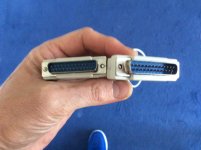 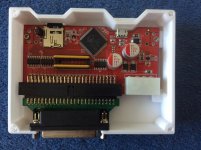 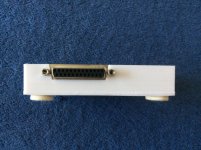 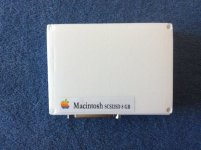 | |
| Posted by: olePigeon on 2018-10-01 12:45:27 That turned out great. 🙂 | |
| Posted by: ben68 on 2018-10-01 13:28:55 Yes - that's what I want to do too. I found an empty external SCSI enclosure that I'd like to try to use with the SCSI2SD. I think that will work - but won't look as great as a custom one. Straight through parallel cables should be easy to find at a thrift store and easy to validate with an ohm meter. | |
| Posted by: LaPorta on 2018-10-03 02:44:29 That's really nice! How are you powering it? Is the Micro USB port accessible? It didn't look like it in the picture. Heck, I hooked mine up to a gutted internal SCSI ribbon cable that had a female 50 pin connector at the end, to a cable that had 50-25 pin ends...worked fine. I had similar issues that you did, and enabling Apple mode also solved my problems. How did you make that enclosure...and can we order them? 😉 | |
| 1 > |