68kMLA Classic Interface
This is a version of the 68kMLA forums for viewing on your favorite old mac. Visitors on modern platforms may prefer the main site.
| Click here to select a new forum. | |
| PowerBook 1400 CD ROM | |
| Posted by: AlpineRaven on 2018-08-07 05:23:20 G'day all, I have 4x PowerBook 1400 CD ROM drives and neither works. What options do I have and does anyone know direct replacement for those? Any suggestions to get them working again? Cheers AP | |
| Posted by: Byrd on 2018-08-07 17:41:49 Hi AP, I vaguely recall the only drive that lined up was a Toshiba drive from the same era (as found on Toshiba Satellites), but I'll have to look into that more 🙂 Clean the drive lens and see if there is a pot to adjust the laser in the mean time | |
| Posted by: pb3623 on 2018-08-24 11:08:37 @AlpineRaven Do you want to sell one or two of them? If for no other reason, I want to get rid of the gaping hole on the front of the two I have 🙂 | |
Posted by: bibilit on 2018-09-05 08:08:12there is a pot to adjust the laser in the mean timeYes a pot is present, done it a couple of years ago on mine, worked fine, but never used the CD-Rom again after that... | |
| Posted by: bibilit on 2022-10-10 01:58:43 Anyone has found a replacement unit for the original CD-Rom ? tried this week some units i had lying around, didn't work. The Original unit is a Teak CD-211 | |
| Posted by: MacUp72 on 2022-10-21 02:37:35 I would like know this, too..if the bezel fits is a another question. | |
| Posted by: MacUp72 on 2022-10-27 23:10:41 Yesterday I disassambled the drive and it appears to be a quite 'standard' IDE drive. the front bezel is is attached with three small screws and reveal three special locations for the bezel mounting holes.. I have not seen this on many drives. Other than that it appears that it could be repleced with any more modern -CR/DVD/ multi drives as long as they are IDE. (In order to identify a matching drive it is necessary to see the front part without any bezel). | |
| Posted by: 3lectr1cPPC on 2022-10-28 11:24:28 I’ll bet you could 3D print new clips that line up with the new drive and glue them to the old bezel (this would require removing the originals though). | |
| Posted by: nickpunt on 2022-10-29 14:25:47 This might help: https://web.archive.org/web/20150313024727/http://home.comcast.net/~macdan/ebms.html | |
| Posted by: MacUp72 on 2022-11-05 04:10:34 I now swapped the old 1997 Teac CD 211 E against a 2000 Teac CD 224 E, but it does not work. The 224 E is working, a perfect drop-in replacement, the bezel fits exactly. But the 1400 does not even boot with it in, when I swap the drives for each other, the system just freezes. | |
Posted by: MacUp72 on 2022-11-05 05:54:15This might help: https://web.archive.org/web/20150313024727/http://home.comcast.net/~macdan/ebms.htmlI wonder what the author meant by M/S/CS mod?..a little mods sounds fine to me👍 "Some CD-224e mechanisms apparently need the M/S/CS mod and others don't. There are a number of revisions of the CD-224e, the revs are named in the form ' - A43'. I don't know which is the ideal rev, sorry, however AFAIK, all will work with either no mod or a minor mod." another thing, are there any working solutions for an 16Bit PcCard-to-USB? | |
| Posted by: bibilit on 2022-11-05 08:23:31 Master/Slave/Cable Select. The PowerBook CD-ROM should ne set as Master. a mod should be done shorting two pins in the connecting board to get it working. if not, yes, your issue there. I have a Belkin pc card to usb, but not 16 bit IIRC | |
| Posted by: Fizzbinn on 2022-11-05 15:03:23 I did this a while back for my PB1400 to get a Compaq branded new old stock CD-224E working. The drives made for Apple apparently had the ATA master bus "jumper" set internally. Some PC targeted devices do have jumper settings exposed but without that adding this solder bridge (Pins 45 & 47) on the adapter board sets the drive to master externally and allows you to use non-Apple branded drives. Here's mine: 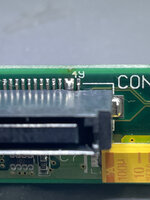 I originally found info on this here (original page is gone but its in the Internet Achieve ): (Looks like is just another page on the achieved site @nickpunt posted above, @MacUp72, this is "the mod") This issue applies to other PowerBooks as well, the page is specifically talking about doing this to use generic ATA CD-RW and DVD drives in PowerBook G3 Lombard (1999) and Pismo (2000) models. Hope this helps! | |
| Posted by: Byrd on 2022-11-05 22:41:56 Recently pulled apart a Toshiba Satellite 4030CDT which has the same Teac CD 224E branded drive - saving it for that rainy day when my 1400 optical drive dies. | |
Posted by: MacUp72 on 2022-11-06 07:22:12I did this a while back for my PB1400 to get a Compaq branded new old stock CD-224E working. The drives made for Apple apparently had the ATA master bus "jumper" set internally. Some PC targeted devices do have jumper settings exposed but without that adding this solder bridge (Pins 45 & 47) on the adapter board sets the drive to master externally and allows you to use non-Apple branded drives. great, thanks.. it worked, I soldered pins like yours, set my HD to master/slave on the IDE-CF adapter and it booted. Now the CD drive is listed correctly in the profiler, named CD-224E 😎.. | |
| Posted by: MacUp72 on 2023-02-20 12:38:01 I restored another 1400cs, it came without a CD drive..today I got an old stock CD module, a slower 8x one..interestingly it has a different connector on the back, name is TEAC CD-48E 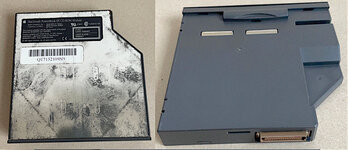 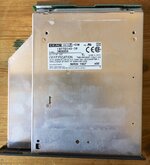 the connector board on the back is set onto a vertical IDE connection board.. the connection itself is the same as the faster model. 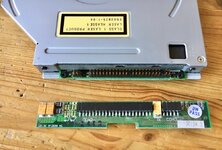 | |
| Posted by: MacUp72 on 2023-02-22 03:54:35 I dont know how to set this as Master with a solder mod..there are no pins clearly marked on the board.. this doesnt help very much either, the author just installes an additional HDD into the bay | |
| Posted by: MacUp72 on 2023-02-23 02:57:16 I now took a deeper look into the drive.. 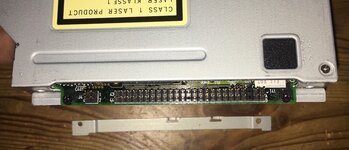 back connector, the board has more connector pins than an IDE hdd has, on the right end left there are groups of pins that dont connect to the board 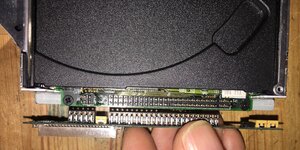 front and back of the transfer board 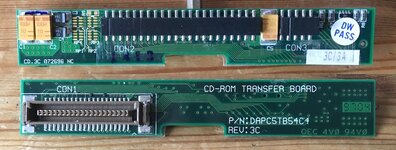 | |
| Posted by: MacUp72 on 2023-02-23 03:02:52 the circuit board inside, on the upper right you can set up a jumper on three positions (but it dindnt make a difference on selection?) 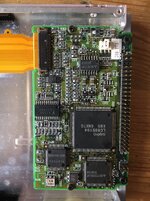 ..and while we are here I repaired the broken off attachment studs of the front bezel. I cut some thin aluminium and dremeled two holes in it, screwed them onto the stand offs, it worked..rock solid. 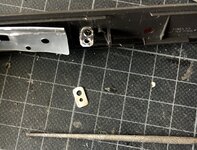 | |
| Posted by: avadondragon on 2023-02-23 05:15:50 J1 looks like the standard 2.5" ide drive interface. If it is, then the M/S/CS jumper settings will be over on the 4 pins next to where it is labeled AB. Here's a picture: 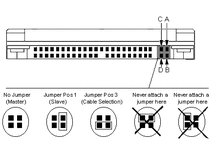 Edit: Just looked at that link you posted. Yep that's definitely the standard 2.5" ide connector. | |
| 1 > |