68kMLA Classic Interface
This is a version of the 68kMLA forums for viewing on your favorite old mac. Visitors on modern platforms may prefer the main site.
| Click here to select a new forum. | |
| Dead Color Classic? | |
| Posted by: Megatron on 2018-07-25 13:18:42 Evening, everyone! Ive joined because perhaps you all can help me. I picked up a Mac Classic and Color Classic off of CraigsList yesterday, both in non-working condition. Ive located the issue with the Classic and Im prepping to begin the repair process on it, but the Color Classic has me stumped. Im fairly new to this hobby, and this is my first CC. When I got it home, I plugged it in, flipped on the switch, and hit the power key to find.... nothing. No fan or HDD spinups, no buzz from the CRT tube, no bongs, bips, beeps, boops, or any sort of chime. Just silence. Now, I know that the power cable is good, and I tested the keyboard on my Performa, to find that it works. The guy I bought it off of says hes kept both Macs in his basement for 13-something years, and had only attempted to power them up once for the CL listing. I cracked it open and found an ungodly amount of dust, which took the entirety of my compressed air can to remove. Any advice or suggestions? Ive attached some photos of the system and its guts in the hope some info might be gleaned off of them. 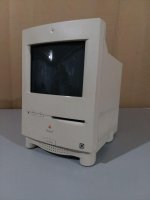 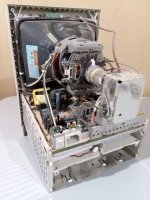 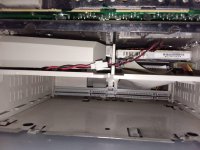 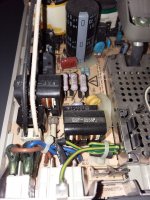 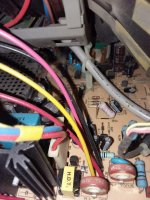 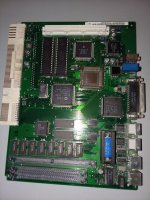 | |
| Posted by: mraroid on 2018-07-25 17:03:26 You are missing some SIMMS on the logic board. I think you might need them to boot (anyone?) Also, you need to pull that battery out and test it with a VOM and see if it is any good or not. You can buy new batteries on line and it is a drop in replacement. Keep us updated. mraroid | |
| Posted by: mraroid on 2018-07-25 17:04:56 Here is a link for a new battery: https://store.retrofixes.com/products/macintosh-pram-battery-for-classic-classic-ii-color-classic-se-30-iisi-lc mraroid | |
| Posted by: mraroid on 2018-07-25 17:25:26 After doing a quick look, it seems that you do not need to upgrde the RAM and VRAM to get this to boot. Here is a link to a PDF of the manual for the CC: http://tim.id.au/laptops/apple/legacy/color_classic.pdf Do you have a boot floppy? mraroid | |
Posted by: Megatron on 2018-07-25 17:26:48You are missing some SIMMS on the logic board. I think you might need them to boot (anyone?) Also, you need to pull that battery out and test it with a VOM and see if it is any good or not. You can buy new batteries on line and it is a drop in replacement.Im pretty sure the Color Classic had 4 MB of soldered RAM on it, and the SIMMs were simply for upgrades. Ill check the battery. I have a Batteries Plus right down the road from where I live that I get my PRAM batteries from. Its how I replaced the one in my G3. Is a floppy necessary for booting? Because Im getting no response from turning it on at all. The power light does not come on. I do have some System 7 disks for it. | |
| Posted by: mraroid on 2018-07-25 18:40:59 It should boot from your hard drive. If your hard drive is bad, you can boot from a floppy. But it seems like you have no power at all. Did you slide the logic board out, then in again to make sure it is fully seated? Saw this on ebay: https://www.ebay.com/itm/2x-4MB-30-Pin-70ns-Parity-FPM-SIMMs-Macintosh-COLOR-CLASSIC-LC-Memory-Apple-RAM/132670009871?hash=item1ee3bfb20f%3Ag%3AoroAAOSwpHpbDsOx&_sacat=0&_nkw=Mac+Color+Classic+4+MB+SIMM&_from=R40&rt=nc&LH_TitleDesc=0|0 and https://www.ebay.com/itm/256KB-Apple-Mac-LC-Centris-Video-Quadra-Performa-VRAM-SIMM-M1310LL-A-670-0269-/391696367204 mraroid 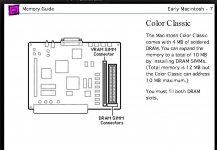 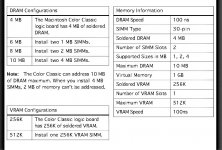 | |
| Posted by: Bolle on 2018-07-25 21:29:05 The battery is most probably dead. CCs won’t turn on with a dead battery in place. Remove it and it might just turn on. I would suggest you also recap it (and the Classic as well) even though the caps are still looking ok in the pictures. CC and Classic are both known for notoriously having bad caps. | |
| Posted by: superjer2000 on 2018-07-25 21:33:46 I agree you need to install a working battery as I needed that for my colour classics to boot. That being said, I also needed to push the CUDA (PRAM?) button on mine to boot after putting in a new battery. Your logic board doesn't seem to have the button (I'm pretty sure it's at the location marked S1 by your battery). I think I was able to actually boot at least one of my machines without a battery by pressing that CUDA button while the unit was plugged in then powering on from the keyboard. | |
| Posted by: olePigeon on 2018-07-25 22:04:26 It also has the original caps. Might need to be recapped. | |
| Posted by: Bolle on 2018-07-25 23:36:52 If your machine is ok otherwise it will boot without a battery installed. All CCs are that way. The CUDA in the CC however does seem to react extremely sensitive to leftover cap goo and starts to act wonky. The result will be a machine that does not turn on or needs the reset pressed very often or other powerup/-down misbehaviour. Make sure to clean the CUDA IC very well (i.e removing, cleaning and resoldering it) as there is one cap right next to it spilling its guts right into it. I got many CCs to boot again that way. | |
| Posted by: Megatron on 2018-07-26 03:53:39 Alright, Ive tried the system without the PRAM, and got nothing. I then inspected the area around the CUDA IC as suggested and found what might be bad caps. Ive ordered some replacements of the 47µF (16V) off of eBay. Heres a picture for reference. 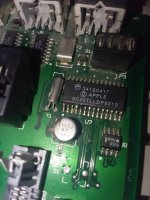 | |
| Posted by: Bolle on 2018-07-26 04:36:56 Yep, definetly bad. You can see how the legs on the CUDA already started corroding. I would go for new caps at first and see what it gives you then. The vias around that cap look funky too, might want to check if they are still ok as well. If it still does not power on with new caps in place and traces checked remove the CUDA, clean everything and put it back on. As said this fixed all CCs that wouldn't boot for me up to now. (besides one, where two vias in the area you pictured were bad) | |
| Posted by: Megatron on 2018-07-26 04:42:49 Will do. How do you suggest I go about testing the vias? Im very new to this sort of work. I have a multimeter, would that be of any use? And Im guessing if the vias are bad, then its pretty much bricked? Thanks. | |
| Posted by: Bolle on 2018-07-26 04:56:39 Bad vias can be fixed. I like to drill them out and put a tiny patch wire through them if they are going from top to bottom. Vias going to one of the inner layers are a bit harder. For them I usually go and solder directly to the component where the trace goes (or the next via on that trace that's accessible somewhere) With your multimeter in continuity mode you can try to follow the traces step by step and see if it still gives you continuity. For that one sketchy looking trace on pin 8 of the CUDA you would start with one probe on pin 8 of the CUDA and see if there is continuity directly to the via. Often the connection between via and trace fails but not the via itself. If you are egtting continuity there you turn the board around and take a look at the other side to see if there is a trace coming out of that via you just checked. If that's the case you follow that trace to the next via or component and probe between there and the via and pin 8 of the CUDA. That way you work through everything that looks sketchy. If you have a schematic you can just go and probe the ending points of all connections right away. There are a lot of pullup and pulldown resistors on the back of the board connected to several (unused) pins on the CUDA. If those inputs are floating when unused or not correctly pulled up/down it will start to act funky. | |
| Posted by: Megatron on 2018-07-26 05:10:48 Alright, thanks for the info. Ill have to get my friend to get the caps and the IC off, and Ill go from there. | |
| 1 |