68kMLA Classic Interface
This is a version of the 68kMLA forums for viewing on your favorite old mac. Visitors on modern platforms may prefer the main site.
| Click here to select a new forum. | |
| IIci logic board power issue | |
| Posted by: Jon183 on 2018-06-03 21:33:38 Hi everyone, got a centris 650 that works fine, dropped the PSU into the IIci to find that this whole time, the logic board doesn't work properly, I wasted a PSU. Using an ATX PSU, the IIci will boot up fine, what could be the issue with the logic board? It will turn on for 2 secs and just turn off after. | |
| Posted by: Bolle on 2018-06-03 21:58:26 Has the logicboard been recapped? There are caps in a feedback circuit as part of the startup/shutdown logic and that circuit fails if the caps go bad. Did you wire in /PFW with the ATX power supply or did you just jumpstart it? If you hardwire the PSU to stay powered on you skip that whole logic part and that would explain why it won’t turn off with the ATX supply. | |
| Posted by: Jon183 on 2018-06-03 22:12:51 ATX PSU was hardwired to stay powered on, logic board has been washed and recapped. Original owner said it had been off for years, I powered it on without looking inside, straight out of parcel and it died after 5 seconds, now it just switches off. @Bolle | |
| Posted by: Bolle on 2018-06-03 23:28:50 Hmmm... I would still suspect something wrong with the startup circuit. There are two HC132 and one HC74 that die sometimes from cap goo. Might want to check those. And while you're at it you can check if all traces in the startup circuit are fine as well:  | |
| Posted by: trag on 2018-06-04 12:00:18 Back around '97 my first IIci failed because of leaky capacitors... In that particular case, in addition to replacing the caps, I also had to repair some non-obvious damage to the circuit board. The cap goo had pooled in one of the vias (conductor lined hole through the circuit board) and eaten the conductor. But it was not apparent to visible inspection. The solder in the via might have been a little dull appearing, but that was the only indicator. I found the issue by testing the solder in the nearby vias with a dental pick. In the corroded via the solder was soft and just came out. In other vias the solder was hard. So, it's very possible that you have an eaten via or otherwise compromised circuit board trace. | |
Posted by: MrGasS27 on 2018-06-04 13:50:37Hi everyone, got a centris 650 that works fine, dropped the PSU into the IIci to find that this whole time, the logic board doesn't work properly, I wasted a PSU.I use my IIci with an ATX PSU, I manually power it by shorting PS_ON and a GND rocker switch, never had an issue, I use it also with IIsi and I used it on the Q700 | |
| Posted by: Jon183 on 2018-06-04 20:43:19 The rocker switch way sounds good but I want to restore it to the point where it can be used with software power. I cleaned the two HC132 chip's and it booted and ran for about 30 secs this time. Will inspect further in about 2 weeks when I am on study break and have better tools. | |
| Posted by: Jon183 on 2018-07-26 23:55:03 Well I managed to replace three chips and it works fine all the time now with my centris 650 PSU, shutdown is odd though, says "its now safe to switch off your macintosh" and proceeds to shut down seconds after displaying the message. Going to wire my ATX PSU for the IIci now. Photo is old, trace has been repaired and capacitors were installed. 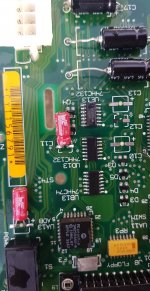 | |
Posted by: AppleTree on 2020-05-10 15:02:59Well I managed to replace three chips and it works fine all the time now with my centris 650 PSU, shutdown is odd though, says "its now safe to switch off your macintosh" and proceeds to shut down seconds after displaying the message. Going to wire my ATX PSU for the IIci now.Hi Jon183, it's been a while since you posted this so this is a long shot but I thought I'd give it a try. I have a similar issue to you. I dug up my 30 year old Mac IIci and it didn't boot properly (It started up a couple of times, no sound, and then eventually it stopped booting completely). I cleaned the board with alcohol and replaced all caps. I actually recapped the PSU as well (all caps apart from one cap, which was impossible to reach) Now it starts up fine. I have sound too. But when I go to shut down, it gives me "It's now safe to switch off your machine" and stays there. In your case, you stated that it shuts down after a few seconds. In my case, it stays with the message. The only way to shut it down is to pull the main plug, which is a real hassle. I actually worked on this last Aug and I left it at this. I started looking at it again and I found your post. Did you ever manage to find out what was causing this message to come up in your IIci? Here is my post from last year for reference. Thanks. | |
| Posted by: AppleTree on 2020-05-14 03:12:17 I am answering back to my own question. I fixed the shutdown issue with my IIci by replacing three chips in the startup/shutdown circuit (UB13, UD13, UE13). It is working perfectly. I do not get the shutdown delay that Jon183 reported. You can see the photo of the motherboard with chips removed in my topic (see the link right above). Thanks. | |
| Posted by: bibilit on 2020-05-14 03:42:50 similar issue, same repair Didn't replace the chips, remove only, cleaned underneath and soldered back. capacitors fluid issue probably. | |
Posted by: AppleTree on 2020-05-14 03:49:08Didn't replace the chips, remove only, cleaned underneath and soldered back.Yeah I did think about just cleaning underneath and soldering the chips back, but I couldn't be bothered doing it twice if it didn't work. I had already ordered the chips (they only came in lots of 20s so I have plenty of them anyway) so I just replaced them to save the hassle. Now IIci is working as it did when I bought it 30 years ago (or my parents bought it for me, rather 🙂 ) | |
Posted by: Papichulo on 2020-05-27 07:06:20Back around '97 my first IIci failed because of leaky capacitors...Wow it died in 97? No wonder people just threw these out later on. To bad | |
Posted by: trag on 2020-05-27 22:04:38Wow it died in 97? No wonder people just threw these out later on. To badI remember I was living in my little one-bedroom apartment at the time, and I bought a house in July '97. So it was 97 at the latest. It could have been a couple of years earlier. I got the IIci while I was living there, but I don't remember exactly what year. But, even then, there was someone on the news groups (UseNet) who was able to recommend replacing the caps and looking around the surrounding areas for damage. It wasn't commonly known at the time, but there was at least one person to tell me where to look. | |
| 1 |