68kMLA Classic Interface
This is a version of the 68kMLA forums for viewing on your favorite old mac. Visitors on modern platforms may prefer the main site.
| Click here to select a new forum. | |
| Farallon EtherMac MicroSCSI | |
| Posted by: MikeatOSX on 2018-05-20 03:16:30 Hi, I got this Farallon EtherMac MicroSCSI Adapter (PN574-C), but it seems I can't get it to work - tried it with PowerBook 180c and SE/30. I'm using the last driver (1.1.2) but didn't find any pdf manual on the wayback machine. Only view informations: https://web.archive.org/web/19980524084211/http://www.farallon.com:80/support/faqs/en/scsifaq.html Is there anybody, who can guide me a little bit? Thanks! 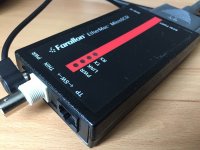 | |
| Posted by: MikeatOSX on 2018-05-20 03:50:57 Several utilities (TattleTech, SCSI Director etc.) can see this adapter on SCSI ID 5 and read it's informations (adapter version etc.). I also opened the adapter. It's power supply should deliver 5 volts - it's 4,8 volts. Power LED is on, but there's no Link LED when I connect it to an old 10base-T Hub or a 10/100 switch, which are connected to my home net. Should I try to connect the SE/30 with MicroSCSI to an old 68k PowerBook (540c) via crossover cable? (must first search for one in my cellar...) 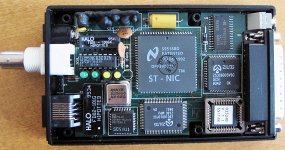 | |
| Posted by: techknight on 2018-05-20 05:10:48 Well if you can never get it to link, chances are it was a victim of a lightning strike. I have seen a ton back in the day. the big HALO matching transformer is probably open circuit as a consequence, you will have to meter it and see for sure though. Oh.. And... you did flip the switch. right? | |
| Posted by: MikeatOSX on 2018-05-20 07:21:12 Yes, I did flip the switch. 🙂 Is there a chance to get the adapter work again, if a lightning strike ruined the transformer? In the meantime I found a crossover cable... | |
Posted by: MikeatOSX on 2018-05-20 11:56:40Should I try to connect the SE/30 with MicroSCSI to an old 68k PowerBook (540c) via crossover cable?And so I did, I also changed the SCSI ID. The Link LED is blinking now when I restart the SE/30 and network software extensions are loaded. After that, the Link LED is dark again. I installed several software packages (Asante, Farallon) to get any help from its utilities, but that doesn't really work, as these utilities need their special network adapters. Nevertheless I see the Link LED blinking sometimes, when this software starts. What should this say that to me?? As I'm very patient today, I'm installing a fresh system now to do more tests. 🙂 Maybe the power supply which I got with the adapter is wrong, so here's a picture. It's important to me, to determine if the adapter is faulty or if I'm too silly to install the adapter without (missing) docs. 🙂 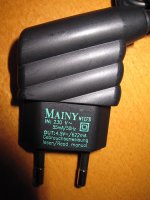 | |
| Posted by: MikeatOSX on 2018-05-20 15:26:20 As far as I found out, the power supply is not original: it should be 5 volts, not 4.5, so I'll search for a fitting one. | |
| Posted by: MOS8_030 on 2018-05-20 16:31:48 Can that unit get power from the ADB? I have an Astante Micro EN/SC that gets its power from the ADB. | |
| Posted by: MikeatOSX on 2018-05-20 17:43:57 No, it's the PowerBook version which uses ADB power. | |
Posted by: MOS8_030 on 2018-05-20 18:45:07No, it's the PowerBook version which uses ADB power.Ah, well that would explain why mine uses the ADB. 🙂 | |
| Posted by: MikeatOSX on 2018-05-21 00:17:08 [SIZE=12pt]PN574-C EtherMac MicroSCSI Adapter PowerBook[/SIZE] [SIZE=12pt]PN575-C EtherMac MicroSCSI Adapter Macintosh[/SIZE] [SIZE=12pt](the number in my first post was wrong)[/SIZE] [SIZE=12pt] ADB delivers 5 volts. [/SIZE] [SIZE=12pt]Does your adapter work well?[/SIZE] | |
| Posted by: MikeatOSX on 2018-05-21 02:17:45 I tried the Iomega Zip power supply today which delivers exactly 5.0 volts with my MicroSCSI adapter: same results. Link LED is blinking several times when my SE/30 is booting and thats all. Ping tests from both Macs: timeouts... I think I should give up: I've really bought a faulty adapter, grrrr@&€()%¥~$$$. 🙁 Now I'll have to wait for my Asante MacCon. I hope it's not faulty too... | |
| Posted by: MikeatOSX on 2018-05-21 05:39:50 Finally this is what TattleTech tells about Farallons MicroSCSI adapter: [SIZE=12pt]SCSI Device# = 6[/SIZE] [SIZE=12pt] ◊ Device Status = Device Connected[/SIZE] [SIZE=12pt] ◊ Name = NA[/SIZE] [SIZE=12pt] ◊ Driver# = -39[/SIZE] [SIZE=12pt] ◊ Type = 3 (Processor)[/SIZE] [SIZE=12pt] ◊ Manufacturer = Farallon[/SIZE] [SIZE=12pt] ◊ Product = EtherMac SCSI[/SIZE] [SIZE=12pt] ◊ Revision = 1.10[/SIZE] [SIZE=12pt] ◊ ROM Revision = C2100468B9D24000[/SIZE] [SIZE=12pt] ◊ Device Attributes :[/SIZE] [SIZE=12pt] + ANSI Compliant = Yes (SCSI 1)[/SIZE] [SIZE=12pt] + ECMA-111 Compliant = No[/SIZE] [SIZE=12pt] + ISO IS 9316 Compliant = No[/SIZE] [SIZE=12pt] + Wide SCSI (32-bit Transfers) = No[/SIZE] [SIZE=12pt] + Wide SCSI (16-bit Transfers) = No[/SIZE] [SIZE=12pt] + Fast SCSI (Synchronous Transfers) = No[/SIZE] [SIZE=12pt] + Linked Commands = No[/SIZE] [SIZE=12pt] + Tagged Command Queuing = No[/SIZE] [SIZE=12pt] + Soft Reset = No[/SIZE] [SIZE=12pt] + Relative Addressing = No[/SIZE] [SIZE=12pt] + Terminate I/O Process = No[/SIZE] [SIZE=12pt] + Asynchronous Event Notification = No[/SIZE] [SIZE=12pt] + Response Data Format = 1[/SIZE] [SIZE=12pt]---------------------------------- [/SIZE] | |
| Posted by: olePigeon on 2018-05-21 08:19:03 I had the exact same issue with my Farallon SCSI adapter. It was the larger desktop version, but I never got it to work. The lights would flash on boot and when loading the driver, but then nothing else. Also, if I ran the network utility, it'd freeze the computer. I eventually sold it as salvage. I never did figure it out. I sure hope you do, you seem more knowledgable about the technical side of it. | |
Posted by: MOS8_030 on 2018-05-21 09:52:12[SIZE=12pt]Does your adapter work well?[/SIZE]I only used my Asante MicroEN/SC maybe twice with my PB 180 probably ~20 years ago. It worked fine then! 🙂 Back then I had several external SCSI enclosures and Appletalk-capable Macs and the internet was still mostly dial-up so there wasn't much need for it. | |
| Posted by: MikeatOSX on 2018-05-21 10:32:18 I bought my adapter for about $ 25 several months ago and was proud of this good purchase, as I never saw this adapter before and after. 🙂 Until yesterday I thought I was to stupid to install this adapter. 😉 | |
Posted by: MikeatOSX on 2018-05-21 10:52:53the big HALO matching transformer is probably open circuit as a consequence, you will have to meter it and see for sure though.Can you please specify which component you mean? 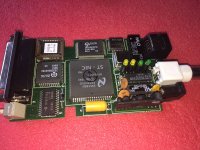 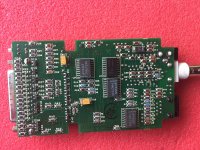 | |
| Posted by: Trash80toHP_Mini on 2018-05-21 14:34:04 Pretty sure my Futura II 10baseT daughtercard has a part similar to the HALO labeled transformer, but the ThinNet daughtercards don't. Maybe a transceiver will work for that channel where the 10baseT section might be cooked? | |
| Posted by: Trash80toHP_Mini on 2018-05-21 14:45:26 Pretty sure my Futura II 10baseT daughtercard has a part similar to the HALO labeled transformer, but the ThinNet daughtercards don't. Maybe a transceiver will work for that channel where the 10baseT section might be cooked? | |
| Posted by: MikeatOSX on 2018-05-21 15:46:02 Is the the transformer the part near the 10base-T connector? An IC is also labeled "HALO". Hmm, I'll look for a [SIZE=12pt]hypothetic 10BASE2 to 10BASE-T[/SIZE] transceiver... 🙂 | |
| 1 > |