68kMLA Classic Interface
This is a version of the 68kMLA forums for viewing on your favorite old mac. Visitors on modern platforms may prefer the main site.
| Click here to select a new forum. | |
| Loud Pop When starting Mac Classic, Performance Unaffected | |
| Posted by: ahahthunder on 2018-05-03 14:01:49 I'm repairing a classic. I've so far washed and replaced all capacitors on the logic board, and replaced a few on the analog board. The machine almost works fine except cold starts usually have horizontal lines on screen for the first minute or so. I assume this is due to the capacitors I've yet to replace. However, now when I do a cold start, there's a small chance that I hear a very loud pop. I thought it must be a capacitor exploding so I switched it off immediately and later took it apart to inspect the boards. I found no blown capacitors on either analog or logic board. I plugged the computer back in and turned it on again and it started working again just like before, if not a little better. There was no horizontal lines it just started up perfectly. The next day I turned it on and it booted again perfectly. Then I moved it into another room and it made the loud explosion sound again, then proceeded to successfully boot. What is going on here? | |
| Posted by: techknight on 2018-05-03 15:09:16 probably the yellow safety capacitor near the power cord input that blew. | |
Posted by: ahahthunder on 2018-05-03 17:47:12probably the yellow safety capacitor near the power cord input that blew.I've heard the pop two times. Could a capacitor do that twice? Also, I've never heard of this 'safety capacitor' before; I am new here. Can you give/point me to some more information on this? Does it need replacing? | |
| Posted by: AwkwardPotato on 2018-05-03 18:31:03 In most power supplies there's an X2 filter capacitor right around the AC inlet, and it's not too uncommon for it to blow after 30 or so years, especially if the machine has been sitting dormant for a long time. I'm by no means an expert, but I think it would be strange for the filter cap to make the 'pop' noise twice. Maybe it's an issue related to the flyback? | |
| Posted by: ahahthunder on 2018-05-14 14:15:51 Ok I think I found the problem. The protective paper on the AB has a burn mark and some solder is has soot on it. I'm touching the component where the short happened, but it seems like that paper is just shorting those two points. I'm going to go through with the cap replacement today. Is there something I can do to prevent this? 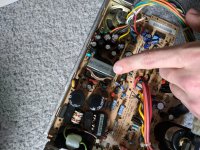 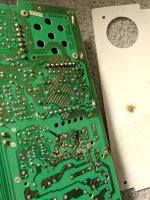 | |
| Posted by: techknight on 2018-05-15 15:37:54 Ahh yep. created by BAD solder joints... I see quite a few of them there in that pic. | |
Posted by: ahahthunder on 2018-05-15 17:19:03Ahh yep. created by BAD solder joints... I see quite a few of them there in that pic.The burned solder joints in question here are actually original; I didn't do them. There's a gap cut out of the board here to really separate those two points. Maybe they expected something like this was possible in design. Could a condition cause over voltage here enough to arc like that? | |
| Posted by: ahahthunder on 2018-05-29 21:37:47 I've finished replacing every capacitor on the AB now and it did not seem to improve performance. After a few days of continued function (under-powered on cold starts, otherwise OK) the computer suddenly died. The hard drive, fan, and display show no signs of life. Using a multimeter, I've found that not all capacitors are being charged. The big 220V ones seem OK, but the cluster near the speaker read 0V. I re-soldered that ZP1 transformer since it did seem kind of jank, and I re-soldered RP2. I guess it's time to start looking at diodes & transistors. Although I wonder if these symptoms could narrow down this problem. It's a rev. 2 classic 120V AB board with known good caps. ZP1 did a few arcs like a week before death. It's not blowing fuses. Could a single diode or transistor stop everything like this? I'm a little out of my area of expertise here but when I know everything else works I don't want to quit. :-/ | |
| Posted by: bibilit on 2018-05-30 00:04:37 Yes, DP3 and DP4 (diodes) are weak points in those board, also several other components, made a few posts about this problems. | |
| Posted by: ahahthunder on 2018-06-01 15:39:52 Yep, as soon as I read your post I checked those diodes and found DP3 to have failed. Replaced those and now the mac is back in working order! 🙂 Still undervoltage on cold starts, but as long as it works I'm happy. Thanks for the help! | |
| 1 |