68kMLA Classic Interface
This is a version of the 68kMLA forums for viewing on your favorite old mac. Visitors on modern platforms may prefer the main site.
| Click here to select a new forum. | |
| Macintosh 128K Sad Icon error Code | |
| Posted by: macalle69 on 2018-04-23 15:10:34 Hello Folks , I found this 128K motherboard, unfortunately on start up chime is a little bit distorted and after 1 second of normal grey display , dark screen and sad icon with message 04A000 , I have tested Rom on another motherboard and are 100% working, message appear with and without floppy drive connected, I have tried "piggy" with some ram one by one on the soldered banks but message does not change , only pigging on g11 and g12 and f11 and f12 the display shows vertical strips on startup instead of normal grey with some black points. Any suggestion ? thank you ! see video 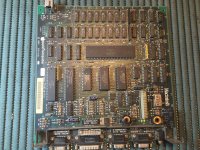 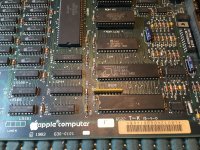 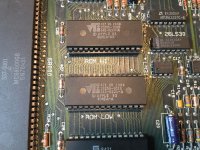 | |
| Posted by: BadGoldEagle on 2018-04-24 08:06:23 04= Bad RAM, don't look any further, you'll have to replace them all anyway sooner or later. The RAM chips on the 128k and IIc are known for going bad after some time. Some failed even back in the day. Your piggybacking didn't work probably because you only tried one chip at at time. You may have multiple bad chips. Again, it's best to replace them all and it won't happen again. | |
| Posted by: MOS8_030 on 2018-04-24 09:19:54 Doesn't that code indicate the specific chip? Or is it just a general ram check failure? | |
| Posted by: BadGoldEagle on 2018-04-24 11:49:52 It usually does but when multiple chips are bad, the code doesn't actually indicate anything. To prove my point, macalle69's mac error code isn't on this rather handy list. When I got my faulty 128k a couple of years ago, the code it was displaying wasn't on that list either. I had it fixed by uniserver who replaced every single one of those RAM ICs. Single Chip Identification Data Bit Location Sub Code Bits 0 F5 0001 1 F6 0002 2 F7 0004 3 F8 0008 4 F9 0010 5 F10 0020 6 F11 0040 7 F12 0080 8 G5 0100 9 G6 0200 10 G7 0400 11 G8 0800 12 G9 1000 13 G10 2000 14 G11 4000 15 G12 8000 | |
Posted by: macalle69 on 2018-04-24 13:57:0604= Bad RAM, don't look any further, you'll have to replace them all anyway sooner or later. The RAM chips on the 128k and IIc are known for going bad after some time. Some failed even back in the day.Yes I agree the error shown on my 128 isn't indicated in that "common error list" , I have also tried pigging all ram chips at the same time but unsuccessfully , last time I've been able to identify 4 faulty ram , this time I think the only way is to re-ram entirely ( it is a nasty job but I'll try when i'll be very "inspired" ) thanks everybody for your support , will update as soon as I'll do the job. | |
| Posted by: macalle69 on 2018-05-12 05:42:20 Hello Folks finally received all parts , replaced all ram and now my 128K is back to life ! 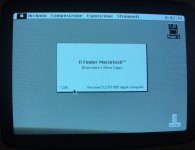 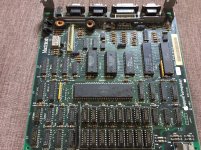 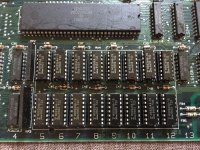 | |
| Posted by: MOS8_030 on 2018-05-12 05:58:10 Congrats! That's a lot of soldering... | |
| Posted by: macalle69 on 2018-05-12 07:20:12 Yep! a lot of Desoldering & Soldering , I have tried to save all the old rams just for curiosity and check how many failed , 8 of those were bad ! | |
| Posted by: beachycove on 2018-05-12 07:51:52 From where did you source the ram chips? | |
| Posted by: macalle69 on 2018-05-12 08:58:32 I live in Italy I found on eBay in Europe (Bulgaria) object 172668289677 | |
| Posted by: PB145B on 2018-05-12 11:11:56 Very nice! Adding sockets was definitely a good idea. I’ll do the same if I ever have to replace the RAM one of these. | |
| Posted by: macalle69 on 2018-05-12 11:18:57 Well... aesthetically should be better resolder like original one but I preferred socket for further “accidents “ ( hope will not happen) | |
| 1 |