68kMLA Classic Interface
This is a version of the 68kMLA forums for viewing on your favorite old mac. Visitors on modern platforms may prefer the main site.
| Click here to select a new forum. | |
| PowerBook G4 lines in internal screen | |
| Posted by: toples50 on 2018-04-19 11:07:52 I have purchase recently a PowerBook G4 with internal screen problem as you can see from the pics.When connected in external monitor works fine.The seller told me that if I hit it around the speakers the picture comes back... Is it fixable the problem or not?Thanks! 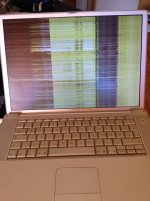 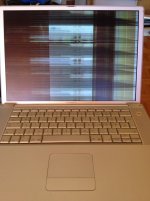 | |
| Posted by: Unknown_K on 2018-04-19 11:40:20 Loose,damaged,bad video cable? Does tapping around the speaker fix the screen? Working in the LCD panel is not something I would want to do so you would need to replace the whole panel assuming the graphics chip isn't messed up then you need a new laptop. | |
| Posted by: PB145B on 2018-04-20 00:15:16 If the picture looks okay on an external monitor, it’s definitely not the GPU. If the picture comes back when you tap around the speaker, you likely have a bad/loose video cable. Be careful when removing the top casing! Those tabs by the optical drive slot are a pain. | |
| 1 |